

Heads up: we may earn a commission when you buy through links on this page, at no extra cost to you. As an Amazon Associate we earn from qualifying purchases. How we make money
Short on time? Our top pick is Lenovo ThinkPad P16s Gen 3, HP OmniBook X 17 takes Best Big-Screen Streaming Pick, while Dell Latitude 5550 takes Best Webcam for Webinars.
- Best Business Laptop for Streaming Lenovo ThinkPad P16s Gen 3 Check price
- Best Big-Screen Streaming Pick HP OmniBook X 17 Check price
- Best Webcam for Webinars Dell Latitude 5550 Check price
Shopping on Amazon? Get it faster with Prime
Free fast delivery on eligible items above, Prime-only deals and Prime Video. New members can try it free for 30 days and cancel anytime.
The best business laptop for streaming handles webinars, live demos and video calls without dropping frames. That takes a good webcam, enough memory to run OBS or a meeting app beside your slides, and ideally an NVIDIA GPU that can take over video encoding.
Two picks here have NVIDIA graphics, and the rest lean on 32GB of memory, Thunderbolt 4 for capture cards and docks, and FHD or better webcams. We checked each Amazon listing on October 22, 2026 and used only the specs the maker or seller lists. We do not list exact prices because Amazon prices change in real time. Use the buttons to see the current price and availability on Amazon before you buy. Scores are our editorial scores out of 10, not Amazon customer ratings.
Best Business Laptops for Streaming at a Glance
| Award | Laptop | Graphics | Why It Fits | Score |
|---|---|---|---|---|
| Best Business Laptop for Streaming | Lenovo ThinkPad P16s Gen 3 (RTX 500 Ada) | RTX 500 Ada | RTX 500 Ada, 5MP | 8.9/10 |
| Best Big-Screen Streaming Pick | HP OmniBook X 17 (RTX 4050) | RTX 4050 | RTX 4050, 5MP IR | 8.7/10 |
| Best Webcam for Webinars | Dell Latitude 5550 (32GB) | Intel graphics | FHD HDR webcam, 32GB | 8.4/10 |
| Best 16-Inch Work Pick | Lenovo ThinkPad T16 Gen 4 (32GB) | Intel graphics | 32GB, 400 nits | 8.1/10 |
| Best Lower-Cost Pick | HP ProBook 4 G1i (Ultra 7) | Intel graphics | Ultra 7, FHD webcam | 7.7/10 |

Lenovo ThinkPad P16s Gen 3 Mobile Workstation, Intel Core Ultra 7 155H, NVIDIA RTX 500 Ada, 16GB DDR5, 1TB SSD, 16-inch WUXGA, Windows 11 Pro
An NVIDIA RTX 500 Ada GPU, a 5MP webcam with a shutter and Ethernet.

HP OmniBook X 17.3-inch Touchscreen Laptop, Intel Core Ultra 7 256V, GeForce RTX 4050, 16GB, 1TB SSD
An RTX 4050, a 5MP IR camera and Poly Studio audio on a 17.3-inch touchscreen.
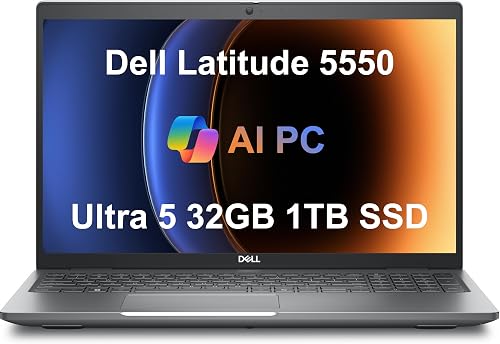
Dell Latitude 5550 15.6-inch Laptop, Intel Core Ultra 5 125U, 32GB DDR5, 1TB SSD, Windows 11 Pro
An FHD HDR webcam with a privacy shutter and 32GB of DDR5.

Lenovo ThinkPad T16 Gen 4, Intel Core Ultra 5 225U, 32GB DDR5, 1TB SSD, 16-inch WUXGA, Windows 11 Pro
32GB, a 1TB SSD and a bright 16-inch screen for slides and chat side by side.

HP ProBook 4 G1i 16-inch Laptop, Intel Core Ultra 7 255U, 16GB DDR5, 512GB SSD, FHD Webcam, Windows 11 Pro
A 12-core Core Ultra 7 255U and an FHD webcam at a lower tier.
In-Depth Reviews
1. What Streaming Needs From a Laptop
Encoding live video is heavy work. NVIDIA GPUs include a hardware video encoder that OBS and many streaming tools can use, which frees the CPU for your apps; the ThinkPad P16s and HP OmniBook X have NVIDIA graphics. On laptops with integrated graphics, keep the stream at 1080p and close other heavy apps.
The camera and microphone matter as much as the chip. A 5MP or FHD HDR webcam looks clearly better than a 720p one, and a wired Ethernet port keeps uploads steady. For gaming streams, see our gaming laptop for streaming guide.
2. Lenovo ThinkPad P16s Gen 3 (RTX 500 Ada): Best Business Laptop for Streaming
The Lenovo ThinkPad P16s Gen 3 (RTX 500 Ada) has an Intel Core Ultra 7 155H, an NVIDIA RTX 500 Ada GPU, 16GB of DDR5 and a 1TB SSD, with a 16-inch 1920 x 1200 screen, a 5MP webcam with a privacy shutter, two Thunderbolt 4 ports and Gigabit Ethernet. An NVIDIA RTX 500 Ada GPU, a 5MP webcam with a shutter and Ethernet.
3. HP OmniBook X 17 (RTX 4050): Best Big-Screen Streaming Pick
The HP OmniBook X 17 (RTX 4050) has an 8-core Intel Core Ultra 7 256V, an RTX 4050 with 6GB, 16GB of memory and a 1TB SSD, with a 17.3-inch touchscreen at 400 nits and 100% sRGB, a 5MP IR camera with a shutter, Poly Studio audio and Wi-Fi 7. An RTX 4050, a 5MP IR camera and Poly Studio audio on a 17.3-inch touchscreen.
4. Dell Latitude 5550 (32GB): Best Webcam for Webinars
The Dell Latitude 5550 (32GB) has a 12-core Intel Core Ultra 5 125U, 32GB of DDR5 and 1TB of storage as two 512GB SSDs, with a 15.6-inch anti-glare screen, an FHD HDR webcam with a privacy shutter and two Thunderbolt 4 ports. An FHD HDR webcam with a privacy shutter and 32GB of DDR5.
5. Lenovo ThinkPad T16 Gen 4 (32GB): Best 16-Inch Work Pick
The Lenovo ThinkPad T16 Gen 4 (32GB) has a 12-core Intel Core Ultra 5 225U, 32GB of DDR5 and a 1TB SSD plus a 500GB portable drive, with a 16-inch 1920 x 1200 400-nit anti-glare screen and two Thunderbolt 4 ports. 32GB, a 1TB SSD and a bright 16-inch screen for slides and chat side by side.
6. HP ProBook 4 G1i (Ultra 7): Best Lower-Cost Pick
The HP ProBook 4 G1i (Ultra 7) has a 12-core Intel Core Ultra 7 255U, 16GB of DDR5 and a 512GB SSD, with a 16-inch 1920 x 1200 screen, an FHD webcam, Wi-Fi 6E and a backlit keyboard. A 12-core Core Ultra 7 255U and an FHD webcam at a lower tier.
How to Choose a Business Laptop for Streaming
Webcam
5MP or FHD HDR for a clear picture.
GPU
An NVIDIA GPU can handle video encoding.
Memory
16GB minimum; 32GB for OBS plus apps.
Ports
Thunderbolt 4 and Ethernet for docks and steady uploads.
Quick Setup Tips
- Use the right power mode: balanced for battery, performance when plugged in
- Keep drivers current: creative apps rely on up-to-date GPU drivers
- Back up your projects: use cloud or an external SSD
- Add a dock or USB-C hub: it makes a laptop a desk setup in seconds
- Check the live price: use the buttons to see the current price on Amazon
Frequently Asked Questions
What is the best business laptop for streaming?
The Lenovo ThinkPad P16s Gen 3 with an NVIDIA RTX 500 Ada GPU and a 5MP webcam.
Do I need a GPU to stream from a laptop?
Not for meetings, but an NVIDIA GPU helps with OBS streams and recordings.
Which pick has the best audio for calls?
The HP OmniBook X 17, which lists Poly Studio audio.
Is 16GB enough for streaming?
For a meeting app, yes; for OBS with other apps open, 32GB is better.
Does Ethernet help streaming?
Yes. A wired connection keeps uploads steadier than Wi-Fi.
The Bottom Line
The ThinkPad P16s Gen 3 is the best business laptop for streaming in our check. Choose the HP OmniBook X 17 for a big screen and Poly audio, or the Dell Latitude 5550 for its HDR webcam.





