

Heads up: we may earn a commission when you buy through links on this page, at no extra cost to you. As an Amazon Associate we earn from qualifying purchases. How we make money
Short on time? Our top pick is msi Cyborg 17 RTX 5060, Acer Nitro V 15 i7 RTX 4050 takes Best Memory and Storage, while msi Crosshair 18 HX RTX 5070 takes Best Large Display.
- Best Overall msi Cyborg 17 RTX 5060 Check price
- Best Memory and Storage Acer Nitro V 15 i7 RTX 4050 Check price
- Best Large Display msi Crosshair 18 HX RTX 5070 Check price
Shopping on Amazon? Get it faster with Prime
Free fast delivery on eligible items above, Prime-only deals and Prime Video. New members can try it free for 30 days and cancel anytime.
The best laptop for League of Legends should pair a fast screen with steady frame rates, because smooth motion matters in every team fight. We compared six in-stock gaming laptops, from an RTX 2050 starter to an RTX 5070 build.
Each laptop was ranked on refresh rate, graphics card, memory, storage and cooling, so you can match the hardware to the way you play. We checked each Amazon listing on November 2, 2026 and used only the specs the maker or seller lists. We do not list exact prices because Amazon prices change in real time. Use the buttons to see the current price and availability on Amazon before you buy. Scores are our editorial scores out of 10, not Amazon customer ratings.
Best Laptops for League of Legends at a Glance
| Award | Laptop | Key Spec | Why It Fits | Score |
|---|---|---|---|---|
| Best Overall | msi Cyborg 17 RTX 5060 | RTX 5060, 17.3-inch 144Hz | An RTX 5060 with a 17.3-inch 144Hz screen and 1TB of storage covers fast play and a big library. | 9.2/10 |
| Best Memory and Storage | Acer Nitro V 15 i7 RTX 4050 | RTX 4050, 16GB DDR5, 1TB | An RTX 4050 with 16GB of DDR5 and a 1TB drive keeps the game and updates handy. | 9.0/10 |
| Best Large Display | msi Crosshair 18 HX RTX 5070 | 18-inch 240Hz QHD+, RTX 5070 | An 18-inch 240Hz QHD+ screen with an RTX 5070 and 2TB of storage suits a desk setup. | 8.8/10 |
| Best Memory Value | HP Victus 15 Ryzen 7 RTX 4050 | 32GB DDR5, 1TB SSD | An RTX 4050 with 32GB of DDR5 and a 1TB drive gives plenty of memory for the game and chat apps. | 8.5/10 |
| Best Compact Pick | HP OMEN 15 RTX 5050 | RTX 5050, 15.3-inch 165Hz | A 15.3-inch 165Hz screen with an RTX 5050 suits players who want a compact system. | 8.2/10 |
| Best Entry Level | HP Victus 15 RTX 2050 | RTX 2050, 144Hz | An RTX 2050 with a 144Hz screen covers lower settings for new players. | 7.9/10 |

msi Cyborg 17 17.3" FHD 144Hz Gaming Laptop: Intel Core 7-240H, NVIDIA Geforce RTX 5060, 16GB DDR5, 1TB NVMe SSD, Type C, Wi-Fi 6E
Players who prefer a big screen will like the 17.3-inch display in a 0.83 in thin, 5.5 lb body. Cooler Boost shared-pipe cooling supports long sessions. The trade-off is a Full HD resolution on a large screen.

Acer Nitro V Gaming Laptop, Intel Core i7-13620H Processor, NVIDIA GeForce RTX 4050 Laptop GPU, 15.6" FHD IPS 165Hz Display, 16GB DDR5
Players who want a fast screen and enough storage for several games will like the 165Hz IPS panel and the 1TB drive. Two DDR5 slots with a 32GB maximum leave room to add memory later, and Killer Ethernet suits wired play. The trade-off is an entry tier graphics card.

msi Crosshair 18 HX 18" 2560x1600 240Hz Display Gaming Laptop, Intel Core Ultra 9 275HX, NVIDIA RTX 5070 8GB GDDR7, 32GB RAM, 2TB NVMe SSD
Players who want a large, fast screen will like the 18-inch panel with 240Hz and 100% DCI-P3 color. The 2TB drive holds a big game library. The trade-off is an 18-inch size that is less compact to carry.

HP Victus 15.6" Gaming Laptop, AMD Ryzen 7 7445HS CPU, NVIDIA GeForce RTX 4050 6GB GPU, FHD 144Hz IPS, 32GB DDR5 RAM, 1TB SSD, HDMI, USB-C
Players who want generous memory for the game plus a browser and voice chat will like the 32GB of DDR5 and the 1TB drive. The anti-glare panel supports AMD FreeSync Premium. The trade-off is an entry tier graphics card.
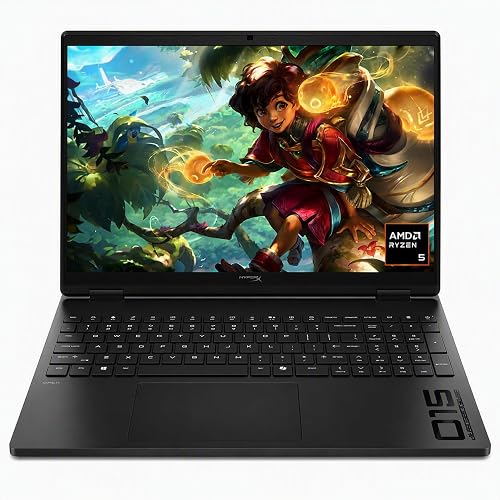
HP HyperX OMEN 15 inch Gaming Laptop, 2K 165Hz Display, AMD Ryzen 5 240, 16 GB RAM, 512 GB SSD
Players who want a compact screen with a high refresh rate will like the 165Hz anti-glare panel and the RTX 5050. The 16GB of DDR5 covers the game and background apps. The trade-off is a 512GB drive.

HP Victus 15 Gaming Laptop, 15.6" FHD 144Hz Display, AMD Ryzen 5 7535HS, 16GB DDR5 RAM, 512GB PCIe M.2 SSD, NVIDIA GeForce RTX 2050, HDMI
Players who are new to PC gaming and play at lower settings will find a dedicated card and a smooth screen. The 16GB of DDR5 helps when a browser or chat app is open. The trade-off is an older graphics card.
In-Depth Reviews
1. What Specs Matter for a League of Legends Laptop?
League of Legends rewards a fast screen and steady frame rates more than extreme graphics settings. Start with refresh rate, then check the graphics card, memory and storage.
The Acer Nitro V 15 uses a 165Hz IPS panel with 16GB of DDR5 and a 1TB drive. The msi Cyborg 17 adds an RTX 5060 for extra room at higher settings.
2. Is 144Hz Enough for League of Legends?
A 144Hz screen already feels smooth for many players, and the HP Victus 15 Ryzen 7 and msi Cyborg 17 both use 144Hz panels. Choose 165Hz, as on the Acer Nitro V 15, if you want a little more.
3. msi Cyborg 17 RTX 5060: Best Overall
The msi Cyborg 17 RTX 5060 has an Intel Core 7-240H processor, a GeForce RTX 5060 with 8GB of GDDR7, 16GB of DDR5 and a 1TB NVMe SSD, with a 17.3-inch 1920 x 1080 screen at 144Hz. Players who prefer a big screen will like the 17.3-inch display in a 0.83 in thin, 5.5 lb body. Cooler Boost shared-pipe cooling supports long sessions. The trade-off is a Full HD resolution on a large screen.
4. Acer Nitro V 15 i7 RTX 4050: Best Memory and Storage
The Acer Nitro V 15 i7 RTX 4050 has an Intel Core i7-13620H processor, a GeForce RTX 4050, 16GB of DDR5 and a 1TB PCIe Gen 4 SSD, with a 15.6-inch Full HD IPS screen at 165Hz. Players who want a fast screen and enough storage for several games will like the 165Hz IPS panel and the 1TB drive. Two DDR5 slots with a 32GB maximum leave room to add memory later, and Killer Ethernet suits wired play. The trade-off is an entry tier graphics card.
5. msi Crosshair 18 HX RTX 5070: Best Large Display
The msi Crosshair 18 HX RTX 5070 has an Intel Core Ultra 9 275HX processor, a GeForce RTX 5070 with 8GB of GDDR7, 32GB of DDR5 and a 2TB NVMe SSD, with an 18-inch 2560 x 1600 IPS screen at 240Hz. Players who want a large, fast screen will like the 18-inch panel with 240Hz and 100% DCI-P3 color. The 2TB drive holds a big game library. The trade-off is an 18-inch size that is less compact to carry.
6. HP Victus 15 Ryzen 7 RTX 4050: Best Memory Value
The HP Victus 15 Ryzen 7 RTX 4050 has an AMD Ryzen 7 7445HS processor with 6 cores and 12 threads, a GeForce RTX 4050 with 6GB of GDDR6, 32GB of DDR5 and a 1TB SSD, with a 15.6-inch 1920 x 1080 IPS screen at 144Hz. Players who want generous memory for the game plus a browser and voice chat will like the 32GB of DDR5 and the 1TB drive. The anti-glare panel supports AMD FreeSync Premium. The trade-off is an entry tier graphics card.
7. HP OMEN 15 RTX 5050: Best Compact Pick
The HP OMEN 15 RTX 5050 has an AMD Ryzen 5 processor, a GeForce RTX 5050 with 8GB of GDDR7, 16GB of DDR5 and a 512GB PCIe Gen4 SSD, with a 15.3-inch 1920 x 1200 IPS screen at 165Hz. Players who want a compact screen with a high refresh rate will like the 165Hz anti-glare panel and the RTX 5050. The 16GB of DDR5 covers the game and background apps. The trade-off is a 512GB drive.
8. HP Victus 15 RTX 2050: Best Entry Level
The HP Victus 15 RTX 2050 has an AMD Ryzen 5 7535HS processor with 6 cores and 12 threads, a GeForce RTX 2050 with 4GB of GDDR6, 16GB of DDR5 and a 512GB PCIe SSD, with a 15.6-inch 1920 x 1080 anti-glare screen at 144Hz. Players who are new to PC gaming and play at lower settings will find a dedicated card and a smooth screen. The 16GB of DDR5 helps when a browser or chat app is open. The trade-off is an older graphics card.
How to Choose a Laptop for League of Legends
Refresh rate
Choose a 144Hz screen or faster so motion looks smooth.
Graphics card
Choose an RTX 4050 or better for high settings and an RTX 2050 for lower settings.
Memory
Pick 16GB so the game and background apps run together.
Storage
Choose 512GB at minimum and 1TB if you keep several games installed.
Quick Setup Tips
- Power mode: Keep the charger connected and use the performance profile while you play.
- Display settings: Set the screen to its top refresh rate in Windows after you unbox the laptop.
- Cooling: Use the laptop on a hard flat surface so the fans can pull in air.
- Drivers: Install the latest graphics driver before your first match.
- Check the live price: use the buttons to see the current price on Amazon
Frequently Asked Questions
What is the best laptop for league of legends?
The msi Cyborg 17 leads this list with an RTX 5060 and a 17.3-inch 144Hz display.
Do I need an RTX 5060 for League of Legends?
No, the Acer Nitro V 15 uses an RTX 4050 and still gives you a 165Hz screen.
Is 16GB of RAM enough for League of Legends?
Many players use 16GB, as on the msi Cyborg 17.
Which pick suits a desk setup?
The msi Crosshair 18 HX has an 18-inch 240Hz display.
Which pick has 32GB of memory?
The HP Victus 15 Ryzen 7 uses 32GB of DDR5.
The Bottom Line
The best laptop for league of legends pick for most shoppers is the msi Cyborg 17, with the Acer Nitro V 15 and msi Crosshair 18 HX as strong alternates. Check the buttons for the current price before you buy.





