

Heads up: we may earn a commission when you buy through links on this page, at no extra cost to you. As an Amazon Associate we earn from qualifying purchases. How we make money
Short on time? Our top pick is msi Vector 16 HX RTX 5080, HP OMEN 16 Slim RTX 5070 takes Best Memory and Storage, while HP OMEN 16 OLED RTX 5060 takes Best Display.
- Best Overall msi Vector 16 HX RTX 5080 Check price
- Best Memory and Storage HP OMEN 16 Slim RTX 5070 Check price
- Best Display HP OMEN 16 OLED RTX 5060 Check price
Shopping on Amazon? Get it faster with Prime
Free fast delivery on eligible items above, Prime-only deals and Prime Video. New members can try it free for 30 days and cancel anytime.
The best laptop for content creation needs plenty of memory, a sharp display and fast storage, because editing and design projects grow quickly. We compared six in-stock laptops, from a light Arc graphics model to an RTX 5080 build.
Each laptop was ranked on memory, display, storage and ports, with extra weight on the parts that help with large project files. We checked each Amazon listing on November 2, 2026 and used only the specs the maker or seller lists. We do not list exact prices because Amazon prices change in real time. Use the buttons to see the current price and availability on Amazon before you buy. Scores are our editorial scores out of 10, not Amazon customer ratings.
Best Laptops for Content Creation at a Glance
| Award | Laptop | Key Spec | Why It Fits | Score |
|---|---|---|---|---|
| Best Overall | msi Vector 16 HX RTX 5080 | RTX 5080 16GB, QHD+ 240Hz | An RTX 5080 with 16GB of graphics memory and a QHD+ screen suits video and 3D work. | 9.4/10 |
| Best Memory and Storage | HP OMEN 16 Slim RTX 5070 | 64GB RAM, 2TB SSD | An RTX 5070 with 64GB of RAM and a 2TB drive leaves room for large projects. | 9.2/10 |
| Best Display | HP OMEN 16 OLED RTX 5060 | 2560 x 1600 OLED, 165Hz | A 2560 x 1600 OLED screen shows color and detail clearly for editing. | 9.0/10 |
| Best Large Canvas | msi Crosshair 18 HX RTX 5070 | 18-inch QHD+, 100% DCI-P3 | An 18-inch QHD+ screen with 100% DCI-P3 color and 2TB of storage suits a desk setup. | 8.8/10 |
| Best Balance | Lenovo Legion 5 RTX 5060 | 32GB DDR5, WQXGA | An RTX 5060 with 32GB of DDR5 and a WQXGA screen balances memory and display. | 8.5/10 |
| Best Portable | Acer Aspire 14 Ultra 7 | 3.09 lbs, 32GB, 2TB | A 3.09 lb body with 32GB of memory and a 2TB drive suits creators who travel. | 8.0/10 |

msi Vector 16 HX Gaming Laptop 16" QHD+ IPS 240Hz Intel 24-core Ultra 9 275HX (>i9-14900HX) 32GB DDR5 1TB SSD GeForce RTX 5080 (Up to 1334
Creators who render video or 3D scenes will like the 16GB of graphics memory and the sharp QHD+ screen. Thunderbolt 5 ports connect fast drives and displays. The trade-off is a premium price point.

HP Omen 16 Slim Gaming Laptop 16" WUXGA IPS 144Hz Intel 16-core Ultra 9 285H 64GB RAM 2TB SSD GeForce RTX 5070 GDDR7 (Up to 988 Tops) 4-Zon
Creators who juggle large projects will like the 64GB of RAM and the roomy 2TB drive. The anti-glare display suits bright rooms. The trade-off is a resolution that stops at 1920 x 1200.
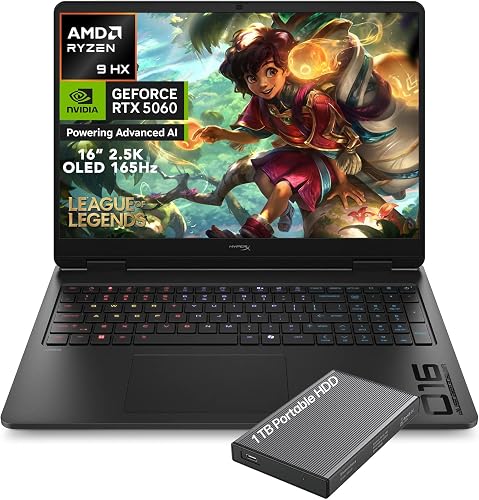
HP HyperX OMEN Gaming Laptop 2026, Ryzen 9 8940HX, NVIDIA GeForce RTX 5060
Creators who judge color and detail will like the OLED panel and its sharp resolution. Wi-Fi 7 helps with large file uploads. The trade-off is 16GB of memory with a 1TB drive that fills over time.

msi Crosshair 18 HX 18" 2560x1600 240Hz Display Gaming Laptop, Intel Core Ultra 9 275HX, NVIDIA RTX 5070 8GB GDDR7, 32GB RAM, 2TB NVMe SSD
Creators who want a large canvas will like the 18-inch panel with 240Hz and 100% DCI-P3 color. The 2TB drive holds big project files. The trade-off is an 18-inch size that is less compact to carry.

Lenovo Legion 5 16" WQXGA 240Hz Gaming Laptop
Creators who want a sharp screen will like the 2560 x 1600 resolution and the 500 nit anti-glare panel. The 32GB of DDR5-5600 gives projects room. The trade-off is 8GB of graphics memory.
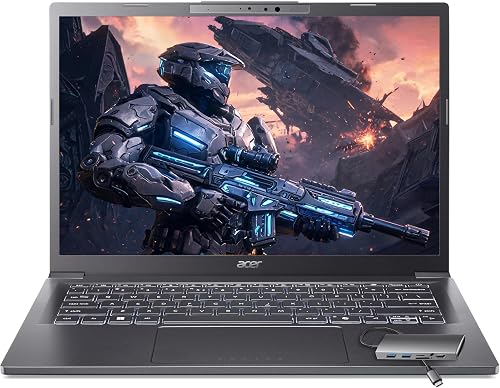
Acer Aspire Laptop 2026, Touchscreen, Intel Ultra 7 258V, 32GB RAM+2TB SSD
Creators who edit photos and travel often will like the 3.09 lb body and the 2TB drive. Wi-Fi 6E helps with large file uploads, and the included USB hub adds HDMI, USB and Ethernet ports. The trade-off is integrated graphics for heavy video work.
In-Depth Reviews
1. What Specs Matter for a Content Creation Laptop?
Creative apps lean on memory, storage and the display, and a dedicated graphics card helps with video effects and 3D work. Check memory first, then the display and graphics.
The HP OMEN 16 Slim offers 64GB of RAM and a 2TB drive. The HP OMEN 16 OLED uses an OLED panel with 2560 x 1600 resolution.
2. Is a Dedicated Graphics Card Needed for Content Creation?
It helps with video effects and 3D work, as on the msi Vector 16 HX with 16GB of graphics memory. Integrated graphics, as on the Acer Aspire 14, suit lighter photo editing.
3. msi Vector 16 HX RTX 5080: Best Overall
The msi Vector 16 HX RTX 5080 has an Intel Core Ultra 9 275HX processor with 24 cores, a GeForce RTX 5080 with 16GB of graphics memory, 32GB of DDR5 and a 1TB SSD, with a 16-inch 2560 x 1600 IPS screen at 240Hz. Creators who render video or 3D scenes will like the 16GB of graphics memory and the sharp QHD+ screen. Thunderbolt 5 ports connect fast drives and displays. The trade-off is a premium price point.
4. HP OMEN 16 Slim RTX 5070: Best Memory and Storage
The HP OMEN 16 Slim RTX 5070 has an Intel Core Ultra 9 285H processor with 16 cores, a GeForce RTX 5070 with 8GB of GDDR7, 64GB of RAM and a 2TB SSD, with a 16-inch 1920 x 1200 IPS screen at 144Hz. Creators who juggle large projects will like the 64GB of RAM and the roomy 2TB drive. The anti-glare display suits bright rooms. The trade-off is a resolution that stops at 1920 x 1200.
5. HP OMEN 16 OLED RTX 5060: Best Display
The HP OMEN 16 OLED RTX 5060 has an AMD Ryzen 9 8940HX processor, a GeForce RTX 5060 with 8GB of GDDR7, 16GB of DDR5 and a 1TB PCIe Gen4 SSD, with a 16-inch 2560 x 1600 OLED screen at 165Hz. Creators who judge color and detail will like the OLED panel and its sharp resolution. Wi-Fi 7 helps with large file uploads. The trade-off is 16GB of memory with a 1TB drive that fills over time.
6. msi Crosshair 18 HX RTX 5070: Best Large Canvas
The msi Crosshair 18 HX RTX 5070 has an Intel Core Ultra 9 275HX processor, a GeForce RTX 5070 with 8GB of GDDR7, 32GB of DDR5 and a 2TB NVMe SSD, with an 18-inch 2560 x 1600 IPS screen at 240Hz. Creators who want a large canvas will like the 18-inch panel with 240Hz and 100% DCI-P3 color. The 2TB drive holds big project files. The trade-off is an 18-inch size that is less compact to carry.
7. Lenovo Legion 5 RTX 5060: Best Balance
The Lenovo Legion 5 RTX 5060 has an Intel Core Ultra 9 275HX processor, a GeForce RTX 5060 with 8GB of GDDR7, 32GB of DDR5-5600 and a 1TB NVMe SSD, with a 16-inch 2560 x 1600 IPS screen at 240Hz. Creators who want a sharp screen will like the 2560 x 1600 resolution and the 500 nit anti-glare panel. The 32GB of DDR5-5600 gives projects room. The trade-off is 8GB of graphics memory.
8. Acer Aspire 14 Ultra 7: Best Portable
The Acer Aspire 14 Ultra 7 has an Intel Core Ultra 7 258V processor with Intel Arc 140V graphics, 32GB of LPDDR5X and a 2TB PCIe SSD, with a 14-inch 1920 x 1200 touchscreen. Creators who edit photos and travel often will like the 3.09 lb body and the 2TB drive. Wi-Fi 6E helps with large file uploads, and the included USB hub adds HDMI, USB and Ethernet ports. The trade-off is integrated graphics for heavy video work.
How to Choose a Laptop for Content Creation
Memory
Pick 16GB at minimum and 32GB or more for large projects.
Display
Choose a sharp screen with wide color coverage for editing.
Graphics card
Choose a dedicated card for video and 3D work and integrated graphics for lighter photo editing.
Storage
Choose 1TB or more because project files and media take a lot of space.
Quick Setup Tips
- Power mode: Keep the charger connected and use the performance profile while you edit.
- Display settings: Set the display profile and brightness for the kind of work you do.
- Backups: Keep project files on a fast drive and back them up regularly.
- Drivers: Install the latest graphics driver before your first project.
- Check the live price: use the buttons to see the current price on Amazon
Frequently Asked Questions
What is the best laptop for content creation?
The msi Vector 16 HX leads this list with an RTX 5080 and a 2560 x 1600 screen.
How much RAM do I need for content creation?
Start with 16GB and choose 32GB or more for large projects. The HP OMEN 16 Slim offers 64GB.
Which pick has an OLED screen?
The HP OMEN 16 OLED has a 165Hz OLED display.
Which pick has a large screen?
The msi Crosshair 18 HX has an 18-inch 240Hz display.
Which pick suits travel?
The Acer Aspire 14 weighs 3.09 lbs and includes a USB hub with HDMI, USB and Ethernet ports.
The Bottom Line
The best laptop for content creation pick for most shoppers is the msi Vector 16 HX, with the HP OMEN 16 Slim and HP OMEN 16 OLED as strong alternates. Check the buttons for the current price before you buy.






