

Heads up: we may earn a commission when you buy through links on this page, at no extra cost to you. As an Amazon Associate we earn from qualifying purchases. How we make money
Short on time? Our top pick is Lenovo ThinkPad P16v Gen 3, Lenovo ThinkPad P14s takes Best SOLIDWORKS Pick, while Lenovo ThinkPad T14 Gen 6 takes Best Monitor Trio Pick.
- Best Overall Lenovo ThinkPad P16v Gen 3 Check price
- Best SOLIDWORKS Pick Lenovo ThinkPad P14s Check price
- Best Monitor Trio Pick Lenovo ThinkPad T14 Gen 6 Check price
Shopping on Amazon? Get it faster with Prime
Free fast delivery on eligible items above, Prime-only deals and Prime Video. New members can try it free for 30 days and cancel anytime.
The best work laptop under $2500 should handle serious work, from CAD drawings and big models to boardroom presentations. Five of the six laptops run Windows 11 Pro, and the range spans workstations, slim travel designs and OLED screens.
Our ranking weighs certified graphics and build quality early, since premium work punishes shortcuts. Look at each pick for the job it fits and the compromise built into it. We checked each Amazon listing on October 27, 2026 and used only the specs the maker or seller lists. We do not list exact prices because Amazon prices change in real time. Use the buttons to see the current price and availability on Amazon before you buy. Scores are our editorial scores out of 10, not Amazon customer ratings.
Premium Work Laptops at a Glance
| Award | Laptop | Key Spec | Why It Fits | Score |
|---|---|---|---|---|
| Best Overall | Lenovo ThinkPad P16v Gen 3 | RTX PRO 1000 Blackwell | It suits engineers and CAD users, with certified pro graphics, Ethernet and Wi-Fi 7. | 9.8/10 |
| Best SOLIDWORKS Pick | Lenovo ThinkPad P14s | ISV-validated, Wi-Fi 7 | It suits design teams, with validation for SOLIDWORKS, AutoCAD and Revit in a slim body. | 9.6/10 |
| Best Monitor Trio Pick | Lenovo ThinkPad T14 Gen 6 | Three 4K monitor support | It suits desk workers who present, with a 5MP IR camera and support for three 4K monitors. | 9.4/10 |
| Best Storage Room Pick | ASUS Zenbook S 16 | 2TB SSD, OLED touchscreen | It suits presenters with big file sets, with the largest storage here and a 3K OLED touchscreen. | 9.2/10 |
| Best Number Entry Pick | HP EliteBook 16 2026 | Numeric keypad, fast charging | It suits finance and data teams, with the only numeric keypad here and fast charging. | 9.0/10 |
| Best Creative GPU Pick | HP Omen Transcend 14 | RTX 5070 graphics | It suits creative work after hours, with the strongest graphics card here and a 3K OLED screen. | 8.8/10 |
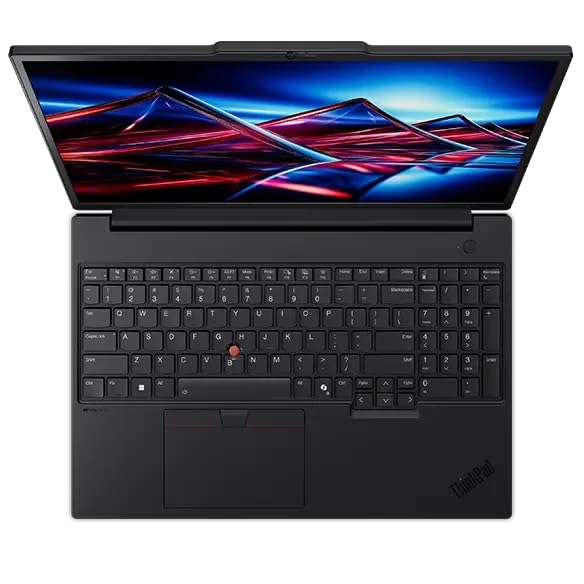
Lenovo ThinkPad P16v Gen 3 Mobile Workstation, Intel Core Ultra 7 255H - NVIDIA RTX PRO 1000 Blackwell 8GB, 32GB DDR5 + 1TB PCIe SSD
The Lenovo ThinkPad P16v Gen 3 suits you if your projects live in CAD and your models keep growing. Its 1920x1200 panel packs fewer pixels than the sharpest screens in this guide.

LENOVO ThinkPad P14s AMD Ryzen Business Laptop, 32GB + 1TB
Choose the Lenovo ThinkPad P14s if your firm standardizes on SOLIDWORKS, AutoCAD or Revit. Its integrated Radeon graphics share memory with the system, so huge assemblies slow down.
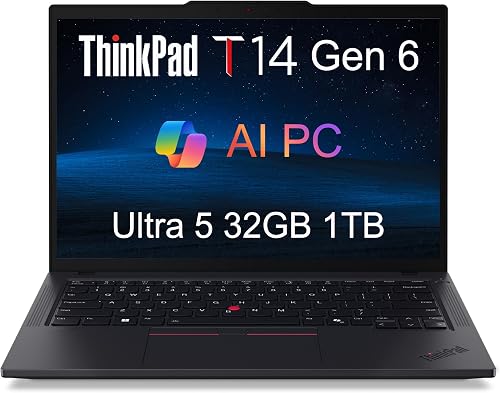
Lenovo ThinkPad T14 Gen 6 Laptop, Intel Ultra 5 225U, 32GB DDR5, 1TB SSD
The Lenovo ThinkPad T14 Gen 6 suits you if your desk spans three monitors and your travel stays light. At 3.1 pounds, long carries stay comfortable, but the 14-inch panel crowds split windows.

ASUS Zenbook S 16 Laptop, 16" 3K Touchscreen, 24GB/2TB
The ASUS Zenbook S 16 suits you if your presentations travel and your archive travels with them. With 24GB of RAM, big multitasking sessions feel cramped.

HP 2026 EliteBook 16 Laptop, AMD Ryzen 5 200, 32GB DDR5, 1TB SSD
It suits you if your day runs on spreadsheets, calls and figures across one wide screen. Its Wi-Fi 6E radio trails the newest standard, so wireless transfers cap below newer standards.

HP Omen Transcend 14 Gaming Laptop 14" 3k OLED 120Hz (100% DCI-P3
The HP Omen Transcend 14 suits you if creative work fills your evenings after office hours. Its 512GB SSD runs short once video projects pile up.
In-Depth Reviews
1. Which Graphics Fit CAD, Office Work and Creative Projects?
For engineering apps, the Lenovo ThinkPad P16v Gen 3 and the Lenovo ThinkPad P14s carry ISV backing for pro software. The Lenovo ThinkPad P14s names SOLIDWORKS, AutoCAD and Revit in its validation list.
For creative projects, the HP Omen Transcend 14 brings the strongest graphics card here, a GeForce RTX 5070. Four laptops run integrated graphics, which cover office apps and light visuals.
2. How Do Screens, Cameras and Ports Shape Your Workday?
For calls, the Lenovo ThinkPad T14 Gen 6 lists a 5MP IR camera, the highest resolution camera in this guide. For desks, the same laptop drives up to three external 4K monitors.
For presentations, the ASUS Zenbook S 16 and the HP Omen Transcend 14 each show an OLED screen with deep blacks. For figures, the HP EliteBook 16 2026 stands alone with a numeric keypad.
3. Lenovo ThinkPad P16v Gen 3: Best Overall
The Lenovo ThinkPad P16v Gen 3 has an Intel Core Ultra 7 255H with vPro, an NVIDIA RTX PRO 1000 Blackwell graphics card with 8GB of GDDR7 memory, 32GB of DDR5 RAM and a 1TB PCIe SSD, with a 16-inch 1920x1200 IPS screen at 500 nits of brightness and 100% sRGB color. The Lenovo ThinkPad P16v Gen 3 suits you if your projects live in CAD and your models keep growing. Its 1920x1200 panel packs fewer pixels than the sharpest screens in this guide.
4. Lenovo ThinkPad P14s: Best SOLIDWORKS Pick
The Lenovo ThinkPad P14s has an AMD Ryzen processor, AMD Radeon Graphics, 32GB of DDR5 RAM and a 1TB SSD, with a 14-inch 1920 x 1200 IPS screen and 100% sRGB color. Choose the Lenovo ThinkPad P14s if your firm standardizes on SOLIDWORKS, AutoCAD or Revit. Its integrated Radeon graphics share memory with the system, so huge assemblies slow down.
5. Lenovo ThinkPad T14 Gen 6: Best Monitor Trio Pick
The Lenovo ThinkPad T14 Gen 6 has an Intel Core Ultra 5 225U with 12 cores, Intel Graphics, 32GB of DDR5 RAM and a 1TB PCIe NVMe SSD, with a 14-inch 1920x1200 IPS screen at 400 nits of brightness. The Lenovo ThinkPad T14 Gen 6 suits you if your desk spans three monitors and your travel stays light. At 3.1 pounds, long carries stay comfortable, but the 14-inch panel crowds split windows.
6. ASUS Zenbook S 16: Best Storage Room Pick
The ASUS Zenbook S 16 has an AMD Ryzen processor, AMD Radeon 880M Graphics, 24GB of RAM and a 2TB SSD, with a 16-inch 2880 x 1800 OLED touchscreen at 120Hz and 500 nits of brightness. The ASUS Zenbook S 16 suits you if your presentations travel and your archive travels with them. With 24GB of RAM, big multitasking sessions feel cramped.
7. HP EliteBook 16 2026: Best Number Entry Pick
The HP EliteBook 16 2026 has an AMD Ryzen 5 200 Series processor, Radeon 740M Graphics, 32GB of DDR5 RAM and a 1TB PCIe NVMe SSD, with a 16-inch 1920x1200 anti-glare display. It suits you if your day runs on spreadsheets, calls and figures across one wide screen. Its Wi-Fi 6E radio trails the newest standard, so wireless transfers cap below newer standards.
8. HP Omen Transcend 14: Best Creative GPU Pick
The HP Omen Transcend 14 has an Intel Core Ultra 9 285H with 16 cores, an NVIDIA GeForce RTX 5070 with 8GB of GDDR7 graphics memory, 32GB of RAM and a 512GB SSD, with a 14-inch 2880x1800 OLED screen at 120Hz and 500 nits of HDR brightness. The HP Omen Transcend 14 suits you if creative work fills your evenings after office hours. Its 512GB SSD runs short once video projects pile up.
How to Spend a Premium Work Budget
Job type
Start from your heaviest program, because CAD, video and office suites pull power differently.
Graphics
Pick certified pro graphics for engineering apps, or GeForce RTX power for creative work.
Memory
Plan on 32GB for office loads, and more room if your models keep growing.
Edition
Confirm the Windows edition before you buy, since one pick here runs Home.
Quick Setup Tips
- List your apps: Write down your three heaviest programs before you compare chips.
- Sketch your desk: Draw your monitor layout, then count the ports it needs.
- Save for storage: Keep a quarter of your SSD empty so projects breathe.
- Test your calls: Join a test call and check your camera framing before a big meeting.
- Check the live price: use the buttons to see the current price on Amazon
Frequently Asked Questions
What is the best work laptop under $2500 for most professionals?
The Lenovo ThinkPad P16v Gen 3 is the top pick, with certified pro graphics, a 500-nit screen and Windows 11 Pro.
Which laptop has the strongest graphics card?
The HP Omen Transcend 14 packs a GeForce RTX 5070, the strongest graphics card in this guide.
Which laptop has the largest storage?
The ASUS Zenbook S 16 carries 2TB of storage, the largest figure in this guide.
Which laptop has the highest resolution camera?
The Lenovo ThinkPad T14 Gen 6 carries a 5MP IR camera, which tops the camera list here.
Which laptops include wired Ethernet?
The Lenovo ThinkPad P16v Gen 3, the Lenovo ThinkPad P14s and the Lenovo ThinkPad T14 Gen 6 each include an RJ-45 Ethernet port.
The Bottom Line
The best work laptop under $2500 pick for most shoppers is the Lenovo ThinkPad P16v Gen 3. Pick the Lenovo ThinkPad T14 Gen 6 if your desk runs three monitors, or the ASUS Zenbook S 16 for 2TB of archive room.





