

Heads up: we may earn a commission when you buy through links on this page, at no extra cost to you. As an Amazon Associate we earn from qualifying purchases. How we make money
Short on time? Our top pick is Lenovo ThinkPad P1 Gen 7, Dell Precision 7680 takes Best HX Workstation, while Lenovo ThinkPad P16v Gen 3 takes Best New GPU Pick.
- Best Business Laptop for Video Editing Lenovo ThinkPad P1 Gen 7 Check price
- Best HX Workstation Dell Precision 7680 Check price
- Best New GPU Pick Lenovo ThinkPad P16v Gen 3 Check price
Shopping on Amazon? Get it faster with Prime
Free fast delivery on eligible items above, Prime-only deals and Prime Video. New members can try it free for 30 days and cancel anytime.
The best business laptop for video editing is usually a mobile workstation: a business-class laptop with a pro NVIDIA GPU, lots of memory and support from the maker. Editing apps use the GPU for effects, color work and exports, and long timelines fill memory fast.
Four picks here have pro NVIDIA RTX GPUs, and one trades the GPU for a 14-inch Tandem OLED screen. All have 32GB or more and Windows 11 Pro. We checked each Amazon listing on October 22, 2026 and used only the specs the maker or seller lists. We do not list exact prices because Amazon prices change in real time. Use the buttons to see the current price and availability on Amazon before you buy. Scores are our editorial scores out of 10, not Amazon customer ratings.
Best Business Laptops for Video Editing at a Glance
| Award | Laptop | Graphics | Why It Fits | Score |
|---|---|---|---|---|
| Best Business Laptop for Video Editing | Lenovo ThinkPad P1 Gen 7 (RTX 3000 Ada) | RTX 3000 Ada | RTX 3000 Ada, 2TB | 9.2/10 |
| Best HX Workstation | Dell Precision 7680 (RTX 2000 Ada) | RTX 2000 Ada | i7-13850HX, RTX 2000 Ada | 8.9/10 |
| Best New GPU Pick | Lenovo ThinkPad P16v Gen 3 (RTX PRO 1000) | RTX PRO 1000 | RTX PRO 1000, 8GB | 8.6/10 |
| Most Memory | HP ZBook 8 G1i (64GB, RTX 500 Ada) | RTX 500 Ada | 64GB, 2TB | 8.3/10 |
| Best OLED for Color Work | Dell Pro Max 14 Premium (OLED) | Intel Arc Pro | Tandem OLED, DCI-P3 | 8.0/10 |

Lenovo ThinkPad P1 Gen 7 Workstation, Intel Core Ultra 7 165H, NVIDIA RTX 3000 Ada 8GB, 32GB, 2TB SSD, 16-inch 2560 x 1600, Windows 11 Pro
An RTX 3000 Ada with 8GB, 2TB of storage and a 2560 x 1600 165Hz screen.

Dell Precision 7680 Mobile Workstation, Intel Core i7-13850HX, NVIDIA RTX 2000 Ada 8GB, 32GB DDR5, 1TB SSD, 16-inch FHD+, Windows 11 Pro
An HX-class Core i7, an RTX 2000 Ada with 8GB and four external monitor support.

Lenovo ThinkPad P16v Gen 3 Mobile Workstation, Intel Core Ultra 7 255H, NVIDIA RTX PRO 1000 Blackwell 8GB, 32GB DDR5, 1TB SSD, 16-inch WUXGA, Windows 11 Pro
An RTX PRO 1000 Blackwell with 8GB of GDDR7 and a 500-nit screen.
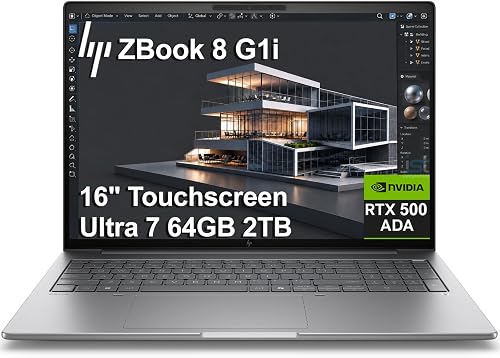
HP ZBook 8 G1i Mobile Workstation, Intel Core Ultra 7 255H, NVIDIA RTX 500 Ada, 64GB DDR5, 2TB SSD, 16-inch Touchscreen, Windows 11 Pro
64GB of DDR5 and a 2TB SSD for long timelines and big caches.

Dell Pro Max 14 Premium, Intel Core Ultra 7 265H, 32GB, 1TB SSD, 14-inch QHD+ Tandem OLED Touch, Windows 11 Pro
A 14-inch 2880 x 1800 Tandem OLED with DCI-P3 color and 3 years of ProSupport.
In-Depth Reviews
1. Why Workstations Suit Business Video Editing
Mobile workstations like ThinkPad P, Dell Precision and HP ZBook use pro NVIDIA GPUs with drivers tested for creative apps, and they come with business warranties and support options. That matters when an editing laptop is a work tool, not a hobby machine.
Memory and storage come next. 32GB is a practical minimum for 4K timelines, and 64GB helps with long projects and heavy effects. A 2TB SSD, like the ThinkPad P1 and ZBook 8 have, keeps footage and cache on one fast drive. For creator-focused laptops, see our creator laptop for video editing guide.
2. Lenovo ThinkPad P1 Gen 7 (RTX 3000 Ada): Best Business Laptop for Video Editing
The Lenovo ThinkPad P1 Gen 7 (RTX 3000 Ada) has an Intel Core Ultra 7 165H, an NVIDIA RTX 3000 Ada with 8GB of GDDR6, 32GB of LPDDR5x and 2TB of storage as two 1TB SSDs, with a 16-inch 2560 x 1600 screen at 165Hz, 500 nits and 100% sRGB. An RTX 3000 Ada with 8GB, 2TB of storage and a 2560 x 1600 165Hz screen.
3. Dell Precision 7680 (RTX 2000 Ada): Best HX Workstation
The Dell Precision 7680 (RTX 2000 Ada) has an Intel Core i7-13850HX with vPro, an NVIDIA RTX 2000 Ada with 8GB of GDDR6, 32GB of DDR5 CAMM memory and a 1TB SSD, with a 16-inch 1920 x 1200 screen and support for four external monitors. An HX-class Core i7, an RTX 2000 Ada with 8GB and four external monitor support.
4. Lenovo ThinkPad P16v Gen 3 (RTX PRO 1000): Best New GPU Pick
The Lenovo ThinkPad P16v Gen 3 (RTX PRO 1000) has an Intel Core Ultra 7 255H, an NVIDIA RTX PRO 1000 Blackwell with 8GB of GDDR7, 32GB of DDR5 and a 1TB SSD, with a 16-inch 1920 x 1200 500-nit 100% sRGB screen, a 5MP camera, Ethernet and Wi-Fi 7. An RTX PRO 1000 Blackwell with 8GB of GDDR7 and a 500-nit screen.
5. HP ZBook 8 G1i (64GB, RTX 500 Ada): Most Memory
The HP ZBook 8 G1i (64GB, RTX 500 Ada) has a 16-core Intel Core Ultra 7 255H, an NVIDIA RTX 500 Ada with 4GB, 64GB of DDR5 and a 2TB SSD, with a 16-inch 1920 x 1200 touchscreen, two Thunderbolt 4 ports and Wi-Fi 7. 64GB of DDR5 and a 2TB SSD for long timelines and big caches.
6. Dell Pro Max 14 Premium (OLED): Best OLED for Color Work
The Dell Pro Max 14 Premium (OLED) has an Intel Core Ultra 7 265H, 32GB of LPDDR5x and a 1TB SSD, with a 14-inch 2880 x 1800 Tandem OLED touchscreen with DCI-P3 color, an 8MP HDR camera, Wi-Fi 7 and 3 years of Dell ProSupport. A 14-inch 2880 x 1800 Tandem OLED with DCI-P3 color and 3 years of ProSupport.
How to Choose a Business Laptop for Video Editing
GPU
8GB of video memory for 4K effects and exports.
Memory
32GB minimum; 64GB for long timelines.
Screen
100% sRGB or DCI-P3 for accurate color.
Support
Business warranties reduce downtime.
Quick Setup Tips
- Use the right power mode: balanced for battery, performance when plugged in
- Keep drivers current: creative apps rely on up-to-date GPU drivers
- Back up your projects: use cloud or an external SSD
- Add a dock or USB-C hub: it makes a laptop a desk setup in seconds
- Check the live price: use the buttons to see the current price on Amazon
Frequently Asked Questions
What is the best business laptop for video editing?
The Lenovo ThinkPad P1 Gen 7 with an RTX 3000 Ada, 32GB and 2TB of storage.
Is a mobile workstation better than a gaming laptop for editing?
For business use, often yes: pro GPU drivers, business support and quieter designs. Gaming laptops can give more GPU power for the money.
How much RAM do I need for video editing?
32GB for most 4K work; 64GB for long or heavy projects.
Which pick has the best screen for color?
The Dell Pro Max 14 Premium with a Tandem OLED and DCI-P3 color.
Do these laptops have Windows 11 Pro?
Yes, all five list Windows 11 Pro.
The Bottom Line
The ThinkPad P1 Gen 7 is the best business laptop for video editing in our check. Choose the Dell Precision 7680 for an HX-class CPU, or the HP ZBook 8 G1i for 64GB of memory.





