

Heads up: we may earn a commission when you buy through links on this page, at no extra cost to you. As an Amazon Associate we earn from qualifying purchases. How we make money
Short on time? Our top pick is Dell Pro Max 14 Premium, HP Omen Transcend 14 takes Best Export Power Pick, while ASUS Zenbook S 16 takes Best Big Storage Pick.
- Best Overall Dell Pro Max 14 Premium Check price
- Best Export Power Pick HP Omen Transcend 14 Check price
- Best Big Storage Pick ASUS Zenbook S 16 Check price
Shopping on Amazon? Get it faster with Prime
Free fast delivery on eligible items above, Prime-only deals and Prime Video. New members can try it free for 30 days and cancel anytime.
The best work laptop for video editing should show true color, hold hours of footage and export company videos without long waits. Every pick here runs Windows 11 Pro, so security and updates stay simple at work.
We weighed screen color, memory and storage first, since footage punishes weak links in all three. Each pick below names its main strength and its main drawback for business editing. We checked each Amazon listing on October 27, 2026 and used only the specs the maker or seller lists. We do not list exact prices because Amazon prices change in real time. Use the buttons to see the current price and availability on Amazon before you buy. Scores are our editorial scores out of 10, not Amazon customer ratings.
Work Laptops for Video Editing at a Glance
| Award | Laptop | Key Spec | Why It Fits | Score |
|---|---|---|---|---|
| Best Overall | Dell Pro Max 14 Premium | Tandem OLED touchscreen | It suits careful color work, with a Tandem OLED screen, an 8MP camera and vPro security. | 9.8/10 |
| Best Export Power Pick | HP Omen Transcend 14 | RTX 5070 graphics | It suits fast exports, with the strongest graphics card here and a 3K OLED screen. | 9.6/10 |
| Best Big Storage Pick | ASUS Zenbook S 16 | 2TB SSD, OLED touchscreen | It suits big footage libraries, with the largest storage here at 2TB and an OLED touchscreen. | 9.4/10 |
| Best Heavy Project Pick | Dell Precision 7680 | 64GB CAMM memory | It suits huge timelines, with the most memory in this guide at 64GB and workstation graphics. | 9.2/10 |
| Best 4K Edit Pick | Lenovo ThinkPad P16v Gen 3 | RTX PRO 1000 Blackwell | It suits 4K company videos, with an ISV-certified pro card and Ethernet for uploads. | 9.0/10 |
| Best Light OLED Pick | Acer Swift 16 OLED | 16-inch OLED touchscreen | It suits editing on trips, with an OLED touchscreen and a light 3-pound body. | 8.8/10 |

Dell Pro Max 14 Premium MA14250 Laptop - 14-inch QHD+ (2880 x 1800) Tandem OLED Touch Display - Intel Core Ultra 7 265H - 32GB RAM - 1TB SS
The Dell Pro Max 14 Premium suits you if you grade company videos and want true color on a business laptop. Its integrated Arc Pro graphics suit edits, so heavy effects render more slowly.

HP Omen Transcend 14 Gaming Laptop 14" 3k OLED 120Hz (100% DCI-P3
Choose the HP Omen Transcend 14 if you edit on trips and want graphics power in a small laptop. Its 512GB SSD fills fast with footage, so archive finished projects.

ASUS Zenbook S 16 Laptop, 16" 3K Touchscreen, 24GB/2TB
The ASUS Zenbook S 16 suits you if you keep large footage libraries and grade on an OLED touchscreen. With 24GB of RAM, very large projects leave less room for other apps.

Dell Precision 7680 Laptop, NVIDIA RTX 1000 Ada 6GB, i7-13850HX, 64GB DDR5
Pick the Dell Precision 7680 if your edits span several monitors and your timelines run long. At 5.9 pounds and 1.03 inches thick, it suits a fixed desk.
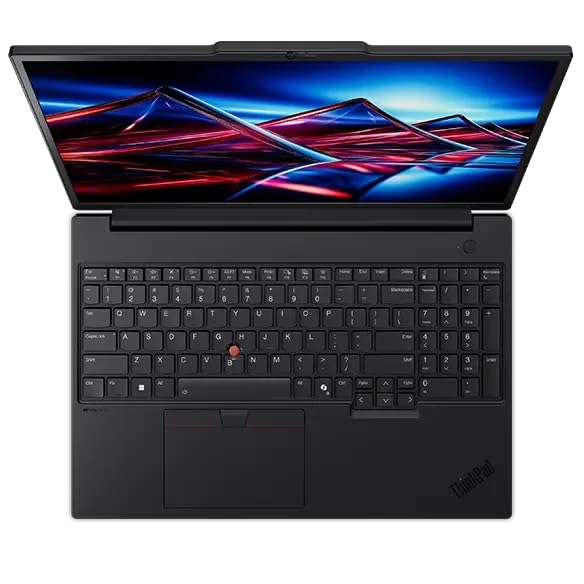
Lenovo ThinkPad P16v Gen 3 Mobile Workstation, Intel Core Ultra 7 255H - NVIDIA RTX PRO 1000 Blackwell 8GB, 32GB DDR5 + 1TB PCIe SSD
The Lenovo ThinkPad P16v Gen 3 suits you if you cut 4K training videos and want certified graphics at work. Its 1920x1200 screen shows less detail than sharper screens here.

Acer Swift 16 Laptop 16" 2k WUXGA OLED Touch Intel 8-core Ultra 7 355 (>Ultra 9 288V Up to 49 Tops) 32GB RAM 1TB SSD Backlit Thunderbolt fo
The Acer Swift 16 OLED suits you if you edit social clips and reviews on a light laptop. Its 8-core chip suits everyday edits more than heavy effects.
In-Depth Reviews
1. Which Screens Give You True Color for Grading?
For grading, the Dell Pro Max 14 Premium and the HP Omen Transcend 14 each give you an OLED screen with 100% DCI-P3 color. The Dell Pro Max 14 Premium uses a Tandem OLED panel with HDR True Black 500 for dark scenes.
The ASUS Zenbook S 16 and the Acer Swift 16 OLED also use OLED touchscreens for color checks on trips. Grade on the screen you trust most, then check the export on a second display.
2. How Much Memory, Storage and GPU Power Do Exports Need?
For memory, the Dell Precision 7680 gives you 64GB of RAM, the most memory in this guide. For storage, the ASUS Zenbook S 16 gives you a 2TB SSD, the largest storage in this guide.
For exports, the HP Omen Transcend 14 carries the strongest graphics card here, a GeForce RTX 5070 card. The Lenovo ThinkPad P16v Gen 3 and the Dell Precision 7680 use pro cards built for certified work apps.
3. Dell Pro Max 14 Premium: Best Overall
The Dell Pro Max 14 Premium has an Intel Core Ultra 7 265H with 16 cores, Intel Arc Pro Graphics, 32GB of LPDDR5X RAM and a 1TB PCIe Gen 4 NVMe self-encrypting SSD, with a 14-inch 2880 x 1800 Tandem OLED touchscreen at 400 nits of brightness and 100% DCI-P3 color. The Dell Pro Max 14 Premium suits you if you grade company videos and want true color on a business laptop. Its integrated Arc Pro graphics suit edits, so heavy effects render more slowly.
4. HP Omen Transcend 14: Best Export Power Pick
The HP Omen Transcend 14 has an Intel Core Ultra 9 285H with 16 cores, an NVIDIA GeForce RTX 5070 with 8GB of GDDR7 graphics memory, 32GB of RAM and a 512GB SSD, with a 14-inch 2880 x 1800 OLED screen at 120Hz and 500 nits of HDR brightness. Choose the HP Omen Transcend 14 if you edit on trips and want graphics power in a small laptop. Its 512GB SSD fills fast with footage, so archive finished projects.
5. ASUS Zenbook S 16: Best Big Storage Pick
The ASUS Zenbook S 16 has an AMD Ryzen processor, AMD Radeon 880M Graphics, 24GB of RAM and a 2TB SSD, with a 16-inch 2880 x 1800 OLED touchscreen at 120Hz and 500 nits of brightness. The ASUS Zenbook S 16 suits you if you keep large footage libraries and grade on an OLED touchscreen. With 24GB of RAM, very large projects leave less room for other apps.
6. Dell Precision 7680: Best Heavy Project Pick
The Dell Precision 7680 has an Intel Core i7-13850HX vPro, an NVIDIA RTX 1000 Ada Generation graphics card with 6GB of GDDR6 memory, 64GB of DDR5 CAMM RAM and a 1TB PCIe NVMe SSD, with a 16-inch 1920 x 1200 anti-glare display. Pick the Dell Precision 7680 if your edits span several monitors and your timelines run long. At 5.9 pounds and 1.03 inches thick, it suits a fixed desk.
7. Lenovo ThinkPad P16v Gen 3: Best 4K Edit Pick
The Lenovo ThinkPad P16v Gen 3 has an Intel Core Ultra 7 255H with vPro, an NVIDIA RTX PRO 1000 Blackwell graphics card with 8GB of GDDR7 memory, 32GB of DDR5 RAM and a 1TB PCIe SSD, with a 16-inch 1920x1200 IPS screen at 500 nits of brightness and 100% sRGB color. The Lenovo ThinkPad P16v Gen 3 suits you if you cut 4K training videos and want certified graphics at work. Its 1920x1200 screen shows less detail than sharper screens here.
8. Acer Swift 16 OLED: Best Light OLED Pick
The Acer Swift 16 OLED has an Intel Core Ultra 7 355 with 8 cores, Intel Graphics, 32GB of RAM and a 1TB SSD, with a 16-inch 1920x1200 OLED touchscreen. The Acer Swift 16 OLED suits you if you edit social clips and reviews on a light laptop. Its 8-core chip suits everyday edits more than heavy effects.
How to Choose an Editing Work Laptop
Screen
Grade on a screen with full DCI-P3 color if you publish company videos.
Memory
Start with 32GB of RAM, and choose more if you run many apps at once.
Storage
Choose 2TB if you keep raw footage and finished videos on the laptop.
Security
Check for a fingerprint reader or an IR camera if you sign in often.
Quick Setup Tips
- Calibrate first: Set one color space in your editor and on your screen before grading.
- Archive footage: Move raw footage to a second drive when a project ships.
- Export overnight: Queue long exports after your last call of the day.
- Check the export: Watch the full export once before you share the link.
- Check the live price: use the buttons to see the current price on Amazon
Frequently Asked Questions
What is the best work laptop for video editing for most editors?
The Dell Pro Max 14 Premium is the top pick, with a Tandem OLED touchscreen, 100% DCI-P3 color and an 8MP camera.
Which pick has the strongest graphics card?
The HP Omen Transcend 14 has a GeForce RTX 5070 card, the strongest graphics here.
Which pick has the most memory?
The Dell Precision 7680 has 64GB of RAM, the most memory in this guide.
Which pick has the largest storage?
The ASUS Zenbook S 16 has a 2TB SSD, the largest storage in this guide.
Which pick has the highest resolution camera?
The Dell Pro Max 14 Premium has an 8MP HDR + IR camera, the highest resolution camera here.
The Bottom Line
The best work laptop for video editing pick for most shoppers is the Dell Pro Max 14 Premium. Choose the HP Omen Transcend 14 for stronger graphics, or the Dell Precision 7680 for more memory and monitors.





