

Heads up: we may earn a commission when you buy through links on this page, at no extra cost to you. As an Amazon Associate we earn from qualifying purchases. How we make money
Short on time? Our top pick is HP OMEN Transcend 14, GIGABYTE AERO X16 takes Best Big Screen Pick, while Acer Swift X 14 takes Best Portable Pick.
- Best Overall HP OMEN Transcend 14 Check price
- Best Big Screen Pick GIGABYTE AERO X16 Check price
- Best Portable Pick Acer Swift X 14 Check price
Shopping on Amazon? Get it faster with Prime
Free fast delivery on eligible items above, Prime-only deals and Prime Video. New members can try it free for 30 days and cancel anytime.
The best ultrabook for gaming packs a real RTX graphics card into a slim chassis you can carry to class, work or a hotel room. This guide is for gamers who want one thin laptop for daily tasks and evening play.
We looked only at laptops with GeForce RTX graphics and a weight of 4.3 pounds or less, then compared GPUs, screens, memory and portability. We checked each Amazon listing on October 27, 2026 and used only the specs the maker or seller lists. We do not list exact prices because Amazon prices change in real time. Use the buttons to see the current price and availability on Amazon before you buy. Scores are our editorial scores out of 10, not Amazon customer ratings.
Best Thin Gaming Ultrabooks at a Glance
| Award | Laptop | Key Spec | Why It Fits | Score |
|---|---|---|---|---|
| Best Overall | HP OMEN Transcend 14 | RTX 5070, 14-inch OLED | Pairs RTX 5070 graphics and 32GB of RAM with a 3.6-pound build. | 9.3/10 |
| Best Big Screen Pick | GIGABYTE AERO X16 | RTX 5070, 16-inch 165Hz | The largest screen here at 16 inches, with RTX 5070 graphics in a 0.65-inch chassis. | 8.9/10 |
| Best Portable Pick | Acer Swift X 14 | RTX 4060, 3.3 pounds | The lightest pick at 3.3 pounds, with a 14.5-inch 120Hz OLED screen. | 8.5/10 |
| Best for Multitasking | MSI Katana 15HX | RTX 5070, 64GB DDR5 | Runs games, streams and many apps at once with 64GB of DDR5 and a 16-core chip. | 8.1/10 |
| Best Ethernet Pick | MSI Thin Gaming Laptop | RTX 4060, 32GB RAM | Adds an RJ45 Ethernet port and 32GB of RAM for steady online matches. | 7.7/10 |
| Best Entry RTX Pick | MSI Cyborg A15 | RTX 5050, 144Hz FHD | Brings RTX 5050 graphics, a 144Hz screen and a 1TB SSD to a thin frame. | 7.3/10 |

HP Omen Transcend 14 Gaming Laptop 14" 3k OLED 120Hz (100% DCI-P3
It suits gamers who travel and want RTX 5070 power in a small bag. A 71Wh battery, Thunderbolt 4 and Windows 11 Pro round out a strong work and play setup. The trade-off is a 512GB SSD, which holds only a few large game installs.

GIGABYTE AERO X16 - AMD Ryzen GeForce RTX 5070 16" Laptop
It suits players who want a roomy screen for shooters and strategy games while keeping a slim profile. The panel covers 100% sRGB with 400 nits of brightness, which helps photo and video work too. The trade-off is 4.2 pounds, so it feels heavier than the smaller picks.

Acer Swift X 14 Laptop, 14.5" OLED 2880 x 1800 120Hz Calman Verified, Intel Core Ultra 7 Processor 155H, NVIDIA GeForce RTX 4060
It suits students and creators who game after class and want the lightest laptop in this guide. A MUX switch, Calman Verified color and a fingerprint reader add value beyond games. The trade-off is RTX 4060 graphics, a step below the strongest GPU here.
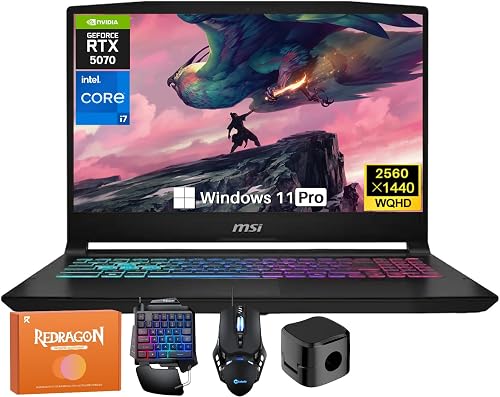
MSI Katana 15HX Gaming Laptop, NVIDIA GeForce RTX 5070 8GB GDDR7, 14th Gen Intel Core i7-14650HX, 15.6" 165Hz 2.5K QHD (2560x1440) Screen
It suits gamers who also stream, edit or run many apps in the background. The QHD panel covers 100% DCI-P3, and the Cooler Boost 5 system manages heat during long sessions. The trade-off is a 0.98-inch chassis, which is thicker than a classic ultrabook.

MSI Thin 15.6" FHD Intel Core i5-13420H Gaming Laptop, NVIDIA GeForce RTX 4060 8GB Graphic, 32GB RAM 1TB PCIe SSD, 256gb 9H Docking Station
It suits players who game at a desk on wired internet and want plenty of memory. Wi-Fi 6E, Bluetooth 5.3 and Windows 11 Pro cover the rest. The trade-off is a 45W maximum graphics power, which holds the RTX 4060 back in demanding games.

msi Cyborg A15 15.6” FHD 144Hz Thin & Light Gaming Laptop, Ryzen 7 260, GeForce RTX 5050, 16GB DDR5, 1TB SSD, Portable Design, Wi-Fi 6E
It suits first-time PC gamers and students who want a newer RTX card in a portable design. Translucent backlit keycaps and a fingerprint reader add style and convenience. The trade-off is RTX 5050 graphics, which sit below the strongest GPU here in demanding titles.
In-Depth Reviews
1. Can a Thin Laptop Really Handle Modern Games?
Yes, as long as it carries a GeForce RTX card, and every pick here does. The HP OMEN Transcend 14, the GIGABYTE AERO X16 and the MSI Katana 15HX each use an RTX 5070, the strongest GPU in this guide.
The Acer Swift X 14 and the MSI Thin Gaming Laptop use an RTX 4060, and the MSI Cyborg A15 uses an RTX 5050. These suit esports and older titles, with lower settings in newer, demanding games.
2. Is OLED or High Refresh Better for Gaming on the Go?
OLED screens deliver deep blacks and rich color for story games and movies. The HP OMEN Transcend 14 and the Acer Swift X 14 both pair an OLED panel with a 120Hz refresh rate.
Fast shooters benefit more from a high refresh rate. The GIGABYTE AERO X16 and the MSI Katana 15HX tie for the fastest refresh here at 165Hz, and the MSI Cyborg A15 runs at 144Hz.
3. HP OMEN Transcend 14: Best Overall
The HP OMEN Transcend 14 has an Intel Core Ultra 9 285H, 32GB of RAM, a 512GB SSD and RTX 5070 graphics, with a 14-inch 2880x1800 OLED screen. It suits gamers who travel and want RTX 5070 power in a small bag. A 71Wh battery, Thunderbolt 4 and Windows 11 Pro round out a strong work and play setup. The trade-off is a 512GB SSD, which holds only a few large game installs.
4. GIGABYTE AERO X16: Best Big Screen Pick
The GIGABYTE AERO X16 has an AMD Ryzen processor, dual 16GB DDR5 memory, a 1TB SSD and RTX 5070 graphics, with a 16-inch 2560x1600 screen. It suits players who want a roomy screen for shooters and strategy games while keeping a slim profile. The panel covers 100% sRGB with 400 nits of brightness, which helps photo and video work too. The trade-off is 4.2 pounds, so it feels heavier than the smaller picks.
5. Acer Swift X 14: Best Portable Pick
The Acer Swift X 14 has an Intel Core Ultra 7 155H, 16GB of LPDDR5X memory, a 1TB SSD and RTX 4060 graphics, with a 14.5-inch OLED screen. It suits students and creators who game after class and want the lightest laptop in this guide. A MUX switch, Calman Verified color and a fingerprint reader add value beyond games. The trade-off is RTX 4060 graphics, a step below the strongest GPU here.
6. MSI Katana 15HX: Best for Multitasking
The MSI Katana 15HX has a 14th Gen Intel Core i7-14650HX, 64GB of DDR5 RAM, a 1TB SSD and RTX 5070 graphics, with a 15.6-inch 2560x1440 screen. It suits gamers who also stream, edit or run many apps in the background. The QHD panel covers 100% DCI-P3, and the Cooler Boost 5 system manages heat during long sessions. The trade-off is a 0.98-inch chassis, which is thicker than a classic ultrabook.
7. MSI Thin Gaming Laptop: Best Ethernet Pick
The MSI Thin Gaming Laptop has a 13th Gen Intel Core i5-13420H, 32GB of RAM, a 1TB SSD and RTX 4060 graphics, with a 15.6-inch FHD anti-glare screen. It suits players who game at a desk on wired internet and want plenty of memory. Wi-Fi 6E, Bluetooth 5.3 and Windows 11 Pro cover the rest. The trade-off is a 45W maximum graphics power, which holds the RTX 4060 back in demanding games.
8. MSI Cyborg A15: Best Entry RTX Pick
The MSI Cyborg A15 has an AMD Ryzen 7 260, 16GB of DDR5 RAM, a 1TB SSD and RTX 5050 graphics, with a 15.6-inch FHD screen at 144Hz. It suits first-time PC gamers and students who want a newer RTX card in a portable design. Translucent backlit keycaps and a fingerprint reader add style and convenience. The trade-off is RTX 5050 graphics, which sit below the strongest GPU here in demanding titles.
How to Choose an Ultrabook for Gaming
Graphics
Choose an RTX 5070 for demanding games, or an RTX 4060 or RTX 5050 for esports.
Weight
Stay near 4 pounds or less if you carry the laptop every day.
Screen
Pick OLED for color and contrast, or 165Hz for fast competitive play.
Storage
Get 1TB if you keep several large games installed at once.
Quick Setup Tips
- Plug in to play: Keep the charger close, since thin laptops game best on wall power.
- Lift the back: Raise the rear of a thin laptop to help airflow during long sessions.
- Update drivers: Install the latest NVIDIA drivers before you launch a new game.
- Add an external SSD: Move older games to a USB-C drive when space runs low.
- Check the live price: use the buttons to see the current price on Amazon
Frequently Asked Questions
What is the best ultrabook for gaming?
The HP OMEN Transcend 14 is the top pick, with RTX 5070 graphics, 32GB of RAM and a 3.6-pound build.
Which pick is the lightest?
The Acer Swift X 14 is the lightest pick at 3.3 pounds.
Which pick has the largest screen?
The GIGABYTE AERO X16 has the largest screen here at 16 inches.
Is an RTX 5050 enough for a thin gaming laptop?
The MSI Cyborg A15 pairs an RTX 5050 with 8GB of GDDR7, which suits esports and lighter games. Choose an RTX 5070 pick for demanding releases.
How much RAM do you need for gaming and streaming?
16GB covers most games, while 32GB or more helps when you stream or keep apps open. The MSI Katana 15HX offers 64GB of DDR5.
The Bottom Line
The best ultrabook for gaming pick for most shoppers is the HP OMEN Transcend 14, which fits RTX 5070 graphics into a 3.6-pound body. For a bigger 165Hz screen choose the GIGABYTE AERO X16, or pick the Acer Swift X 14 if weight matters most.





