Heads up: we may earn a commission when you buy through links on this page, at no extra cost to you. As an Amazon Associate we earn from qualifying purchases. How we make money
Short on time? Our top pick is Kingston NV3 NVMe SSD, Seagate BarraCuda 2TB takes Best Budget Hard Drive for Desktops, while WD Blue 4TB Hard Drive takes Lowest Cost per Terabyte.
- Best Overall Kingston NV3 NVMe SSD Check price
- Best Budget Hard Drive for Desktops Seagate BarraCuda 2TB Check price
- Lowest Cost per Terabyte WD Blue 4TB Hard Drive Check price
Shopping on Amazon? Get it faster with Prime
Free fast delivery on eligible items above, Prime-only deals and Prime Video. New members can try it free for 30 days and cancel anytime.
The best budget hard drive depends on where it goes. For a gaming laptop, the smartest affordable upgrade is an M.2 NVMe SSD that drops into a spare slot; for a desktop, a 3.5-inch hard drive still gives you the most terabytes for the least money. Either way, a new internal drive is one of the lowest-cost upgrades you can make to stop deleting games to make room.
We compared popular low-cost internal drives on Amazon on cost per terabyte, real speed, compatibility with laptops and desktops, warranty and included software. These six cover every budget build in 2026, from a 6,000MB/s NVMe SSD to a 4TB desktop hard drive. Scores below are our editorial scores out of 10, not Amazon customer ratings, and prices change often, so check the current price before you buy.
Best Budget Hard Drives of 2026 at a Glance
| Award | Drive | Type | Capacity | Score |
|---|---|---|---|---|
| Best Overall | Kingston NV3 NVMe SSD | M.2 NVMe SSD (PCIe 4.0) | 1TB (500GB to 4TB) | 9.0/10 |
| Best Budget Hard Drive for Desktops | Seagate BarraCuda 2TB | 3.5-inch HDD (7200 RPM) | 2TB (2TB to 8TB) | 8.8/10 |
| Lowest Cost per Terabyte | WD Blue 4TB Hard Drive | 3.5-inch HDD (5400 RPM) | 4TB (1TB to 12TB) | 8.7/10 |
| Lowest-Priced NVMe Upgrade | WD Green SN3000 NVMe SSD | M.2 NVMe SSD (PCIe 4.0) | 1TB (up to 2TB) | 8.5/10 |
| Best Budget Speed Upgrade | SanDisk Optimus 5100 NVMe SSD | M.2 NVMe SSD (PCIe 4.0) | 1TB (500GB to 4TB) | 8.4/10 |
| Best for Older PCs and Laptops | PNY CS900 2TB SATA SSD | 2.5-inch SATA SSD | 2TB (250GB to 4TB) | 8.2/10 |

Kingston NV3 1TB M.2 2280 NVMe SSD (PCIe 4.0)
A low-cost PCIe 4.0 NVMe drive with read speeds up to 6,000MB/s that fits the M.2 2280 slot in most gaming laptops and desktops. The easiest way to make a whole system feel faster.
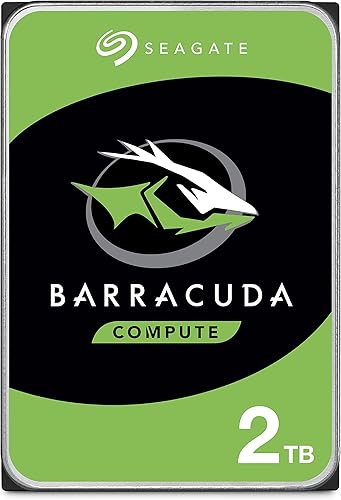
Seagate BarraCuda 2TB 3.5-Inch Internal Hard Drive (ST2000DM008)
The classic desktop storage drive. A 7200 RPM, 256MB cache 3.5-inch SATA hard drive that adds affordable bulk space for game libraries, recordings and backups in any desktop PC.
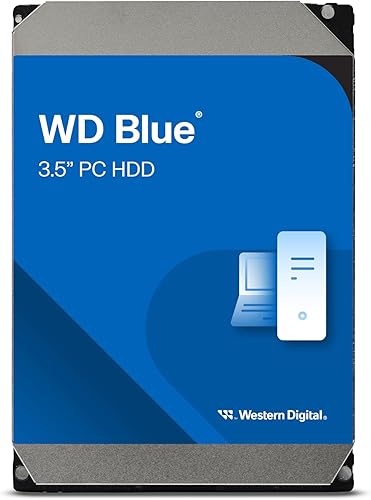
WD Blue 4TB PC Internal Hard Drive, 3.5-Inch (WD40EZZX)
If you want the most terabytes per dollar for a desktop, a 4TB WD Blue is hard to beat. It is a 5400 RPM drive built for everyday storage, with a 2-year limited warranty.

WD Green SN3000 1TB NVMe Internal SSD (PCIe 4.0, M.2 2280)
One of the lowest-cost ways to add a PCIe 4.0 NVMe drive. Its single-sided M.2 2280 design is made to fit thin laptops and small PCs.

SanDisk Optimus 5100 1TB NVMe SSD (PCIe 4.0, M.2 2280)
Costs a little more than the Kingston and WD Green, but reaches up to 7,100MB/s read speeds on the 1TB model and is built around a power-efficient design for laptops.
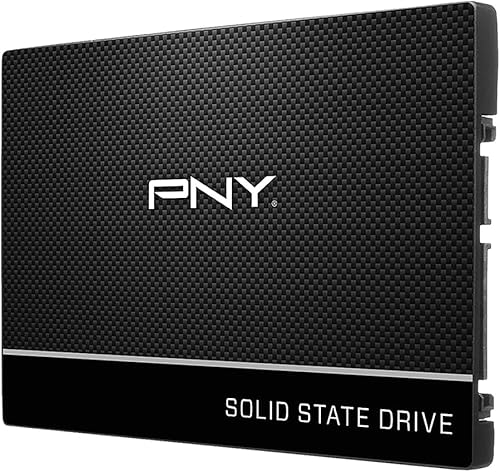
PNY CS900 2TB 2.5-Inch SATA III Internal SSD
Still running a laptop or PC with a 2.5-inch drive bay and no M.2 slot? A SATA SSD like the PNY CS900 replaces an old hard drive and makes boot and load times dramatically faster.
In-Depth Reviews
1. Kingston NV3: The Best Budget Hard Drive Upgrade Overall
For most gaming laptop owners, the Kingston NV3 is the best budget upgrade you can buy. It is a PCIe 4.0 NVMe SSD in the standard M.2 2280 size, with read speeds up to 6,000MB/s and writes up to 4,000MB/s. That is many times faster than any spinning hard drive, so games load faster and Windows feels snappier.
Kingston backs it with a 5-year limited warranty and includes Acronis cloning software, so you can copy your old drive across instead of reinstalling. It comes in 500GB, 1TB, 2TB and 4TB versions. If you plan to use it in a PS5, budget for a separate heatsink, because Sony requires one.
2. Seagate BarraCuda 2TB: Best Budget Hard Drive for Desktops
The Seagate BarraCuda 2TB is the go-to bulk storage drive for desktop gaming PCs. This 3.5-inch SATA model spins at 7200 RPM with a 256MB cache, and Seagate includes its free DiscWizard tool for migrating and cloning data from an older drive.
Use it for your game library overflow, video captures and backups, and keep your boot drive and favorite games on an SSD. Being a 3.5-inch drive, it needs a desktop drive bay and will not fit a laptop. The same BarraCuda line also comes in larger 4TB and 8TB versions.
3. WD Blue 4TB: Lowest Cost per Terabyte
When the goal is simply the most space for the money, the WD Blue 4TB is the pick. In our October 2026 check, it cost far less per terabyte than any 1TB NVMe SSD here. It is a 5400 RPM, 3.5-inch drive with a 128MB cache, so it is slower than 7200 RPM models, which matters little for storage and backups.
Western Digital includes Acronis True Image WD Edition and a 2-year limited warranty, and the WD Blue line runs all the way up to 12TB if you need even more.
4. WD Green SN3000: Lowest-Priced NVMe Upgrade
The WD Green SN3000 is one of the lowest-cost ways to add a PCIe 4.0 NVMe SSD to a laptop. It reads at up to 5,000MB/s and uses a single-sided M.2 2280 design, which Western Digital says is made to fit thin laptops and small PCs where clearance is tight.
It also uses WD's nCache 4.0 technology and comes with free Acronis True Image migration software. The trade-offs: it tops out at 2TB, and its 5,000MB/s read speed is below the 5,500MB/s Sony recommends for PS5 storage expansion.
5. SanDisk Optimus 5100: Best Budget Speed Upgrade
If you want more speed without jumping to premium prices, the SanDisk Optimus 5100 reaches up to 7,100MB/s reads on the 1TB and 2TB models. SanDisk designed it for power efficiency, which helps laptop battery life, and backs it with a 5-year limited warranty plus the SanDisk Dashboard app for health monitoring and firmware updates.
It uses QLC NAND, which SanDisk lists in its warranty notes. QLC is less expensive but less durable under heavy, constant writing than TLC, so it is best for gaming and everyday use rather than nonstop video editing. Capacities run from 500GB to 4TB.
6. PNY CS900: Best for Older PCs and Laptops
Not every computer has an M.2 slot. If your laptop or PC uses a 2.5-inch SATA drive bay, the PNY CS900 is a simple, affordable way to replace an old hard drive. It reads at up to 550MB/s and writes at up to 530MB/s, which makes boot times and app loads dramatically faster than a spinning disk.
PNY includes a 3-year warranty and sells it from 250GB to 4TB. It is much slower than NVMe, and most new gaming laptops no longer have 2.5-inch bays, so check your model first.
How to Choose the Best Budget Hard Drive
HDD or SSD?
A hard disk drive (HDD) stores data on spinning platters and is still the lowest-cost way to buy lots of space. A solid state drive (SSD) has no moving parts and is far faster, quieter and tougher. For a gaming machine, the best budget plan is usually an SSD for Windows and the games you play now, plus a hard drive for bulk storage.
Check What Your Computer Supports
Most modern gaming laptops use M.2 2280 NVMe slots and have no room for a 3.5-inch drive. Desktops usually have both M.2 slots and 3.5-inch bays. Older laptops may only have a 2.5-inch SATA bay. Check your laptop's manual or spec page for free M.2 slots and the supported PCIe generation before you buy. PCIe 4.0 drives also work in PCIe 3.0 slots, just at PCIe 3.0 speeds.
Speed and Cost per Terabyte
The drives here range from around 180MB/s to 220MB/s for desktop hard drives up to 7,100MB/s for the fastest NVMe SSD. Divide each drive's price by its capacity to compare value fairly; hard drives win easily on cost per terabyte, while NVMe SSDs win on speed.
Upgrading a PS5
A PS5 can use an internal M.2 SSD for extra space. Sony's PS5 M.2 SSD guide lists a PCIe Gen4 x4 interface, a recommended sequential read speed of 5,500MB/s or faster, and a required heat-dissipation mechanism such as a heatsink. Of our picks, the Kingston NV3 and SanDisk Optimus 5100 meet the speed recommendation once you add a heatsink.
Warranty and Software
Warranties here range from 2 years on the WD Blue to 5 years on the Kingston NV3 and SanDisk Optimus 5100. Most drives also include free cloning software, which lets you move Windows and your games to the new drive without a fresh install.
Quick Installation Tips
- Back up first: copy important files before opening your laptop or PC.
- Clone or fresh install: use the included Acronis or DiscWizard software to clone your old drive, or install Windows fresh for a clean start.
- Initialize new drives: a blank second drive will not appear in File Explorer until you initialize and format it in Windows Disk Management.
- Mind the heat: use your laptop's included thermal pad or shield on the M.2 slot if it has one.
- Move game libraries: in Steam, open Settings, then Storage, to add the new drive as a library and move games without re-downloading.
Frequently Asked Questions
What is the best budget hard drive in 2026?
For gaming laptops and most PCs, the Kingston NV3 NVMe SSD is our top budget pick thanks to its 6,000MB/s reads and 5-year warranty. For affordable bulk storage in a desktop, the Seagate BarraCuda 2TB and WD Blue 4TB hard drives offer far more space per dollar.
Can I put a hard drive in a gaming laptop?
Most modern gaming laptops only have M.2 slots, so the right upgrade is an M.2 NVMe SSD such as the Kingston NV3 or WD Green SN3000. Some older laptops have a 2.5-inch bay that can take a SATA SSD like the PNY CS900. A 3.5-inch desktop hard drive will not fit a laptop.
Is a hard drive or an SSD better on a budget?
A hard drive is better when you need the most space for the least money, such as backups and media. An SSD is better for Windows and games because it is much faster. Many gamers pair a 1TB NVMe SSD with a large hard drive.
Which budget SSD works in a PS5?
Sony recommends a PCIe Gen4 x4 M.2 SSD with sequential reads of 5,500MB/s or faster and requires a heatsink or heat transfer sheet. The Kingston NV3 and SanDisk Optimus 5100 meet the speed guidance once a heatsink is added.
Should I buy an internal or external drive?
Choose internal if your computer has a free slot or bay; it is faster and tidier. Choose external if you cannot open your laptop or want storage you can move between devices. See our guides to the best budget external hard drive and the best budget external SSD.
The Bottom Line
The Kingston NV3 is the best budget hard drive upgrade for most gaming laptops and PCs in 2026, combining PCIe 4.0 speed, a 5-year warranty and wide compatibility. For desktop bulk storage, pick the Seagate BarraCuda 2TB for 7200 RPM performance or the WD Blue 4TB for the lowest cost per terabyte. Choose the WD Green SN3000 for the lowest-priced NVMe upgrade, the SanDisk Optimus 5100 for extra speed, or the PNY CS900 for older machines with a 2.5-inch bay. Need portable storage instead? Read our best budget external hard drive and best budget external SSD guides.