Heads up: we may earn a commission when you buy through links on this page, at no extra cost to you. As an Amazon Associate we earn from qualifying purchases. How we make money
Short on time? Our top pick is WD Blue 8TB Hard Drive, Seagate BarraCuda 2TB takes Best 7200 RPM Desktop HDD, while WD Blue 4TB Hard Drive takes Best Mid-Size Budget HDD.
- Best Overall Value WD Blue 8TB Hard Drive Check price
- Best 7200 RPM Desktop HDD Seagate BarraCuda 2TB Check price
- Best Mid-Size Budget HDD WD Blue 4TB Hard Drive Check price
Shopping on Amazon? Get it faster with Prime
Free fast delivery on eligible items above, Prime-only deals and Prime Video. New members can try it free for 30 days and cancel anytime.
The best budget HDD is still the lowest-cost way to store terabytes of games, videos and backups. SSDs win on speed, but a spinning hard disk drive gives you far more space for the money, which makes it the perfect partner for the fast SSD inside your gaming PC.
We compared popular low-cost hard drives on Amazon by cost per terabyte, spindle speed, cache, intended workload (desktop, NAS or 24/7 use), warranty and included software. These six cover every common job in 2026, from a 2.5-inch laptop drive to an 8TB desktop drive. Scores are our editorial scores out of 10, not Amazon customer ratings, and prices change often, so check the current price before you buy.
Best Budget HDDs of 2026 at a Glance
| Award | Drive | Type | Capacity | Score |
|---|---|---|---|---|
| Best Overall Value | WD Blue 8TB Hard Drive | 3.5-inch desktop HDD | 8TB (1TB to 12TB) | 9.0/10 |
| Best 7200 RPM Desktop HDD | Seagate BarraCuda 2TB | 3.5-inch desktop HDD | 2TB (2TB to 8TB) | 8.8/10 |
| Best Mid-Size Budget HDD | WD Blue 4TB Hard Drive | 3.5-inch desktop HDD | 4TB (1TB to 12TB) | 8.7/10 |
| Best Budget NAS HDD | WD Red Plus 4TB NAS Drive | 3.5-inch NAS HDD (CMR) | 4TB (2TB to 12TB) | 8.6/10 |
| Best 24/7 Enterprise Value | Toshiba MG Series 4TB HDD | 3.5-inch enterprise HDD | 4TB (2TB to 14TB) | 8.4/10 |
| Best 2.5-Inch Laptop HDD | WD Blue Mobile 1TB HDD | 2.5-inch laptop HDD | 1TB (1TB to 2TB) | 8.1/10 |

WD Blue 8TB PC Internal Hard Drive, 3.5-Inch (5640 RPM, 256MB Cache)
Big capacity at one of the lowest costs per terabyte we found. A 5640 RPM desktop drive with a 256MB cache for game libraries, recordings and full system backups.
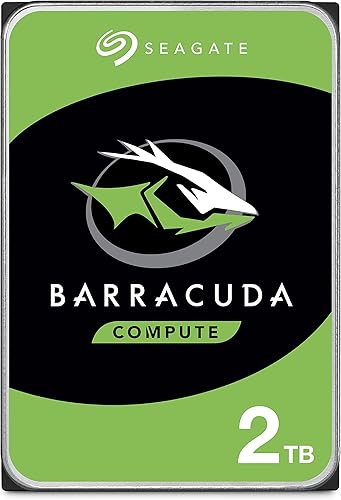
Seagate BarraCuda 2TB 3.5-Inch Internal Hard Drive (7200 RPM, ST2000DM008)
A classic 7200 RPM desktop drive with a 256MB cache. A smaller, lower-cost way to add a second drive to a gaming PC.
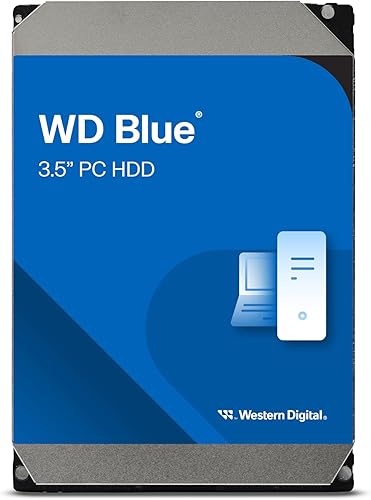
WD Blue 4TB PC Internal Hard Drive, 3.5-Inch (5400 RPM, WD40EZZX)
The sweet spot if you want plenty of room without paying for 8TB. A 5400 RPM everyday drive with a 128MB cache and Acronis cloning software.

WD Red Plus 4TB NAS Internal Hard Drive (5400 RPM, CMR)
Built for network storage boxes that run all day. CMR recording, NASware firmware and support for RAID-optimized NAS systems with up to 8 bays.
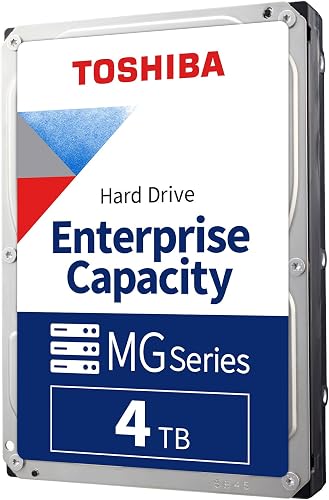
Toshiba MG Series 4TB Enterprise 3.5-Inch SATA Hard Drive
An enterprise-class drive rated for 24/7 operation, with Toshiba's Stable Platter and Persistent Write Cache technologies. A sturdy pick for home servers.

WD Blue 1TB Mobile Hard Drive, 2.5-Inch (5400 RPM, WD10SPZX)
For older laptops, consoles or small PCs with a 2.5-inch bay. A 5400 RPM, 128MB cache drive certified by WD's F.I.T. Lab for a wide range of PCs.
In-Depth Reviews
1. WD Blue 8TB: The Best Budget HDD Overall
If your goal is the most storage for the least money, the WD Blue 8TB is the drive to buy. In our October 2026 check it had the lowest cost per terabyte of any drive here, even lower than the 4TB WD Blue. It spins at 5640 RPM with a large 256MB cache, which is plenty for storing games you are not playing right now, video captures and complete backups.
Western Digital includes Acronis True Image WD Edition for cloning and backups, plus a 2-year limited warranty. The WD Blue family runs from 1TB to 12TB, so you can scale up later. It is a 3.5-inch desktop drive, so it needs a free bay and a SATA port in a desktop PC.
2. Seagate BarraCuda 2TB: Best 7200 RPM Desktop HDD
The Seagate BarraCuda 2TB is the pick if you want a lower upfront price or a faster spindle. It runs at 7200 RPM with a 256MB cache, and Seagate's free DiscWizard tool helps you migrate or clone data from an older drive.
Its cost per terabyte is higher than the big WD Blue, so it makes the most sense when 2TB is all you need. The BarraCuda line also comes in 4TB and 8TB versions if you want to stay with Seagate.
3. WD Blue 4TB: Best Mid-Size Budget HDD
The WD Blue 4TB sits between the two: more room than the BarraCuda 2TB for a modest step up in price. It is a 5400 RPM drive with a 128MB cache, built for everyday storage rather than speed.
Like the 8TB model it includes Acronis True Image WD Edition and a 2-year limited warranty. It is a sensible choice if you want to keep spending down but still store a large Steam library.
4. WD Red Plus 4TB: Best Budget NAS HDD
Running a home NAS for backups or media? Choose a drive built for it. The WD Red Plus 4TB uses CMR recording, comes with WD's NASware firmware and is designed for continuous operation in RAID-optimized NAS systems with up to 8 bays.
It costs more than a WD Blue of the same size, and its 5400 RPM class speed is not about raw performance. What you pay for is a drive tuned for always-on, multi-drive use. The Red Plus line spans 2TB to 12TB.
5. Toshiba MG Series 4TB: Best 24/7 Enterprise Value
The Toshiba MG Series 4TB is an enterprise-class 3.5-inch SATA drive rated for 24/7 operation. Toshiba lists its Stable Platter Technology and Persistent Write Cache technology, features aimed at reliability in servers and storage systems.
For a simple game library it is more than you need, and enterprise drives can be noisier than desktop models. For a home server or a PC that never sleeps, it is a good-value option.
6. WD Blue Mobile 1TB: Best 2.5-Inch Laptop HDD
Older laptops, some small PCs and older consoles use 2.5-inch drives. The WD Blue Mobile 1TB fits those bays and runs at 5400 RPM with a 128MB cache. WD says it is certified by its F.I.T. Lab for a wide range of PC configurations, and Acronis cloning software is included.
Stock was low at the time of writing. If the drive will be your laptop's main boot drive, a 2.5-inch SATA SSD is a much faster upgrade; see our best budget 2TB SSD picks.
How to Choose the Best Budget HDD
Desktop, NAS or Enterprise?
Desktop drives such as WD Blue and Seagate BarraCuda are built for everyday PCs. NAS drives such as WD Red Plus are tuned for always-on, multi-drive boxes. Enterprise drives such as the Toshiba MG Series are rated for 24/7 duty in servers. Pick the type that matches how many hours a day the drive will run.
Cost per Terabyte
Divide the price by the capacity. Larger drives usually win: in our check, the 8TB WD Blue cost less per terabyte than the 4TB model, and both were far less expensive per terabyte than any SSD.
RPM and Cache
A 7200 RPM drive generally transfers data faster than a 5400 RPM drive, and a larger cache helps with bursts of activity. For a storage drive, capacity usually matters more than either.
CMR for NAS and RAID
For NAS and RAID arrays, choose a drive that lists CMR recording, such as the WD Red Plus. For a single drive in a desktop, it matters much less.
Where an HDD Fits in a Gaming PC
Keep Windows and the games you play now on an SSD, and use the hard drive for your backlog, captures and backups. For a laptop without a drive bay, an external drive is the easier option; see our best budget external hard drive guide. On PS5, a USB hard drive can hold games, and Sony's PS5 USB extended storage guide lists a 250GB minimum and 8TB maximum.
Quick Setup Tips
- Check your bays: 3.5-inch drives need a desktop bay plus SATA data and power cables; 2.5-inch drives fit laptops and small cases
- Initialize the drive: a new blank drive will not appear in File Explorer until you initialize and format it in Windows Disk Management
- Use the cloning tool: Acronis (WD) or DiscWizard (Seagate) can copy an old drive to the new one
- Move games, do not re-download: in Steam, open Settings, then Storage, and add a library on the hard drive
- Keep a second copy: any drive can fail, so back up important files to another drive or the cloud
Frequently Asked Questions
What is the best budget HDD in 2026?
The WD Blue 8TB is our top pick because it had the lowest cost per terabyte in our check, with a 256MB cache and a 2-year warranty. The Seagate BarraCuda 2TB is the best lower-priced 7200 RPM option.
Is a 7200 RPM HDD worth it?
It can be a little faster for transfers, but for storing games and backups, capacity and price per terabyte usually matter more. Use an SSD where speed matters.
Can I play games from an HDD?
Yes. Games installed on a hard drive will run, but load times are longer than on an SSD. Many gamers keep current games on an SSD and older ones on an HDD.
What is the difference between a NAS HDD and a desktop HDD?
NAS drives like the WD Red Plus are designed for continuous operation in multi-drive systems and use CMR recording, while desktop drives are designed for everyday PC use.
Can I put a 3.5-inch HDD in a laptop?
No. Laptops use 2.5-inch drives or M.2 SSDs. For a laptop, choose the WD Blue Mobile, an M.2 SSD or an external drive.
The Bottom Line
The WD Blue 8TB is the best budget HDD for most people in 2026 thanks to its very low cost per terabyte. Choose the Seagate BarraCuda 2TB for a less expensive 7200 RPM second drive, the WD Blue 4TB for a middle ground, the WD Red Plus 4TB for a NAS, the Toshiba MG Series 4TB for 24/7 servers, or the WD Blue Mobile 1TB for a 2.5-inch bay. Want speed as well as space? Pair your HDD with an SSD from our best budget NVMe SSD guide.