Heads up: we may earn a commission when you buy through links on this page, at no extra cost to you. As an Amazon Associate we earn from qualifying purchases. How we make money
Short on time? Our top pick is Lexar NM790 2TB NVMe SSD, SanDisk Optimus GX 7100 2TB takes Best Performance Pick, while Kingston NV3 2TB NVMe SSD takes Best Value for Laptops.
- Best Overall for Laptops Lexar NM790 2TB NVMe SSD Check price
- Best Performance Pick SanDisk Optimus GX 7100 2TB Check price
- Best Value for Laptops Kingston NV3 2TB NVMe SSD Check price
Shopping on Amazon? Get it faster with Prime
Free fast delivery on eligible items above, Prime-only deals and Prime Video. New members can try it free for 30 days and cancel anytime.
The best 2TB SSD for gaming laptop upgrades has to do more than read fast. Laptops have tight M.2 bays, limited cooling and a battery to protect, so a slim, efficient drive often beats a faster but hotter one. A 2TB upgrade is also one of the easiest ways to stop deleting games to make room.
We picked six 2TB drives that suit laptops, favoring single-sided designs, low power draw and the right lengths. Every spec was checked against the maker's Amazon listing on October 11, 2026. Scores are our editorial scores out of 10, not Amazon customer ratings. Check your laptop's manual for the M.2 size and interface before you buy.
Best 2TB SSDs for Gaming Laptops at a Glance
| Award | Drive | Size | Why It Suits Laptops | Score |
|---|---|---|---|---|
| Best Overall for Laptops | Lexar NM790 2TB NVMe SSD | M.2 2280, Gen4 | Single-sided, lower power | 9.0/10 |
| Best Performance Pick | SanDisk Optimus GX 7100 2TB | M.2 2280, Gen4 | Power-efficient design | 8.9/10 |
| Best Value for Laptops | Kingston NV3 2TB NVMe SSD | M.2 2280, Gen4 | Single-sided, low power | 8.7/10 |
| Most Efficient Samsung | Samsung SSD 990 2TB | M.2 2280, Gen4 | Better performance per watt | 8.6/10 |
| Best Slim Label Design | TEAMGROUP MP44L 2TB SSD | M.2 2280, Gen4 | Label under 1mm thick | 8.4/10 |
| Best for M.2 2230 Laptops | SanDisk Optimus GX 7100M 2TB | M.2 2230, Gen4 | Short slot laptops | 8.2/10 |

Lexar 2TB NM790 Internal NVMe SSD, PCIe Gen 4x4, M.2 2280
A single-sided Gen4 drive with reads up to 7,400MB/s and, per Lexar, up to 40% lower power use than DRAM Gen4 drives.

SanDisk Optimus GX 7100 2TB NVMe SSD, PCIe 4.0, M.2 2280
Reads up to 7,250MB/s and writes up to 6,900MB/s, with a power-efficient design SanDisk aims at battery life.

Kingston NV3 2TB M.2 2280 NVMe SSD, PCIe 4.0 Gen 4x4
A single-sided, low-power Gen4 drive at the lowest price here, with reads up to 6,000MB/s and a 5-year warranty.
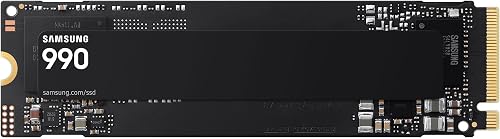
Samsung Internal SSD 990 2TB, Up to 7,250 / 6,450MB/s
Samsung's newer mainstream Gen4 drive, with up to 38% better performance per watt than the 990 PRO per Samsung.

TEAMGROUP MP44L 2TB NVMe PCIe Gen 4x4 M.2 2280 Laptop and Desktop SSD
Its graphene-coated label is under 1mm thick to avoid clearance problems, and it reads at up to 4,800MB/s.

SanDisk Optimus GX 7100M 2TB NVMe SSD, PCIe 4.0, M.2 2230
For laptops with a short 2230 slot: reads up to 7,250MB/s and writes up to 6,900MB/s in the small size.
In-Depth Reviews
1. Lexar NM790 2TB: Best Overall for Laptops
The Lexar NM790 2TB is single-sided, so it fits laptops that cannot take chips on both sides of the drive. It reads at up to 7,400MB/s and writes at up to 6,500MB/s.
Lexar says its HMB design uses up to 40% less power than DRAM-equipped Gen4 drives, which helps battery life and heat in a laptop.
2. SanDisk Optimus GX 7100 2TB: Best Performance Pick
The SanDisk Optimus GX 7100 2TB reads at up to 7,250MB/s and writes at up to 6,900MB/s, and SanDisk describes its architecture as power efficient for longer battery life.
It cost more than the NM790 in our check. SanDisk Dashboard adds a Game Mode on Windows.
3. Kingston NV3 2TB: Best Value for Laptops
The Kingston NV3 2TB is single-sided and marketed for low-power use, and it was the lowest-priced drive here. Reads reach up to 6,000MB/s.
Acronis cloning software makes it easy to copy your old laptop drive, and the warranty is 5 years.
4. Samsung SSD 990 2TB: Most Efficient Samsung
The Samsung SSD 990 2TB focuses on efficiency: Samsung claims up to 38% better performance per watt than the 990 PRO, with reads up to 7,250MB/s.
Samsung Magician and hardware encryption are included features; the warranty is 3 years.
5. TEAMGROUP MP44L 2TB: Best Slim Label Design
Some laptops have very little room above the M.2 slot. The TEAMGROUP MP44L 2TB uses a graphene-coated aluminum label under 1mm thick that TEAMGROUP says avoids mechanical interference.
It reads at up to 4,800MB/s, slower than the other Gen4 picks but plenty for game loading.
6. SanDisk Optimus GX 7100M 2TB: Best for M.2 2230 Laptops
A few compact laptops use the short M.2 2230 size. The SanDisk Optimus GX 7100M 2TB fits those slots with reads up to 7,250MB/s.
It costs much more than 2280 drives, so only choose it if your laptop needs 2230.
How to Choose the Best 2TB SSD for a Gaming Laptop
Find Your Slot Size and Count
Most gaming laptops use M.2 2280; some compact models use 2230. Many gaming laptops have a second empty M.2 slot, which lets you add 2TB without replacing the boot drive.
Single-Sided Matters
Thin laptops often have no space under the drive. Single-sided drives like the NM790 and NV3 avoid that problem.
Power and Heat
Laptop cooling is limited. Efficient drives run cooler and use less battery. Gen5 drives are rarely a good fit in laptops.
Do Not Add a Bulky Heatsink
Most laptops cannot fit a heatsink. Reuse any thermal pad or metal shield that came on the original drive.
Need a Different Size?
See our best 2TB M.2 SSD guide for 2230, SATA and other M.2 types.
Quick Setup Tips
- Back up first: copy important files before opening the laptop
- Unplug and discharge: disconnect the charger and, if your manual says so, the internal battery
- Keep the screw: M.2 screws are tiny and easy to lose
- Clone or reinstall: clone the old drive with the included software, or install Windows fresh
- Check the second slot: if you have a free slot, add the 2TB drive as a game drive
Frequently Asked Questions
What is the best 2TB SSD for a gaming laptop?
The Lexar NM790 2TB, thanks to its single-sided design, fast reads and low power use.
Will any M.2 SSD work in my laptop?
No. Check the length (2280 or 2230) and interface (NVMe or SATA) in your laptop's manual.
Is a PCIe 5.0 SSD good for a gaming laptop?
Usually not. Most laptops lack Gen5 slots and the cooling Gen5 drives need.
Does a faster SSD improve laptop gaming FPS?
No. SSDs affect load times and stutter from asset streaming, not frame rate in general.
Can I add a second SSD to my gaming laptop?
Many gaming laptops have a second M.2 slot. Check your model's specifications.
The Bottom Line
The Lexar NM790 2TB is the best 2TB SSD for gaming laptop upgrades. Choose the SanDisk Optimus GX 7100 2TB for a bit more performance, the Kingston NV3 2TB for value, the TEAMGROUP MP44L 2TB for tight clearance and the SanDisk Optimus GX 7100M 2TB for 2230 slots.