Heads up: we may earn a commission when you buy through links on this page, at no extra cost to you. As an Amazon Associate we earn from qualifying purchases. How we make money
Short on time? Our top pick is Lexar NM790 2TB M.2 2280, TEAMGROUP MP44S 2TB 2230 takes Best M.2 2230 Value, while SanDisk Optimus GX 7100M 2TB takes Fastest M.2 2230.
- Best M.2 2280 Overall Lexar NM790 2TB M.2 2280 Check price
- Best M.2 2230 Value TEAMGROUP MP44S 2TB 2230 Check price
- Fastest M.2 2230 SanDisk Optimus GX 7100M 2TB Check price
Shopping on Amazon? Get it faster with Prime
Free fast delivery on eligible items above, Prime-only deals and Prime Video. New members can try it free for 30 days and cancel anytime.
The best 2TB M.2 SSD is the one that fits your slot. "M.2" only describes the shape of the card, and 2TB M.2 drives come in different lengths (2280 and 2230), with or without heatsinks, and with either NVMe or older SATA interfaces. Buying the wrong one is the most common SSD upgrade mistake.
This guide picks one 2TB M.2 drive for each common slot type, from full-size desktop and laptop slots to the short slots in handhelds. We checked every spec against the maker's Amazon listing on October 11, 2026. Scores are our editorial scores out of 10, not Amazon customer ratings.
Best 2TB M.2 SSDs at a Glance
| Award | Drive | Size and Interface | Max Read | Score |
|---|---|---|---|---|
| Best M.2 2280 Overall | Lexar NM790 2TB M.2 2280 | M.2 2280, PCIe 4.0 NVMe | 7,400MB/s | 9.0/10 |
| Best M.2 2230 Value | TEAMGROUP MP44S 2TB 2230 | M.2 2230, PCIe 4.0 NVMe | 5,000MB/s | 8.8/10 |
| Fastest M.2 2230 | SanDisk Optimus GX 7100M 2TB | M.2 2230, PCIe 4.0 NVMe | 7,250MB/s | 8.7/10 |
| Best M.2 with Heatsink | Lexar NM790 2TB Heatsink | M.2 2280 + heatsink, PCIe 4.0 | 7,400MB/s | 8.6/10 |
| Fastest M.2 Overall | SanDisk GX PRO 8100 2TB | M.2 2280, PCIe 5.0 NVMe | 14,900MB/s | 8.5/10 |
| Best M.2 SATA | WD Blue SA510 2TB M.2 SATA | M.2 2280, SATA III | 560MB/s | 8.2/10 |

Lexar 2TB NM790 Internal NVMe SSD, PCIe Gen 4x4, M.2 2280
A single-sided M.2 2280 drive with reads up to 7,400MB/s and a 1,500TBW rating. It fits desktops and most laptops.
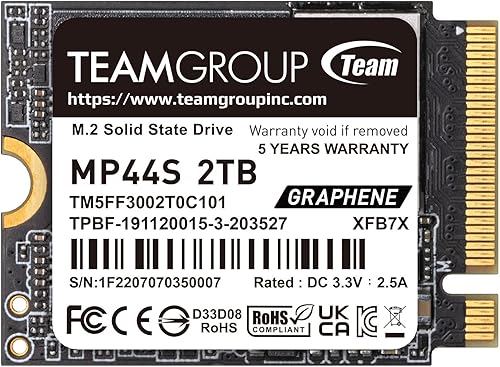
TEAMGROUP MP44S 2TB M.2 2230 PCIe 4.0 NVMe SSD
2TB in the short 2230 length used by Steam Deck, ROG Ally and many thin laptops, at a lower price than other 2TB 2230 drives we checked.

SanDisk Optimus GX 7100M 2TB NVMe SSD, PCIe 4.0, M.2 2230
Full Gen4 speed in the short 2230 size: reads up to 7,250MB/s and writes up to 6,900MB/s, with 8th gen BiCS TLC NAND.

Lexar 2TB NM790 NVMe SSD with Heatsink, PCIe Gen 4x4, M.2 2280
The same NM790 with a heatsink already attached, ready for a PS5 or a desktop board without M.2 cooling.

SanDisk Optimus GX PRO 8100 2TB PCIe 5.0 NVMe SSD, M.2 2280
For M.2 slots wired for PCIe 5.0: reads up to 14,900MB/s and writes up to 14,000MB/s with TLC NAND.

WD Blue SA510 2TB SATA SSD, M.2 2280
For older laptops and PCs whose M.2 slot only supports SATA. Reads up to 560MB/s and includes Acronis cloning software.
In-Depth Reviews
1. Lexar NM790 2TB: Best M.2 2280 Overall
Most desktops and gaming laptops use the M.2 2280 size. The Lexar NM790 2TB reads at up to 7,400MB/s and writes at up to 6,500MB/s, and Lexar rates it for 1,500TBW. Its single-sided layout is a plus in thin laptops with tight clearance.
It uses Host Memory Buffer 3.0 rather than onboard DRAM, which Lexar says lowers power use by up to 40% versus DRAM Gen4 drives.
2. TEAMGROUP MP44S 2TB: Best M.2 2230 Value
Short M.2 2230 slots are common in handhelds and compact laptops. The TEAMGROUP MP44S 2TB reads at up to 5,000MB/s and writes at up to 3,500MB/s, and TEAMGROUP markets it as a top choice for Steam Deck upgrades.
A graphene label helps spread heat, and the Gen4 drive also works in Gen3 slots.
3. SanDisk Optimus GX 7100M 2TB: Fastest M.2 2230
The SanDisk Optimus GX 7100M 2TB brings full Gen4 speed to the 2230 size, with reads up to 7,250MB/s and writes up to 6,900MB/s. It uses 8th generation BiCS TLC NAND and a power-efficient design.
Many handhelds run their M.2 slot at reduced speed, so the extra performance shows most in compact laptops with full Gen4 slots. It cost much more than the MP44S in our check.
4. Lexar NM790 2TB with Heatsink: Best M.2 with Heatsink
Sony's PS5 M.2 SSD guide requires a heat-dissipation mechanism on any M.2 SSD. The Lexar NM790 2TB with Heatsink has one pre-installed, with the same 7,400MB/s reads as the bare version.
It is also a good fit for desktop boards without an M.2 cover. The heatsink makes it too tall for most laptops.
5. SanDisk Optimus GX PRO 8100 2TB: Fastest M.2 Overall
If your motherboard has a PCIe 5.0 M.2 slot, the SanDisk Optimus GX PRO 8100 2TB reads at up to 14,900MB/s and writes at up to 14,000MB/s.
In a Gen4 slot it runs at Gen4 speed, so only buy it for a Gen5 board. Use the board's M.2 heatsink.
6. WD Blue SA510 2TB M.2: Best M.2 SATA
Some older laptops have M.2 slots that only support SATA. The WD Blue SA510 2TB M.2 is made for them, reading at up to 560MB/s, which is still a big step up from a hard drive.
It includes Acronis True Image for cloning your old drive. It will not work in NVMe-only slots, so check your laptop's specs first.
How to Choose the Best 2TB M.2 SSD
Check the Length: 2280 or 2230
The four digits are width and length in millimeters. 2280 (22 x 80mm) is standard in desktops and most laptops. 2230 (22 x 30mm) is used in handhelds and some compact laptops. A 2280 drive will not fit a 2230-only slot.
Check the Key and Interface: NVMe or SATA
Most modern M.2 slots are NVMe. Some older laptops have SATA-only M.2 slots. Your laptop manual or the maker's spec page will say which.
Single-Sided vs Double-Sided
Thin laptops often need single-sided drives. The NM790 and NV3 are single-sided.
Heatsink or Not
Desktops usually have an M.2 heatsink on the board. PS5 requires one. Laptops usually cannot fit one.
PCIe 4.0 or 5.0
Gen5 drives need a Gen5 slot to run at full speed. For more Gen4 options, see our best 2TB PCIe 4.0 SSD guide.
Quick Setup Tips
- Find your slot: look up your laptop or motherboard model and the M.2 lengths it supports
- Handle the screw: M.2 drives are held by a tiny screw or latch; keep it safe
- Ground yourself: touch a metal part of the case before handling the drive
- Clone first: clone your old drive before swapping if it holds Windows
- Check BIOS: confirm the new drive appears in the BIOS or Disk Management after install
Frequently Asked Questions
What is the best 2TB M.2 SSD?
For most M.2 2280 slots, the Lexar NM790 2TB. For 2230 slots, the TEAMGROUP MP44S 2TB or the faster SanDisk Optimus GX 7100M 2TB.
Is M.2 the same as NVMe?
No. M.2 is the physical shape. NVMe is the interface. Most M.2 drives are NVMe, but some are SATA.
Will a 2280 SSD fit in a 2230 slot?
No. A 2230 slot is too short for a 2280 drive.
Which 2TB M.2 SSD works in a PS5?
A PCIe Gen4 M.2 drive with 5,500MB/s or faster reads and a heatsink, such as the Lexar NM790 2TB with Heatsink.
Can I put a Gen5 M.2 SSD in a Gen4 slot?
Yes, but it will run at Gen4 speed.
The Bottom Line
The Lexar NM790 2TB is the best 2TB M.2 SSD for most 2280 slots. Choose the TEAMGROUP MP44S 2TB or SanDisk Optimus GX 7100M 2TB for 2230 slots, the Lexar NM790 2TB with Heatsink for PS5, the SanDisk GX PRO 8100 2TB for Gen5 boards and the WD Blue SA510 2TB M.2 for SATA-only slots.