
Heads up: we may earn a commission when you buy through links on this page, at no extra cost to you. As an Amazon Associate we earn from qualifying purchases. How we make money
Short on time? Our top pick is HP OmniBook 3 16, Microsoft Surface Laptop 13 takes Best Compact Pick, while Lenovo IdeaPad 5a 2-in-1 takes Best 2-in-1 Pick.
- Best Overall HP OmniBook 3 16 Check price
- Best Compact Pick Microsoft Surface Laptop 13 Check price
- Best 2-in-1 Pick Lenovo IdeaPad 5a 2-in-1 Check price
Shopping on Amazon? Get it faster with Prime
Free fast delivery on eligible items above, Prime-only deals and Prime Video. New members can try it free for 30 days and cancel anytime.
The best Windows laptop under $1000 should handle work, school and home tasks without slowing you down. Every pick here runs Windows 11, and five of the six picks give you a touchscreen for taps and scrolling.
We ranked these laptops by memory, storage, screen size, battery and ports from each laptop's specs. We also weighed the Windows edition and the main drawback of each model for daily use. We checked each Amazon listing on October 27, 2026 and used only the specs the maker or seller lists. We do not list exact prices because Amazon prices change in real time. Use the buttons to see the current price and availability on Amazon before you buy. Scores are our editorial scores out of 10, not Amazon customer ratings.
Best Windows Work and School Laptops at a Glance
| Award | Laptop | Key Spec | Why It Fits | Score |
|---|---|---|---|---|
| Best Overall | HP OmniBook 3 16 | 16-inch touchscreen, 1TB SSD | It suits work and school, with Windows 11 Pro tools and a big touchscreen for daily tasks. | 9.8/10 |
| Best Compact Pick | Microsoft Surface Laptop 13 | 13-inch PixelSense touchscreen | It suits school and travel days, with up to 23 hours of battery life on one charge. | 9.6/10 |
| Best 2-in-1 Pick | Lenovo IdeaPad 5a 2-in-1 | 14-inch touchscreen, stylus support | It suits drawing, notes and classes, with stylus support on a 400-nit touchscreen. | 9.4/10 |
| Best Fingerprint Login Pick | Dell 16 Plus | 16-inch touchscreen, fingerprint reader | It suits a home office, with a big touchscreen, Thunderbolt and one-touch fingerprint sign-in. | 9.2/10 |
| Best Memory Pick | Lenovo V15 Business | 40GB RAM, 1TB SSD | It suits heavy multitasking at a desk, with 40GB of RAM and wired Ethernet built in. | 9.0/10 |
| Best Touch and Keypad Pick | HP 15.6 Touch Business | 15.6-inch touchscreen, numeric keypad | It suits office work and data entry, with a numeric keypad and Windows 11 Pro included. | 8.8/10 |

HP OmniBook Touchscreen Laptop, 16GB DDR5 RAM 1TB SSD
The HP OmniBook 3 16 suits you if you want Windows 11 Pro tools, a big touchscreen and a sharp camera for work calls. Its 16-inch body needs a roomy bag, even at 3.61 pounds.
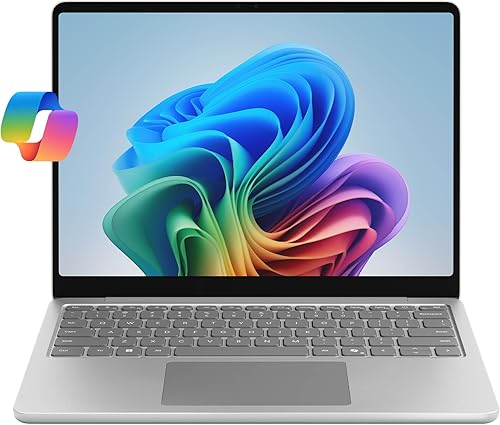
Microsoft Surface Laptop (2025), 13" Touchscreen Display, Snapdragon X Plus (8 core), 16GB RAM, 512GB SSD Storage, Platinum
Choose it if you want the smallest screen here and long battery life on the Microsoft Surface Laptop 13. Check that your apps run on Snapdragon before you buy, since this pick uses that chip family.

Lenovo IdeaPad 5a 2-in-1-2026 - 14" WUXGA IPS Touchscreen Display - 16GB Memory - 512GB Storage - Ryzen - Luna Grey
The Lenovo IdeaPad 5a 2-in-1 suits you if you take notes by hand and want stylus support on a bright touchscreen. Its 14-inch screen gives you less room for side by side windows.

Dell 16 Plus Touchscreen Laptop, Intel Core 7 150U, 16GB DDR5, 512GB SSD
The Dell 16 Plus suits you if you want a big touchscreen and fingerprint sign-in for a home office. At 4.3 pounds, it suits a desk at home more than a daily commute.

Lenovo V-Series V15 Business Laptop, 15.6" FHD Display, AMD Ryzen 7 Processor, 40GB RAM, 1TB SSD, Numeric Keypad, HDMI, RJ45, Webcam, Wi-Fi
The Lenovo V15 Business suits you if you run many apps at once and want wired Ethernet at your desk. Its Ryzen 7 5825U is an older chip, so it suits office work more than heavy creative apps.

HP 15.6 FHD Touchscreen Laptop 2026-2027 Business, AMD Ryzen 7
It suits you if you want a touchscreen, a numeric keypad and Windows 11 Pro on the HP 15.6 Touch Business. Its HD camera gives you a softer picture on work calls.
In-Depth Reviews
1. How Much Memory and Storage Do You Need for Work and School?
The Lenovo V15 Business gives you 40GB of RAM, the most memory in this guide, while the other picks each give you 16GB. That extra memory helps if you keep many apps, tabs and documents open at once.
For storage, the HP OmniBook 3 16 and the Lenovo V15 Business each offer a 1TB SSD, the joint top size here. The other picks each offer a 512GB SSD, so plan to move old files off the laptop.
2. Which Screen and Battery Features Matter for Daily Use?
Five picks give you a touchscreen for taps and scrolling. The HP OmniBook 3 16 and the Dell 16 Plus each offer a 16-inch touchscreen for split windows. The Microsoft Surface Laptop 13 has the smallest screen here, so it travels more easily.
For long days, check the battery figure that matters most to your routine. The Microsoft Surface Laptop 13 gives you up to 23 hours of battery life, while the HP OmniBook 3 16 carries a 68Wh battery.
3. HP OmniBook 3 16: Best Overall
The HP OmniBook 3 16 has an AMD Ryzen processor with 6 cores, 16GB of DDR5 RAM and a 1TB PCIe NVMe SSD, with a 16-inch 1920 x 1200 IPS touchscreen at 300 nits of brightness. The HP OmniBook 3 16 suits you if you want Windows 11 Pro tools, a big touchscreen and a sharp camera for work calls. Its 16-inch body needs a roomy bag, even at 3.61 pounds.
4. Microsoft Surface Laptop 13: Best Compact Pick
The Microsoft Surface Laptop 13 has a Snapdragon X Plus chip with 8 cores, 16GB of RAM and a 512GB SSD, with a 13-inch PixelSense touchscreen. Choose it if you want the smallest screen here and long battery life on the Microsoft Surface Laptop 13. Check that your apps run on Snapdragon before you buy, since this pick uses that chip family.
5. Lenovo IdeaPad 5a 2-in-1: Best 2-in-1 Pick
The Lenovo IdeaPad 5a 2-in-1 has an AMD Ryzen processor, AMD Radeon 840M Graphics, 16GB of memory and 512GB of storage, with a 14-inch 1920 x 1200 IPS touchscreen at 400 nits of brightness. The Lenovo IdeaPad 5a 2-in-1 suits you if you take notes by hand and want stylus support on a bright touchscreen. Its 14-inch screen gives you less room for side by side windows.
6. Dell 16 Plus: Best Fingerprint Login Pick
The Dell 16 Plus has an Intel Core 7 150U, 16GB of DDR5 RAM and a 512GB SSD, with a 16-inch 1920 x 1200 IPS touchscreen. The Dell 16 Plus suits you if you want a big touchscreen and fingerprint sign-in for a home office. At 4.3 pounds, it suits a desk at home more than a daily commute.
7. Lenovo V15 Business: Best Memory Pick
The Lenovo V15 Business has an AMD Ryzen 7 5825U with 8 cores and 16 threads, 40GB of RAM and a 1TB PCIe NVMe SSD, with a 15.6-inch 1920 x 1080 display. The Lenovo V15 Business suits you if you run many apps at once and want wired Ethernet at your desk. Its Ryzen 7 5825U is an older chip, so it suits office work more than heavy creative apps.
8. HP 15.6 Touch Business: Best Touch and Keypad Pick
The HP 15.6 Touch Business has an AMD Ryzen 7 7730U with 8 cores and 16 threads, 16GB of RAM and a 512GB NVMe SSD, with a 15.6-inch FHD IPS touchscreen. It suits you if you want a touchscreen, a numeric keypad and Windows 11 Pro on the HP 15.6 Touch Business. Its HD camera gives you a softer picture on work calls.
How to Choose a Windows Laptop for Work and School
Memory
Start with 16GB of RAM, and choose more if you run many apps at once.
Storage
Choose 1TB if you keep big file sets, since 512GB fills up fast.
Windows edition
Check for Windows 11 Pro if you need BitLocker, domain join or Remote Desktop.
App support
Confirm your apps run on Snapdragon before you choose a Snapdragon laptop.
Quick Setup Tips
- Plan your desk: Count the ports you need for monitors, drives and Ethernet.
- Protect your files: Back up work and school files to a second drive.
- Think about travel: Pick a smaller screen if you carry the laptop daily.
- Charge overnight: Start each school or work day with a full battery.
- Check the live price: use the buttons to see the current price on Amazon
Frequently Asked Questions
What is the best Windows laptop under $1000 for most shoppers?
The HP OmniBook 3 16 is the top pick, with Windows 11 Pro, a 1TB SSD and a 16-inch touchscreen.
Which pick has the most memory?
The Lenovo V15 Business has 40GB of RAM, the most memory in this guide.
Which pick has the smallest screen?
The Microsoft Surface Laptop 13 has a 13-inch screen, the smallest screen in this guide.
Which pick supports a stylus?
The Lenovo IdeaPad 5a 2-in-1 is the only pick with stylus support, on its 14-inch touchscreen.
What should you check on the Snapdragon pick?
Check that your apps run on Snapdragon before you choose the Microsoft Surface Laptop 13.
The Bottom Line
The best Windows laptop under $1000 pick for most shoppers is the HP OmniBook 3 16. Pick the Microsoft Surface Laptop 13 for long battery life, or the Lenovo V15 Business for 40GB of RAM.