

Heads up: we may earn a commission when you buy through links on this page, at no extra cost to you. As an Amazon Associate we earn from qualifying purchases. How we make money
Short on time? Our top pick is Dell Alienware 18 Area-51, Dell Alienware 16X Aurora takes Best Memory and Storage Pick, while HP OMEN 17 Gaming takes Best Variable Refresh Pick.
- Best Overall Dell Alienware 18 Area-51 Check price
- Best Memory and Storage Pick Dell Alienware 16X Aurora Check price
- Best Variable Refresh Pick HP OMEN 17 Gaming Check price
Shopping on Amazon? Get it faster with Prime
Free fast delivery on eligible items above, Prime-only deals and Prime Video. New members can try it free for 30 days and cancel anytime.
The best Windows laptop for streaming runs your game and OBS at once, with an RTX GPU for the NVENC encoder. Every pick here runs Windows 11 Home, so you can stream on Twitch or YouTube from one laptop.
We ranked these laptops by graphics power, memory, storage, webcam quality and ports from each laptop's specs. We also weighed the upload link and the main drawback of each model for live work. We checked each Amazon listing on October 27, 2026 and used only the specs the maker or seller lists. We do not list exact prices because Amazon prices change in real time. Use the buttons to see the current price and availability on Amazon before you buy. Scores are our editorial scores out of 10, not Amazon customer ratings.
Best Windows Streaming Laptops at a Glance
| Award | Laptop | Key Spec | Why It Fits | Score |
|---|---|---|---|---|
| Best Overall | Dell Alienware 18 Area-51 | RTX 5080, 32GB RAM | It suits game streams at high settings, with the strongest GPU and fastest screen here. | 9.8/10 |
| Best Memory and Storage Pick | Dell Alienware 16X Aurora | 64GB RAM, 4TB SSD | It suits long recordings and big game libraries, with a sharp HDR camera for your face cam. | 9.6/10 |
| Best Variable Refresh Pick | HP OMEN 17 Gaming | QHD screen at 240Hz | It suits esports streams and fast games, with a variable refresh screen for smooth motion. | 9.4/10 |
| Best Speaker Pick | MSI Crosshair 18 HX | 18-inch QHD+ 240Hz screen | It suits desk streams, with Dynaudio speakers and woofers for alerts, music and callouts. | 9.2/10 |
| Best for Fast Docks | MSI Vector 16 HX | RTX 5070 Ti graphics | It suits streamers who dock fast drives, with RTX 5070 Ti graphics for AAA gameplay. | 9.0/10 |
| Best Compact Pick | MSI Katana 15 HX | 15.6-inch 165Hz screen | It suits a smaller desk, with wired Ethernet for a steady upload during live shows. | 8.8/10 |

Alienware 18 Area-51 Gaming Laptop AA18250-18.0" WQXGA 300Hz 3ms Display, Intel Core Ultra 9 275HX, NVIDIA GeForce RTX 5080
The Dell Alienware 18 Area-51 suits you if you stream demanding games and want the strongest graphics for your show. At 9.6 pounds and 1.2 inches thick, it suits a fixed desk more than a travel kit.
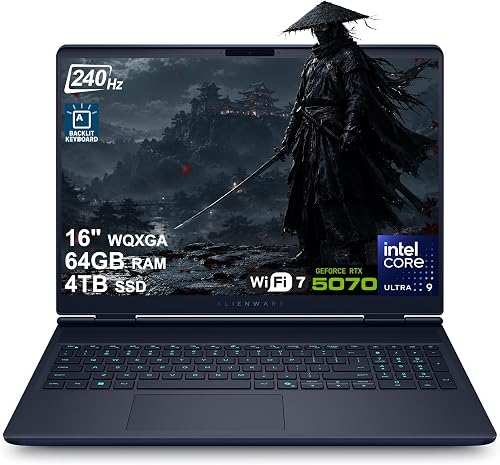
Dell Alienware 16X Aurora Gaming Laptop 16" WQXGA 240Hz (100% DCI-P3) Intel 24-core Ultra 9 275HX 64GB RAM 4TB SSD GeForce RTX 5070 (Up to
Choose it if you record long streams and want a 1080p HDR camera on the Dell Alienware 16X Aurora. Its RTX 5070 graphics trail the strongest GPU here, so high settings need more care.

HP OMEN Gaming Laptop, 17.3" 2K QHD Display 240Hz, NVIDIA GeForce RTX 5070 8GB GDDR7, 32GB DDR5 RAM, 1TB SSD, Wi-Fi 6E, RGB Backlit
The HP OMEN 17 Gaming suits you if you play fast games on stream and want wired Ethernet for uploads. At 6.5 pounds, it suits a home desk more than daily travel.

msi Crosshair 18 HX 18" 2560x1600 240Hz Display Gaming Laptop, Intel Core Ultra 9 275HX, NVIDIA RTX 5070 8GB GDDR7, 32GB RAM, 2TB NVMe SSD
Pick the MSI Crosshair 18 HX if you want a big screen for games, chat and alerts. Its 720p webcam gives your face cam less detail on stream.

msi Vector 16 HX 16” 144Hz FHD+ Gaming Laptop: Intel Core Ultra 7-255HX, NVIDIA Geforce RTX 5070Ti, 16GB DDR5, 512GB NVMe SSD
The MSI Vector 16 HX suits you if you stream AAA games and want Thunderbolt 5 for fast drives. Its 512GB SSD fills fast with recordings, so plan to move files often.

msi Katana 15 HX 5070 QHD Intel Core i7-14650HX Gaming Laptop, 32GB + 1TB
It suits you if you want wired Ethernet and a compact screen for streaming on the MSI Katana 15 HX. Its RTX 5070 graphics trail the strongest GPU here, so top settings need care.
In-Depth Reviews
1. How Much Memory and Storage Do You Need to Stream?
The Dell Alienware 16X Aurora leads with 64GB of RAM, the most memory in this guide. Most of the other picks give you 32GB. The MSI Vector 16 HX gives you 16GB, so close extra apps when your game and OBS run together.
Recordings eat space fast, so storage matters as much as graphics for regular streamers. The Dell Alienware 16X Aurora has the largest storage at 4TB for long recording runs. The MSI Vector 16 HX has a 512GB SSD, so move old recordings off the laptop often.
2. What Makes an Upload and Face Cam Look Steady and Clear?
Wired Ethernet gives your upload a steady path, and only three picks here include an RJ45 port. The HP OMEN 17 Gaming, the Dell Alienware 16X Aurora and the MSI Katana 15 HX each offer RJ45 Ethernet for live shows.
For your face cam, the Dell Alienware 16X Aurora lists a 1080p FHD RGB-IR HDR camera for live streaming. The MSI Crosshair 18 HX lists a 720p HD webcam with a privacy shutter, so expect a softer picture. Check your camera in OBS before showtime, since light in your room changes the result.
3. Dell Alienware 18 Area-51: Best Overall
The Dell Alienware 18 Area-51 has an Intel Core Ultra 9 275HX, an NVIDIA GeForce RTX 5080 graphics card, 32GB of DDR5 RAM and a 2TB SSD, with an 18-inch WQXGA screen at 300Hz. The Dell Alienware 18 Area-51 suits you if you stream demanding games and want the strongest graphics for your show. At 9.6 pounds and 1.2 inches thick, it suits a fixed desk more than a travel kit.
4. Dell Alienware 16X Aurora: Best Memory and Storage Pick
The Dell Alienware 16X Aurora has an Intel Core Ultra 9 275HX, an NVIDIA GeForce RTX 5070 graphics card, 64GB of RAM and a 4TB SSD, with a 16-inch 2560x1600 screen at 240Hz. Choose it if you record long streams and want a 1080p HDR camera on the Dell Alienware 16X Aurora. Its RTX 5070 graphics trail the strongest GPU here, so high settings need more care.
5. HP OMEN 17 Gaming: Best Variable Refresh Pick
The HP OMEN 17 Gaming has an AMD Ryzen processor with 8 cores and 16 threads, an NVIDIA GeForce RTX 5070 graphics card, 32GB of DDR5 RAM and a 1TB SSD, with a 17.3-inch 2560x1440 QHD screen at 240Hz. The HP OMEN 17 Gaming suits you if you play fast games on stream and want wired Ethernet for uploads. At 6.5 pounds, it suits a home desk more than daily travel.
6. MSI Crosshair 18 HX: Best Speaker Pick
The MSI Crosshair 18 HX has an Intel Core Ultra 9 275HX, an NVIDIA GeForce RTX 5070 graphics card, 32GB of DDR5 RAM and a 2TB NVMe SSD, with an 18-inch 2560x1600 IPS screen at 240Hz. Pick the MSI Crosshair 18 HX if you want a big screen for games, chat and alerts. Its 720p webcam gives your face cam less detail on stream.
7. MSI Vector 16 HX: Best for Fast Docks
The MSI Vector 16 HX has an Intel Core Ultra 7 255HX, an NVIDIA GeForce RTX 5070 Ti graphics card, 16GB of DDR5 RAM and a 512GB NVMe SSD, with a 16-inch LCD screen at 144Hz. The MSI Vector 16 HX suits you if you stream AAA games and want Thunderbolt 5 for fast drives. Its 512GB SSD fills fast with recordings, so plan to move files often.
8. MSI Katana 15 HX: Best Compact Pick
The MSI Katana 15 HX has an Intel Core i7-14650HX, a GeForce RTX 5070 graphics card, 32GB of DDR5 RAM and a 1TB SSD, with a 15.6-inch IPS screen at 165Hz. It suits you if you want wired Ethernet and a compact screen for streaming on the MSI Katana 15 HX. Its RTX 5070 graphics trail the strongest GPU here, so top settings need care.
How to Choose a Windows Laptop for Streaming
Graphics
Pick the RTX tier first, since NVENC shares the load with your game.
Memory
Choose at least 32GB of RAM if you play and stream from one laptop.
Upload link
Choose RJ45 Ethernet when you can, since a wired link steadies your upload.
Storage
Plan for 1TB or more, since recordings fill space after each live show.
Quick Setup Tips
- Test your upload: Run a speed test on the same link you plan to use live.
- Check your camera: Frame your face cam in OBS before you start the show.
- Save your recordings: Move finished recordings off the laptop after each show.
- Close extra apps: Free up memory before you play and stream at once.
- Check the live price: use the buttons to see the current price on Amazon
Frequently Asked Questions
What is the best Windows laptop for streaming for most streamers?
The Dell Alienware 18 Area-51 is the top pick, with the strongest GPU, a 300Hz screen and a 2MP FHD IR camera.
Which pick has the most memory?
The Dell Alienware 16X Aurora has 64GB of RAM, the most memory in this guide.
Which pick has the smallest screen?
The MSI Katana 15 HX has a 15.6-inch screen, the smallest screen in this guide.
Which picks have wired Ethernet?
The HP OMEN 17 Gaming, the Dell Alienware 16X Aurora and the MSI Katana 15 HX each include an RJ45 Ethernet port.
How much storage do recordings need?
Plan for at least 1TB if you save full shows. The Dell Alienware 16X Aurora has the largest storage here at 4TB.
The Bottom Line
The best Windows laptop for streaming pick for most shoppers is the Dell Alienware 18 Area-51. Choose the Dell Alienware 16X Aurora for more memory and storage, or the HP OMEN 17 Gaming for a variable refresh QHD screen.





