

Heads up: we may earn a commission when you buy through links on this page, at no extra cost to you. As an Amazon Associate we earn from qualifying purchases. How we make money
Short on time? Our top pick is Acer Aspire 14 Laptop, Dell 15 Laptop takes Best Eye Comfort Pick, while ASUS Vivobook 15 Business takes Best Windows 11 Pro Pick.
- Best Overall Acer Aspire 14 Laptop Check price
- Best Eye Comfort Pick Dell 15 Laptop Check price
- Best Windows 11 Pro Pick ASUS Vivobook 15 Business Check price
Shopping on Amazon? Get it faster with Prime
Free fast delivery on eligible items above, Prime-only deals and Prime Video. New members can try it free for 30 days and cancel anytime.
The best work laptop under $700 should run your office apps, join calls cleanly and leave room for files. All six picks give you 16GB of RAM, and screens run from 14 inches to 17.3 inches.
We ranked these laptops by screen, keyboard, storage and ports, since office days turn on small comforts. Each pick below names its best use and the one compromise you accept with it. We checked each Amazon listing on October 27, 2026 and used only the specs the maker or seller lists. We do not list exact prices because Amazon prices change in real time. Use the buttons to see the current price and availability on Amazon before you buy. Scores are our editorial scores out of 10, not Amazon customer ratings.
Budget Work Laptops at a Glance
| Award | Laptop | Key Spec | Why It Fits | Score |
|---|---|---|---|---|
| Best Overall | Acer Aspire 14 Laptop | 14-inch touchscreen, IR camera | It suits mobile workers, with the smallest screen here, face login and a touchscreen. | 9.8/10 |
| Best Eye Comfort Pick | Dell 15 Laptop | 15.6-inch screen, 300 nits | It suits long reading days, with Dell ComfortView low blue light and a numeric keypad. | 9.6/10 |
| Best Windows 11 Pro Pick | ASUS Vivobook 15 Business | Windows 11 Pro, privacy shutter | It suits company work, with the only Windows 11 Pro license here and a camera shutter. | 9.4/10 |
| Best Wide Screen Pick | HP 17 Business Laptop | 17.3-inch anti-glare screen | It suits desk work at home, with a wide 17.3 inch screen and a full size keyboard. | 9.2/10 |
| Best Big Touchscreen Pick | Acer Aspire 3 Laptop | 15.6-inch multi-touch screen | It suits family offices, with a big touchscreen, a numeric keypad and room for files. | 9.0/10 |
| Best Storage Pick | HP 17.3 inch Laptop | 1TB storage, 17.3-inch screen | It suits desk workers who want room, with the largest storage here and a wide 17.3 inch screen. | 8.8/10 |

Acer Aspire 14 + PC Laptop, 14" WUXGA Touchscreen Display, Intel Core Ultra 5 226V, 16GB RAM, 256GB PCIe SSD
The Acer Aspire 14 Laptop suits you if you work from trains, cafes and small desks. Its IR camera signs you in with Windows Hello when you sit down. The trade-off is its 256GB SSD, which fills sooner than the larger drives here.

Dell 15.6 Laptop, FHD, Intel Core Ultra 5 225U, 16GB RAM, Windows 11 Home
The Dell 15 Laptop suits you if your day is email, documents and calls at one main desk. Its numeric keypad and backlit keyboard cover figures and late work. The trade-off is its 3.7 pound body, which suits a desk more than a daily carry.
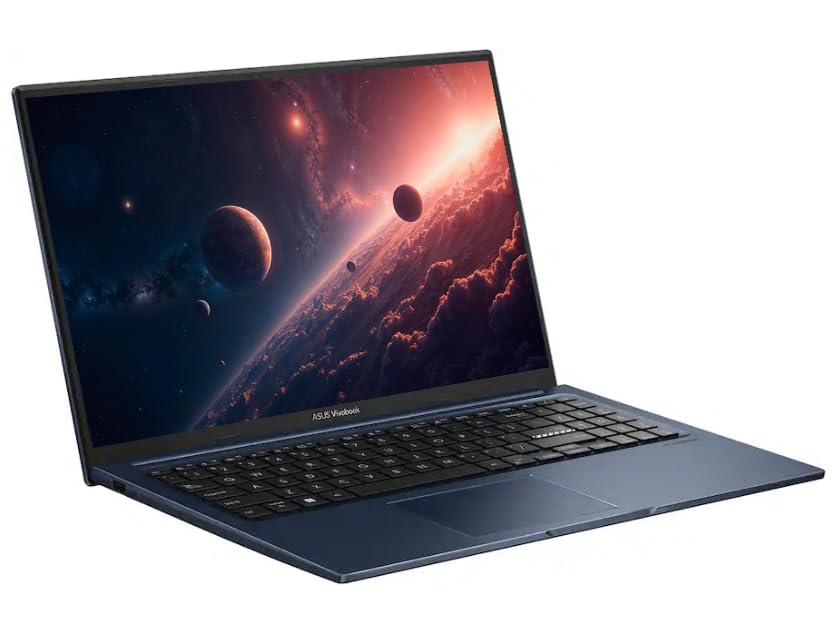
ASUS Vivobook 15 Laptop, 15.6" FHD IPS Business Laptop Computer
The ASUS Vivobook 15 Business suits you if company rules call for Windows 11 Pro and a covered camera. One USB-C, three USB-A ports and HDMI cover drives and desk screens. The trade-off is its Core 3 chip, which suits office apps more than heavy work.

HP 17 inch Business Laptop Computer • 2026 Edition • Latest AMD Ryzen 5 CPU • 16GB RAM • 512GB SSD • 17.3" FHD Display • Numeric Keypad • L
The HP 17 Business Laptop suits you if spreadsheets fill your day and small text strains your eyes. Its full size keyboard spreads keys out, with a numeric keypad on the side. The trade-off is its 720p camera, which looks soft on big call screens.

Acer Aspire 3, 15.6" Touchscreen Laptop, 16GB DDR5 RAM, 512GB SSD, Ryzen 5
The Acer Aspire 3 Laptop suits you if you want touch on a bigger screen for home office work. HDMI 2.1 and USB-C link a monitor and your desk gear in minutes. The trade-off is its 3.9 pound body, which adds up on long carries.

HP 17.3" FHD IPS LED Anti-Glare 300 nits Laptop, AMD Ryzen 5 7430U 6-core CPU, 16GB RAM, 1TB Storage, Webcam w/Shutter, Wi-Fi 6, BT 5.4
The HP 17.3 inch Laptop suits you if your files keep growing and your desk stays put. Its webcam has a shutter you can close between calls. The trade-off is its 0.81 inch body, which takes real room in a bag.
In-Depth Reviews
1. How Much Screen and Storage Do Office Tasks Need?
For screen room, the HP 17 Business Laptop and the HP 17.3 inch Laptop each give you a 17.3 inch screen for wide sheets. The Acer Aspire 14 Laptop gives you the smallest screen here at 14 inches for tight desks and trains.
For storage, the Acer Aspire 14 Laptop holds 256GB, the smallest figure here, so archive old files often. Four other picks hold 512GB for a wider margin. The HP 17.3 inch Laptop holds 1TB, the largest storage here.
2. Which Extras Help Calls, Logins and Number Work?
For logins, the Acer Aspire 14 Laptop is the only pick with an IR camera for face login. For privacy, the ASUS Vivobook 15 Business and the HP 17.3 inch Laptop each give you a camera shutter you can close.
For figures, five picks carry a numeric keypad for fast data entry. For touch, the Acer Aspire 14 Laptop and the Acer Aspire 3 Laptop carry touchscreens for taps and scrolls.
3. Acer Aspire 14 Laptop: Best Overall
The Acer Aspire 14 Laptop has an Intel Core Ultra 5 226V, Intel Arc 130V graphics, 16GB of LPDDR5X RAM and a 256GB SSD, with a 14-inch 1920 x 1200 touchscreen. The Acer Aspire 14 Laptop suits you if you work from trains, cafes and small desks. Its IR camera signs you in with Windows Hello when you sit down. The trade-off is its 256GB SSD, which fills sooner than the larger drives here.
4. Dell 15 Laptop: Best Eye Comfort Pick
The Dell 15 Laptop has an Intel Core Ultra 5 225U, Intel Graphics, 16GB of RAM and a 512GB SSD, with a 15.6-inch FHD screen at 300 nits of brightness. The Dell 15 Laptop suits you if your day is email, documents and calls at one main desk. Its numeric keypad and backlit keyboard cover figures and late work. The trade-off is its 3.7 pound body, which suits a desk more than a daily carry.
5. ASUS Vivobook 15 Business: Best Windows 11 Pro Pick
The ASUS Vivobook 15 Business has an Intel Core 3 100U with 6 cores, 16GB of DDR5 RAM and a 512GB SSD, with a 15.6-inch 1920 x 1080 IPS screen. The ASUS Vivobook 15 Business suits you if company rules call for Windows 11 Pro and a covered camera. One USB-C, three USB-A ports and HDMI cover drives and desk screens. The trade-off is its Core 3 chip, which suits office apps more than heavy work.
6. HP 17 Business Laptop: Best Wide Screen Pick
The HP 17 Business Laptop has an AMD Ryzen 5 processor, 16GB of RAM and a 512GB SSD, with a 17.3-inch anti-glare screen. The HP 17 Business Laptop suits you if spreadsheets fill your day and small text strains your eyes. Its full size keyboard spreads keys out, with a numeric keypad on the side. The trade-off is its 720p camera, which looks soft on big call screens.
7. Acer Aspire 3 Laptop: Best Big Touchscreen Pick
The Acer Aspire 3 Laptop has an AMD Ryzen 5 7520U with 4 cores, Radeon 610M graphics, 16GB of LPDDR5 RAM and a 512GB SSD, with a 15.6-inch 1920 x 1080 IPS multi-touch screen. The Acer Aspire 3 Laptop suits you if you want touch on a bigger screen for home office work. HDMI 2.1 and USB-C link a monitor and your desk gear in minutes. The trade-off is its 3.9 pound body, which adds up on long carries.
8. HP 17.3 inch Laptop: Best Storage Pick
The HP 17.3 inch Laptop has an AMD Ryzen 5 7430U with 6 cores, 16GB of RAM and 1TB of storage, with a 17.3-inch 1920 x 1080 IPS anti-glare screen at 300 nits of brightness. The HP 17.3 inch Laptop suits you if your files keep growing and your desk stays put. Its webcam has a shutter you can close between calls. The trade-off is its 0.81 inch body, which takes real room in a bag.
How to Choose a Budget Work Laptop
Screen
Pick the size you can read all day, since small text tires your eyes.
Storage
Start at 512GB if you keep files local, and archive often on smaller drives.
Keyboard
Test the keys and look for a numeric keypad if figures fill your day.
Edition
Check the Windows edition, since only one pick here runs Windows 11 Pro.
Quick Setup Tips
- Test your posture: Set the screen at eye level before your first long day.
- Clean your drive: Archive old project files to a second drive each month.
- Light your calls: Sit facing a window so your camera shows your face clearly.
- Charge smart: Top up at lunch so a low battery never ends a call.
- Check the live price: use the buttons to see the current price on Amazon
Frequently Asked Questions
What is the best work laptop under $700 for most office workers?
The Acer Aspire 14 Laptop is the top pick, with a touchscreen, face login and the newest chip here.
Which picks have 17.3-inch screens?
The HP 17 Business Laptop and the HP 17.3 inch Laptop each carry a 17.3 inch screen.
Which laptop has the smallest screen?
The Acer Aspire 14 Laptop has a 14-inch screen, the smallest screen in this guide.
Which laptop runs Windows 11 Pro?
The ASUS Vivobook 15 Business is the only pick with Windows 11 Pro for company work.
Which laptops have a touchscreen?
The Acer Aspire 14 Laptop and the Acer Aspire 3 Laptop each carry a touchscreen for taps and scrolls.
The Bottom Line
The best work laptop under $700 pick for most shoppers is the Acer Aspire 14 Laptop. Pick the Dell 15 Laptop for eye comfort at a desk, or the HP 17 Business Laptop for a 17.3 inch screen at home.





