

Heads up: we may earn a commission when you buy through links on this page, at no extra cost to you. As an Amazon Associate we earn from qualifying purchases. How we make money
Short on time? Our top pick is Acer Swift X 14, ASUS Vivobook S 14 OLED takes Best for Color Grading, while Lenovo ThinkPad T14 Gen 6 takes Best for Business Editors.
- Best Overall Acer Swift X 14 Check price
- Best for Color Grading ASUS Vivobook S 14 OLED Check price
- Best for Business Editors Lenovo ThinkPad T14 Gen 6 Check price
Shopping on Amazon? Get it faster with Prime
Free fast delivery on eligible items above, Prime-only deals and Prime Video. New members can try it free for 30 days and cancel anytime.
The best ultrabook for video editing balances memory for long timelines, a screen with trustworthy color and a body light enough to carry. This guide suits YouTubers, vloggers and freelance editors who cut footage away from a desk.
We compared memory, graphics, display color and weight across thin laptops, then ranked six by how well each fits editing on the move. We checked each Amazon listing on October 27, 2026 and used only the specs the maker or seller lists. We do not list exact prices because Amazon prices change in real time. Use the buttons to see the current price and availability on Amazon before you buy. Scores are our editorial scores out of 10, not Amazon customer ratings.
Best Ultrabooks for Video Editing at a Glance
| Award | Laptop | Key Spec | Why It Fits | Score |
|---|---|---|---|---|
| Best Overall | Acer Swift X 14 | RTX 5050, 3K OLED | The only dedicated GPU here, an RTX 5050, meets a Calman Verified OLED screen. | 9.2/10 |
| Best for Color Grading | ASUS Vivobook S 14 OLED | 100% DCI-P3 OLED | A 100% DCI-P3 OLED panel, 32GB of DDR5 and a 2TB SSD in a 2.9-pound body. | 8.9/10 |
| Best for Business Editors | Lenovo ThinkPad T14 Gen 6 | 32GB DDR5, 1TB SSD | Windows 11 Pro, 32GB of DDR5 and two Thunderbolt 4 ports suit editors who work for clients. | 8.6/10 |
| Best for Long Edit Days | LG gram 14 Laptop | 32GB RAM, 72Wh battery | A 72Wh battery and 32GB of RAM keep a 2.5-pound laptop editing far from outlets. | 8.2/10 |
| Best Portable Pick | Lenovo ThinkBook 14X | 2.2 pounds, 100% sRGB | The lightest pick at 2.2 pounds, with a 100% sRGB panel for social video work. | 7.9/10 |
| Best Snapdragon Pick | Lenovo Yoga Slim 7X | Snapdragon X Elite, OLED | A 12-core Snapdragon X Elite and an OLED touch screen suit light edits on long trips. | 7.5/10 |

Acer Swift X 14 Laptop, 14.5" 3K OLED Gorilla Glass 120Hz Touch Display, Intel Core Ultra 7 Processor 255H, NVIDIA GeForce RTX 5050
It suits you if you cut YouTube videos and want real GPU help with effects and exports. The Calman Verified panel lets you switch color profiles between projects. The trade-off is 16GB of memory, so long timelines may need proxy files.

ASUS Vivobook S 14 OLED Laptop, 14" FHD+, Ultra 7 258V, 32GB DDR5, 2TB SSD
It suits you if you grade color and want room for big projects on the internal drive. The MicroSD card reader lets you offload camera cards without an adapter. The trade-off is integrated graphics, so heavy effects render more slowly.
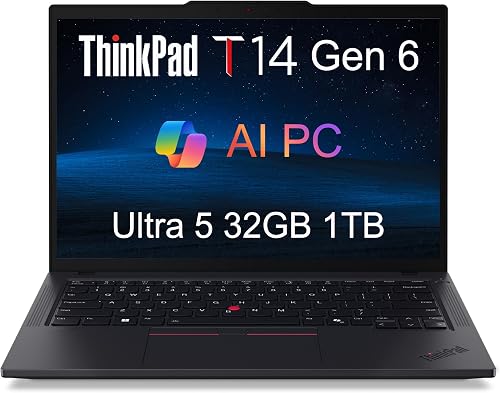
Lenovo ThinkPad T14 Gen 6 Laptop, Intel Ultra 5 225U, 32GB DDR5, 1TB SSD
It suits you if you edit client videos at work and want Windows 11 Pro with a fingerprint reader. Two Thunderbolt 4 ports and HDMI drive up to three external 4K monitors. The trade-off is a U-series chip with integrated graphics, so long exports take more time.

LG gram 14" Light Laptop, Intel Core Ultra 5 325, 32GB RAM, 512GB SSD
It suits you if you edit on trains and planes and want a laptop that barely registers in your bag. Its 72Wh battery is rated for up to 36.5 hours of video playback. The trade-off is a 512GB SSD, which fills quickly with raw footage.
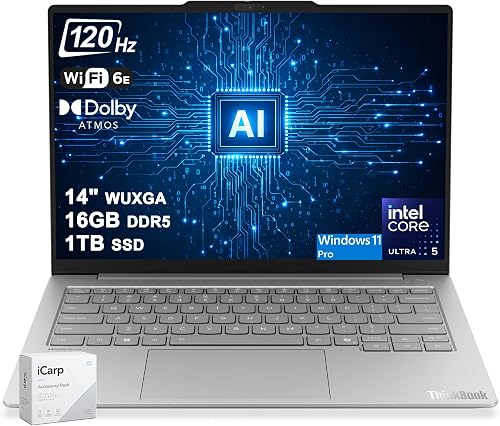
Lenovo ThinkBook 14X Business Laptop 14" WUXGA IPS Anti-Glare 120Hz (100% sRGB) Intel 8-core Ultra 5 226V (Up to 40 NPU Tops) 16GB DDR5 1TB
It suits you if you trim clips for social media and carry your laptop all day. The 100% sRGB panel keeps web video colors on target. The trade-off is 16GB of memory, which limits large multicam projects.

Lenovo Yoga Slim 7X Laptop 14" Touch OLED 3K Snapdragon X Elite 16GB/512GB
It suits you if you want a slim OLED laptop for light edits and long days away from a desk. Its 70Wh battery and 2.9-pound weight make it easy to carry. The trade-off is the Snapdragon chip, so confirm your editing app runs on it before you buy.
In-Depth Reviews
1. How Much RAM Does Video Editing Need on a Thin Laptop?
16GB handles short clips and simple cuts, while 32GB gives you room for long timelines, effects and a browser at once. The LG gram 14 Laptop, the Lenovo ThinkPad T14 Gen 6 and the ASUS Vivobook S 14 OLED each offer 32GB.
The Acer Swift X 14, the Lenovo ThinkBook 14X and the Lenovo Yoga Slim 7X each have 16GB. That works for social clips, but plan on proxy files for heavier projects.
2. Do You Need a Dedicated GPU to Edit Video on an Ultrabook?
A dedicated graphics chip speeds up effects and exports in editors that support it. The Acer Swift X 14 has the strongest GPU in this guide, an RTX 5050, and the other five picks use integrated graphics.
Integrated graphics still handle cuts, titles and basic color work on shorter projects. The ASUS Vivobook S 14 OLED pairs Intel Arc Graphics with a 100% DCI-P3 OLED screen, so you can judge color as you edit.
3. Acer Swift X 14: Best Overall
The Acer Swift X 14 has an Intel Core Ultra 7 255H, 16GB of LPDDR5X, an RTX 5050 and a 3K OLED touch screen. It suits you if you cut YouTube videos and want real GPU help with effects and exports. The Calman Verified panel lets you switch color profiles between projects. The trade-off is 16GB of memory, so long timelines may need proxy files.
4. ASUS Vivobook S 14 OLED: Best for Color Grading
The ASUS Vivobook S 14 OLED has an Intel Core Ultra 7 258V, 32GB of DDR5, a 2TB SSD and a 14-inch OLED screen. It suits you if you grade color and want room for big projects on the internal drive. The MicroSD card reader lets you offload camera cards without an adapter. The trade-off is integrated graphics, so heavy effects render more slowly.
5. Lenovo ThinkPad T14 Gen 6: Best for Business Editors
The Lenovo ThinkPad T14 Gen 6 has an Intel Core Ultra 5 225U, 32GB of DDR5, a 1TB SSD and a 14-inch anti-glare screen. It suits you if you edit client videos at work and want Windows 11 Pro with a fingerprint reader. Two Thunderbolt 4 ports and HDMI drive up to three external 4K monitors. The trade-off is a U-series chip with integrated graphics, so long exports take more time.
6. LG gram 14 Laptop: Best for Long Edit Days
The LG gram 14 Laptop has an Intel Core Ultra 5 325, 32GB of RAM, a 512GB SSD and a 14-inch anti-glare IPS screen. It suits you if you edit on trains and planes and want a laptop that barely registers in your bag. Its 72Wh battery is rated for up to 36.5 hours of video playback. The trade-off is a 512GB SSD, which fills quickly with raw footage.
7. Lenovo ThinkBook 14X: Best Portable Pick
The Lenovo ThinkBook 14X has an Intel Core Ultra 5 226V, 16GB of DDR5, a 1TB SSD and a 14-inch 120Hz IPS screen. It suits you if you trim clips for social media and carry your laptop all day. The 100% sRGB panel keeps web video colors on target. The trade-off is 16GB of memory, which limits large multicam projects.
8. Lenovo Yoga Slim 7X: Best Snapdragon Pick
The Lenovo Yoga Slim 7X has a Snapdragon X Elite X1E-78-100 with 12 cores, 16GB of RAM, a 512GB SSD and an OLED touch screen. It suits you if you want a slim OLED laptop for light edits and long days away from a desk. Its 70Wh battery and 2.9-pound weight make it easy to carry. The trade-off is the Snapdragon chip, so confirm your editing app runs on it before you buy.
How to Choose an Ultrabook for Video Editing
Memory
Aim for 32GB for long projects, while 16GB suits short clips and social cuts.
Graphics
An RTX chip speeds up exports, and integrated graphics handle lighter edits.
Screen color
Check DCI-P3 or sRGB coverage so your grades look right on other screens.
Storage
Pick a large SSD or plan on an external drive, because raw footage fills space fast.
Quick Setup Tips
- Edit with proxies: Create proxy files so a 16GB laptop stays responsive on heavier footage.
- Keep footage external: Store raw clips on a fast external SSD over Thunderbolt 4 or USB-C.
- Lock your brightness: Set the screen to a steady brightness level before you grade color.
- Plug in for exports: Run long renders on wall power so the laptop holds full speed.
- Check the live price: use the buttons to see the current price on Amazon
Frequently Asked Questions
What is the best ultrabook for video editing?
The Acer Swift X 14 is our top pick, with an RTX 5050 and a 3K OLED touch screen in a thin body.
Which pick is lightest?
The Lenovo ThinkBook 14X is the lightest pick at 2.2 pounds.
Which pick has a dedicated graphics chip?
The Acer Swift X 14 is the only pick with one, an RTX 5050 with 8GB of GDDR7.
Is 32GB of RAM worth it for editing?
Yes, if you cut long projects. The ASUS Vivobook S 14 OLED pairs 32GB of DDR5 with a 2TB SSD for that work.
Can a Snapdragon laptop edit video?
Yes, for lighter projects. The Lenovo Yoga Slim 7X runs a 12-core Snapdragon X Elite, but check that your editing app supports it first.
The Bottom Line
The best ultrabook for video editing pick for most shoppers is the Acer Swift X 14, with its RTX 5050 and 3K OLED screen. For more memory, consider the ASUS Vivobook S 14 OLED or the Lenovo ThinkPad T14 Gen 6.





