Heads up: we may earn a commission when you buy through links on this page, at no extra cost to you. As an Amazon Associate we earn from qualifying purchases. How we make money
Short on time? Our top pick is Samsung 990 PRO 1TB, SanDisk Optimus GX 7100 1TB takes Best Efficient NVMe, while Samsung 990 1TB NVMe SSD takes Best Performance per Watt.
- Best NVMe SSD for Gaming Laptop Samsung 990 PRO 1TB Check price
- Best Efficient NVMe SanDisk Optimus GX 7100 1TB Check price
- Best Performance per Watt Samsung 990 1TB NVMe SSD Check price
Shopping on Amazon? Get it faster with Prime
Free fast delivery on eligible items above, Prime-only deals and Prime Video. New members can try it free for 30 days and cancel anytime.
The best NVMe SSD for gaming laptop owners is not always the one with the biggest number on the box. NVMe drives all beat old SATA SSDs by a wide margin, so the real choice is between top Gen4 speed, better efficiency and better value.
We ranked six PCIe 4.0 NVMe drives, mostly 1TB, that suit laptops. Many gaming laptops use M.2 2280 slots, and thin models can have tight clearance, so single-sided drives and thin heat labels are the safer choice. Always check your laptop's manual or the maker's support page for the slot size and PCIe generation before you buy. We checked every listing on Amazon in October 2026 and used the specs the makers publish there. We do not list prices because Amazon prices change in real time; use the buttons to see the current price and availability. Scores are our editorial scores out of 10, not Amazon customer ratings.
Best NVMe SSDs for Gaming Laptops at a Glance
| Award | Drive | Read / Write | Best For | Score |
|---|---|---|---|---|
| Best NVMe SSD for Gaming Laptop | Samsung 990 PRO 1TB | 7,450 / 6,900MB/s | Top speed | 9.1/10 |
| Best Efficient NVMe | SanDisk Optimus GX 7100 1TB | 7,250 / 6,900MB/s | Battery-minded speed | 8.9/10 |
| Best Performance per Watt | Samsung 990 1TB NVMe SSD | 7,150 / 6,450MB/s | Long sessions on battery | 8.8/10 |
| Best Write Speed | Crucial T500 2TB NVMe SSD | 7,400 / 7,000MB/s | Big installs, 2TB | 8.6/10 |
| Best Value Speed | Lexar NM790 1TB NVMe SSD | 7,400 / 6,500MB/s | Speed for less | 8.4/10 |
| Best Budget NVMe | Kingston NV3 1TB NVMe SSD | 6,000 / 4,000MB/s | Saving money | 8.2/10 |

Samsung SSD 990 PRO 1TB, PCIe 4.0 M.2 2280
Reads up to 7,450MB/s, near the top of PCIe 4.0, with a slim build Samsung says fits laptops meeting PCI-SIG D8.

SanDisk Optimus GX 7100 1TB NVMe SSD, PCIe 4.0, M.2 2280
Reads up to 7,250MB/s with a power-efficient design SanDisk aims at battery life, sold by Amazon when we checked.
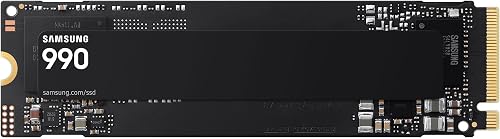
Samsung Internal SSD 990 1TB, PCIe 4.0 NVMe M.2
Samsung's newer 990 reads up to 7,150MB/s and claims up to 38% better performance per watt than the 990 PRO.

Crucial T500 2TB PCIe Gen4 NVMe SSD, M.2 2280
One of the fastest Gen4 drives we checked, with reads up to 7,400MB/s and writes up to 7,000MB/s.

Lexar NM790 1TB NVMe SSD, PCIe Gen 4x4, M.2 2280
Reads up to 7,400MB/s and, per Lexar, uses up to 40% less power than DRAM-equipped Gen4 drives.

Kingston NV3 1TB M.2 2280 NVMe SSD, PCIe 4.0 Gen 4x4
Kingston markets the NV3 for high speed, low power storage, with reads up to 6,000MB/s and a 5-year warranty.
In-Depth Reviews
1. NVMe vs SATA in a Gaming Laptop
SATA SSDs such as the Samsung 870 EVO are rated around 560MB/s, while every NVMe drive here is rated at 6,000MB/s or more. If your laptop has an M.2 NVMe slot, there is little reason to buy SATA for games.
Between NVMe drives, load time gains shrink, so efficiency and price become the tiebreakers. Samsung says its 990 delivers up to 38% better performance per watt than the 990 PRO, which is useful on a laptop.
2. Samsung 990 PRO 1TB: Best NVMe SSD for Gaming Laptop
The Samsung 990 PRO 1TB reads at up to 7,450MB/s and writes at up to 6,900MB/s, with up to 1,400K and 1,550K random IOPS. Samsung quotes up to 50% better performance per watt than the 980 PRO, uses its own nickel-coated controller for thermal control, and says the slim drive fits desktops and laptops that meet the PCI-SIG D8 standard.
3. SanDisk Optimus GX 7100 1TB: Best Efficient NVMe
The SanDisk Optimus GX 7100 1TB reads at up to 7,250MB/s and writes at up to 6,900MB/s, with random speeds up to 1M and 1.4M IOPS. It uses 8th generation BiCS TLC NAND and nCache, and SanDisk describes a power-efficient architecture meant to help battery life.
4. Samsung 990 1TB NVMe SSD: Best Performance per Watt
The Samsung 990 1TB reads at up to 7,150MB/s and writes at up to 6,450MB/s, with random reads and writes up to 700K and 1,100K IOPS. Samsung says it delivers up to 38% better performance per watt than the 990 PRO, which suits laptops where power and heat matter.
5. Crucial T500 2TB NVMe SSD: Best Write Speed
The Crucial T500 2TB reads at up to 7,400MB/s and writes at up to 7,000MB/s, with up to 1.18M and 1.44M random IOPS. Crucial says it installs in desktops, laptops and workstations with Gen4 M.2 slots and claims up to 16% faster game loads with DirectStorage.
6. Lexar NM790 1TB NVMe SSD: Best Value Speed
The Lexar NM790 1TB reads at up to 7,400MB/s and writes at up to 6,500MB/s, rated for 1,000TBW. Lexar says it uses up to 40% less power than DRAM cache-enabled PCIe Gen4 drives and relies on HMB 3.0 to borrow a slice of system memory as cache.
7. Kingston NV3 1TB NVMe SSD: Best Budget NVMe
The Kingston NV3 1TB reads at up to 6,000MB/s and writes at up to 4,000MB/s. Kingston pitches it as high speed, low power storage, includes Acronis cloning software for moving your old drive and backs it with a 5-year limited warranty.
How to Choose an NVMe SSD for a Gaming Laptop
Check the slot
Confirm M.2 2280 and PCIe 4.0 support in your laptop's manual.
Decide on speed vs efficiency
The 990 PRO is the fastest here; the Samsung 990 and SanDisk GX 7100 lean toward efficiency.
Watch the writes
The Crucial T500 has the strongest write rating here, which helps with large game updates.
Budget
The Kingston NV3 gives NVMe speed with a 5-year warranty for less.
Quick Setup Tips
- Check your laptop's manual: confirm the M.2 length, PCIe generation and whether there is a free second slot
- Back up first: copy anything important before you swap the boot drive
- Clone or reinstall: several picks include Acronis cloning software for moving your old drive
- Skip big heatsinks: most laptops have no room for a desktop heatsink; a thin label is fine
- Check the live price: use the buttons to see the current price on Amazon
Frequently Asked Questions
What is the best NVMe SSD for gaming laptop use?
The Samsung 990 PRO 1TB, with reads up to 7,450MB/s and writes up to 6,900MB/s.
Is NVMe much faster than SATA?
Yes. SATA drives like the Samsung 870 EVO are rated around 560MB/s, while these NVMe drives are rated at 6,000MB/s or more.
Which NVMe is most efficient?
Samsung quotes up to 38% better performance per watt for the 990 than the 990 PRO.
Do I need DRAM in a laptop NVMe?
Not for most gaming. The Lexar NM790 uses HMB and Lexar says it uses less power than DRAM Gen4 drives.
Can I add a second NVMe drive?
If your laptop has a free M.2 slot, yes. Check the manual.
The Bottom Line
The Samsung 990 PRO 1TB is the best NVMe SSD for gaming laptop speed. Pick the Samsung 990 1TB for efficiency, or the Kingston NV3 1TB on a budget.