

Heads up: we may earn a commission when you buy through links on this page, at no extra cost to you. As an Amazon Associate we earn from qualifying purchases. How we make money
Short on time? Our top pick is Dell Latitude 5430, Lenovo IdeaPad Slim 3 Chromebook takes Best Screen, while Acer Chromebook Plus 514 takes Best Chromebook Plus.
- Best Creator Laptop Under $400 Dell Latitude 5430 Check price
- Best Screen Lenovo IdeaPad Slim 3 Chromebook Check price
- Best Chromebook Plus Acer Chromebook Plus 514 Check price
Shopping on Amazon? Get it faster with Prime
Free fast delivery on eligible items above, Prime-only deals and Prime Video. New members can try it free for 30 days and cancel anytime.
The best creator laptop under $400 will not replace a studio machine, but it can handle photo touch-ups, Canva designs, short social clips and writing. At this price the trade-offs are memory, storage and screen quality, so we looked for the strongest chip and the best screen we could find under $400.
Our top pick is a renewed business laptop with a Core i7, because it runs full Windows editing apps. The other four are new models, including two Chromebooks that suit browser-based tools like Canva and CapCut online. Picks marked Renewed are Amazon Renewed units from third-party sellers, so check the seller's warranty, return window and battery condition before you buy. We checked each Amazon listing on October 23, 2026 and used only the specs the maker or seller lists. We do not list exact prices because Amazon prices change in real time. Use the buttons to see the current price and availability on Amazon before you buy. Scores are our editorial scores out of 10, not Amazon customer ratings.
Best Creator Laptops Under $400 at a Glance
| Award | Laptop | Key Spec | Why It Fits | Score |
|---|---|---|---|---|
| Best Creator Laptop Under $400 | Dell Latitude 5430 (Renewed, i7) | Intel graphics | Core i7, 16GB | 8.4/10 |
| Best Screen | Lenovo IdeaPad Slim 3 Chromebook (8GB) | Mali-G57 | 400-nit touch | 8.1/10 |
| Best Chromebook Plus | Acer Chromebook Plus 514 (Ryzen 3) | Radeon 610M | Ryzen 3, 8GB | 7.9/10 |
| Best for Sketching | ASUS Chromebook Flip CX1 | Intel UHD | 360 touch | 7.5/10 |
| Best New Windows Pick | Acer Aspire 3 (Ryzen 3 7320U) | Radeon | Ryzen 3, FHD | 7.2/10 |

Dell Latitude 5430 14-inch Business Laptop, Intel Core i7-1255U, 16GB, 512GB SSD, Windows 11 Pro (Renewed)
A 10-core Core i7, 16GB and a 512GB SSD, the most power here for Windows editing apps.

Lenovo IdeaPad Slim 3 Chromebook, 14-inch WUXGA Touch, MediaTek Kompanio 540, 8GB LPDDR5X, 128GB UFS, Wi-Fi 6E
A 14-inch 1920 x 1200 touchscreen at 400 nits, the highest listed brightness here.

Acer Chromebook Plus 514, 14-inch WUXGA IPS, AMD Ryzen 3 7320C, 8GB LPDDR5X, 128GB SSD, Wi-Fi 6E, CB514-3H
A Chromebook Plus with 8GB, an FHD camera and updates listed until June 2033.
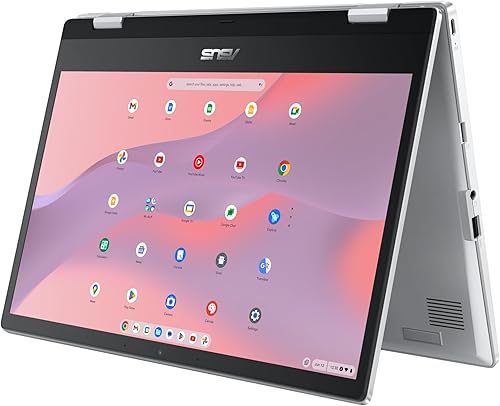
ASUS Chromebook Flip CX1 Convertible, 14-inch FHD 360-degree Touchscreen, Intel Celeron N4500, 8GB RAM, 128GB eMMC, CX1400FKA
A 14-inch FHD touchscreen that folds into tablet mode for sketches and notes.

Acer Aspire 3 A315-24P Slim Laptop, 15.6-inch FHD, AMD Ryzen 3 7320U, 8GB LPDDR5, 128GB SSD, Wi-Fi 6
A new 15.6-inch Windows laptop with a Ryzen 3 7320U and an FHD IPS screen.
In-Depth Reviews
1. What Can You Create Under $400?
Photo edits, thumbnails, Canva layouts, podcasts and short 1080p clips are all realistic. Long 4K timelines and heavy effects are not; they need more memory and a dedicated GPU.
Windows apps like Affinity Photo or DaVinci Resolve run best on the renewed Latitude because it has 16GB. The Chromebooks work best with web apps and Android apps, and they keep projects in the cloud, which helps with their 128GB of storage.
2. Renewed or New?
A renewed business laptop gives you a stronger chip and more memory for the same money, with a sturdier build. A new laptop gives you a fresh battery and a full maker warranty. If you edit in Windows apps, renewed is the better value; for school or cloud tools, a new Chromebook is simpler.
3. Dell Latitude 5430 (Renewed, i7): Best Creator Laptop Under $400
The Dell Latitude 5430 (Renewed, i7) has a 10-core Intel Core i7-1255U, 16GB of memory and a 512GB SSD, with a 14-inch 1920 x 1080 screen, two Thunderbolt 4 ports, Ethernet and HDMI 2.0. A 10-core Core i7, 16GB and a 512GB SSD, the most power here for Windows editing apps.
4. Lenovo IdeaPad Slim 3 Chromebook (8GB): Best Screen
The Lenovo IdeaPad Slim 3 Chromebook (8GB) has an 8-core MediaTek Kompanio 540, 8GB of LPDDR5X and 128GB of UFS storage, with a 14-inch 1920 x 1200 IPS touchscreen at 400 nits, two USB-C ports with charging and DisplayPort, Wi-Fi 6E and up to 13.5 hours of listed battery; Google lists the Slim 3 Chromebook 14 until June 2033. A 14-inch 1920 x 1200 touchscreen at 400 nits, the highest listed brightness here.
5. Acer Chromebook Plus 514 (Ryzen 3): Best Chromebook Plus
The Acer Chromebook Plus 514 (Ryzen 3) has an AMD Ryzen 3 7320C, 8GB of LPDDR5X and a 128GB SSD, with a 14-inch 1920 x 1200 IPS screen, Wi-Fi 6E, an FHD camera, up to 12 hours of listed battery life and a 3.2 lb body; Google lists updates for this model until June 2033. A Chromebook Plus with 8GB, an FHD camera and updates listed until June 2033.
6. ASUS Chromebook Flip CX1: Best for Sketching
The ASUS Chromebook Flip CX1 has an Intel Celeron N4500, 8GB of RAM and 128GB of eMMC, with a 14-inch FHD 360-degree touchscreen, Wi-Fi 6 and MIL-STD 810H testing in a 3.59 lb body; Google lists updates for this model until June 2031. A 14-inch FHD touchscreen that folds into tablet mode for sketches and notes.
7. Acer Aspire 3 (Ryzen 3 7320U): Best New Windows Pick
The Acer Aspire 3 (Ryzen 3 7320U) has a 4-core AMD Ryzen 3 7320U with Radeon graphics, 8GB of LPDDR5 and a 128GB NVMe SSD, with a 15.6-inch FHD IPS screen, Wi-Fi 6 and a 3.9 lb body. A new 15.6-inch Windows laptop with a Ryzen 3 7320U and an FHD IPS screen.
How to Choose a Creator Laptop Under $400
Memory
16GB for Windows editing apps; 8GB is fine on ChromeOS.
Screen
1920 x 1080 or higher, IPS, and 300 nits or more.
Storage
Use cloud or an external SSD if you have 128GB.
Touch
A touchscreen helps with sketching and quick edits.
Quick Setup Tips
- Install updates: system and driver updates fix bugs and security issues
- Use a balanced power mode: it stretches battery life on long days
- Back up your files: use cloud storage or an external drive
- Add a USB-C hub: it turns a laptop into a desk setup in seconds
- Check the live price: use the buttons to see the current price on Amazon
Frequently Asked Questions
What is the best creator laptop under $400?
The renewed Dell Latitude 5430 with a 10-core Core i7-1255U, 16GB and a 512GB SSD.
Can a laptop under $400 edit video?
Yes for short 1080p clips and social videos. Longer 4K projects need a more powerful laptop.
Is a Chromebook good for creators?
For Canva, web-based editors and Android apps, yes. For Adobe or DaVinci desktop apps, choose Windows.
Which pick has the best screen?
The Lenovo IdeaPad Slim 3 Chromebook with a 14-inch 1920 x 1200 touchscreen at 400 nits.
Should I buy renewed?
It is the best way to get 16GB and a Core i7 under $400; check the seller warranty and return window.
The Bottom Line
The Dell Latitude 5430 is the best creator laptop under $400 in our check. Choose the IdeaPad Slim 3 Chromebook for the brightest screen, or the ASUS Chromebook Flip CX1 if you sketch.





