Heads up: we may earn a commission when you buy through links on this page, at no extra cost to you. As an Amazon Associate we earn from qualifying purchases. How we make money
Short on time? Our top pick is SanDisk GX PRO 8100 2TB, Samsung 990 PRO 2TB takes Best PCIe 4.0, while Lexar NM1090 PRO 2TB takes Best Gen5 with DRAM.
- Best Overall SanDisk GX PRO 8100 2TB Check price
- Best PCIe 4.0 Samsung 990 PRO 2TB Check price
- Best Gen5 with DRAM Lexar NM1090 PRO 2TB Check price
Shopping on Amazon? Get it faster with Prime
Free fast delivery on eligible items above, Prime-only deals and Prime Video. New members can try it free for 30 days and cancel anytime.
The best 2TB NVMe SSD for gaming gives you room for a big library and fast load times in one drive. This guide focuses on performance: PCIe 5.0 drives for new gaming PCs, and the best PCIe 4.0 drives for older platforms and the PS5.
Every speed and feature below comes from the maker's Amazon listing, checked on October 11, 2026. Scores are our editorial scores out of 10, not Amazon customer ratings. If you mainly want the lowest price, see our best budget 2TB SSD guide instead.
Best 2TB NVMe SSDs for Gaming at a Glance
| Award | Drive | Interface | Max Read | Score |
|---|---|---|---|---|
| Best Overall | SanDisk GX PRO 8100 2TB | PCIe 5.0 x4 | 14,900MB/s | 9.1/10 |
| Best PCIe 4.0 | Samsung 990 PRO 2TB | PCIe 4.0 x4 | 7,450MB/s | 9.0/10 |
| Best Gen5 with DRAM | Lexar NM1090 PRO 2TB | PCIe 5.0 x4 | 14,000MB/s | 8.9/10 |
| Best Gen4 Value | SanDisk GX 7100 2TB | PCIe 4.0 x4 | 7,250MB/s | 8.8/10 |
| Best for Heavy Writes | Acer Predator GM7000 2TB | PCIe 4.0 x4 | 7,400MB/s | 8.7/10 |
| Best for PS5 | Lexar NM790 2TB Heatsink | PCIe 4.0 x4 | 7,400MB/s | 8.6/10 |

SanDisk Optimus GX PRO 8100 2TB PCIe 5.0 NVMe M.2 2280 SSD
A PCIe 5.0 flagship with reads up to 14,900MB/s and writes up to 14,000MB/s, using TLC NAND. It was also the lowest-priced Gen5 2TB in our check.

Samsung 990 PRO 2TB PCIe 4.0 NVMe M.2 SSD
One of the fastest PCIe 4.0 drives, with reads up to 7,450MB/s and writes up to 6,900MB/s. A safe pick for any Gen4 PC.

Lexar NM1090 PRO 2TB PCIe 5.0 NVMe M.2 2280 SSD
A Gen5 drive with a DRAM cache and reads up to 14,000MB/s. It cost less than the GX PRO 8100 2TB at the time of our check, but changes often.

SanDisk Optimus GX 7100 2TB PCIe 4.0 NVMe M.2 2280 SSD
Top-tier Gen4 speed, up to 7,250MB/s reads and 6,900MB/s writes, for less than the 990 PRO in our check.
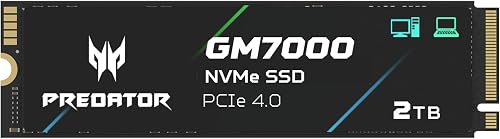
Acer Predator GM7000 2TB PCIe 4.0 NVMe M.2 SSD with Heat Spreader
A Gen4 drive with a DRAM cache, TLC NAND and a heat spreader, reading at up to 7,400MB/s. It was among the lower-priced fast Gen4 2TB drives we checked.

Lexar NM790 2TB PCIe 4.0 NVMe M.2 2280 SSD with Heatsink
A Gen4 drive with a heatsink already attached, reading at up to 7,400MB/s. Lexar markets it as PS5-ready.
In-Depth Reviews
1. SanDisk Optimus GX PRO 8100 2TB: Best Overall
The SanDisk Optimus GX PRO 8100 2TB is the fastest drive here, with reads up to 14,900MB/s and writes up to 14,000MB/s. It uses TLC NAND, and SanDisk claims up to twice the power efficiency of its previous generation.
You need a PCIe 5.0 M.2 slot, found on recent AMD AM5 and Intel boards, to get full speed. In our check it was the lowest-priced Gen5 2TB drive. Gen5 drives run warm, so use your motherboard's M.2 heatsink.
2. Samsung 990 PRO 2TB: Best PCIe 4.0
The Samsung 990 PRO 2TB reads at up to 7,450MB/s and writes at up to 6,900MB/s, near the ceiling of PCIe 4.0. It is a proven choice for any Gen4 gaming PC.
In our check it cost close to the Gen5 GX PRO 8100, so if your board has a Gen5 slot, the GX PRO is the better buy. For a Gen4-only PC, the 990 PRO is a top choice.
3. Lexar NM1090 PRO 2TB: Best Gen5 with DRAM
The Lexar NM1090 PRO 2TB reads at up to 14,000MB/s and writes at up to 13,000MB/s, and includes a DRAM cache. Lexar also lists support for Microsoft DirectStorage.
It was slightly less expensive than the GX PRO 8100 2TB at the time of our check. Prices swap often, so compare both before you buy.
4. SanDisk Optimus GX 7100 2TB: Best Gen4 Value
The SanDisk Optimus GX 7100 2TB reaches up to 7,250MB/s reads and 6,900MB/s writes, close to the 990 PRO, and cost less in our check.
It does not ship with a heatsink, so PS5 owners should add one or choose the Lexar NM790 Heatsink.
5. Acer Predator GM7000 2TB: Best for Heavy Writes
The Acer Predator GM7000 2TB combines a DRAM cache with TLC NAND and a heat spreader, which helps keep speeds steady during long installs and large file copies. It reads at up to 7,400MB/s.
It comes with a 5-year limited warranty. The thin heat spreader is not the same as a full heatsink for PS5.
6. Lexar NM790 2TB with Heatsink: Best for PS5
Sony's PS5 M.2 SSD guide asks for a PCIe Gen4 M.2 drive with 5,500MB/s or faster reads and a heatsink. The Lexar NM790 2TB with Heatsink meets both, with reads up to 7,400MB/s and the heatsink already attached.
It is rated for 1,500TBW at 2TB. Before buying for a laptop, check clearance, since the heatsink adds height.
How to Choose the Best 2TB NVMe SSD for Gaming
PCIe 5.0 or PCIe 4.0?
PCIe 5.0 drives read at up to about 14,000MB/s or more, roughly twice Gen4, but need a Gen5 M.2 slot. In a Gen4 slot, a Gen5 drive runs at Gen4 speed. If your PC only has Gen4, a top Gen4 drive is the smarter buy.
Do Faster Drives Load Games Faster?
Load times improve a lot moving from a hard drive or SATA SSD to NVMe. The gain from Gen4 to Gen5 in current games is much smaller, though Gen5 helps with large file copies and installs.
DRAM Cache and TLC NAND
A DRAM cache and TLC NAND help keep speeds steady during long writes. Drives like the NM1090 PRO and GM7000 have both.
Heat
Gen5 drives run warm. Use a motherboard M.2 heatsink. For PS5, a heatsink is required.
PS5 Compatibility
PS5 supports PCIe Gen4 M.2 drives. Gen5 drives run at Gen4 speed in a PS5, so a heatsink-equipped Gen4 drive like the NM790 is the better value there.
Quick Setup Tips
- Check your slot: look up whether your motherboard M.2 slot is PCIe 5.0 or 4.0 before choosing
- Use the top slot: the M.2 slot closest to the CPU is usually the fastest
- Update firmware: use the maker's tool such as Samsung Magician or SanDisk Dashboard
- Leave free space: keep some space free for consistent performance
- Steam library: add the new drive as a Steam library folder to move games without re-downloading
Frequently Asked Questions
What is the best 2TB NVMe SSD for gaming?
The SanDisk Optimus GX PRO 8100 2TB for PCIe 5.0 PCs, and the Samsung 990 PRO 2TB for PCIe 4.0 systems.
Is PCIe 5.0 worth it for gaming?
Only if your PC has a Gen5 M.2 slot. Game load times gain little over Gen4, but Gen5 prices have come down close to top Gen4 drives.
Can I use a PCIe 5.0 SSD in a PCIe 4.0 slot?
Yes. It works, but runs at Gen4 speed.
What 2TB NVMe SSD is best for PS5?
A Gen4 drive with a heatsink and 5,500MB/s or faster reads, such as the Lexar NM790 2TB with Heatsink.
Do I need a heatsink for an NVMe SSD?
For PS5 it is required. For Gen5 drives in PCs it is strongly recommended. Many motherboards include one.
The Bottom Line
For a new PCIe 5.0 gaming PC, the SanDisk Optimus GX PRO 8100 2TB is the best 2TB NVMe SSD for gaming, with the Lexar NM1090 PRO 2TB as a close alternative. On PCIe 4.0, pick the Samsung 990 PRO 2TB or save with the SanDisk Optimus GX 7100 2TB. PS5 owners should get the Lexar NM790 2TB with Heatsink.