

Heads up: we may earn a commission when you buy through links on this page, at no extra cost to you. As an Amazon Associate we earn from qualifying purchases. How we make money
Short on time? Our top pick is Lenovo Legion 5 Gaming Laptop, Dell Alienware 16X Aurora Gaming Laptop takes Best Storage Pick, while GIGABYTE Gaming A16 Laptop takes Best Slim Pick.
- Best All-Round Pick Lenovo Legion 5 Gaming Laptop Check price
- Best Storage Pick Dell Alienware 16X Aurora Gaming Laptop Check price
- Best Slim Pick GIGABYTE Gaming A16 Laptop Check price
Shopping on Amazon? Get it faster with Prime
Free fast delivery on eligible items above, Prime-only deals and Prime Video. New members can try it free for 30 days and cancel anytime.
The best student laptop for Valorant needs to be light enough for class and quick enough for Valorant matches. Valorant is a lighter game, so an RTX 4050 or 5050 class graphics card is plenty, and weight, battery life and screen clarity matter more than raw power.
We compared graphics cards, memory, storage, screens and weight across the six picks below. Each one fits student life and Valorant, with the trade-offs spelled out beside each pick. We checked each Amazon listing on October 26, 2026 and used only the specs the maker or seller lists. We do not list exact prices because Amazon prices change in real time. Use the buttons to see the current price and availability on Amazon before you buy. Scores are our editorial scores out of 10, not Amazon customer ratings.
Six fast laptops for lectures, study and evening matches
| Award | Laptop | Key Spec | Why It Fits | Score |
|---|---|---|---|---|
| Best All-Round Pick | Lenovo Legion 5 Gaming Laptop | RTX 5070 OLED 165Hz | It pairs a bright OLED screen with strong graphics and a light 4.1-pound carry. | 9.2/10 |
| Best Storage Pick | Dell Alienware 16X Aurora Gaming Laptop | RTX 5070 64GB 4TB | It adds huge memory and storage to a fast 240Hz screen for matches and coursework. | 8.8/10 |
| Best Slim Pick | GIGABYTE Gaming A16 Laptop | RTX 5050 165Hz Slim | It stays slim and light for class while its RTX 5050 card handles Valorant with ease. | 8.4/10 |
| Best Power Pick | Acer Predator Helios Neo 18 Gaming Laptop | RTX 5070 Ti 12GB | It brings a large 18-inch screen and a 90Wh battery to long sessions at a desk. | 8.0/10 |
| Best Everyday Pick | MSI Katana Gaming Laptop | RTX 5050 75Wh 144Hz | It covers Valorant and class work with 16GB memory and a 75Wh battery. | 7.6/10 |
| Best Entry Pick | ASUS TUF Gaming A16 Laptop | RTX 4050 16GB 512GB | It gives a simple RTX 4050 setup for Valorant at the entry end of this set. | 7.2/10 |

Lenovo Legion 5 QHD+ OLED Intel Ultra 9 275HX RTX 5070 Gaming Laptop
It suits a student who wants a bright screen for Valorant and a laptop that travels well. The QHD+ OLED display runs at 165Hz, the 80Wh battery supports long hours away from a plug, and the weight is 4.1 pounds. Its 1TB drive holds less than the larger drives in this set, so large game libraries need more care.
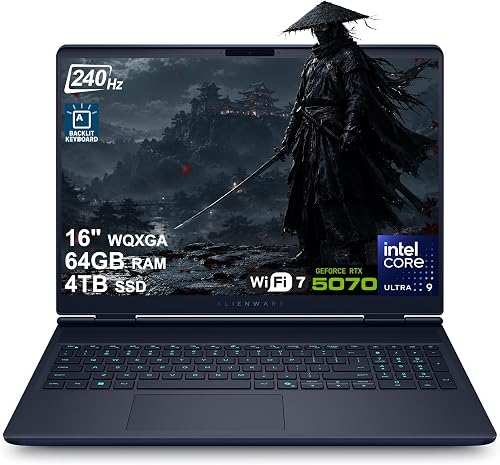
Dell Alienware 16X Aurora Gaming Laptop 16" WQXGA 240Hz (100% DCI-P3) Intel 24-core Ultra 9 275HX 64GB RAM 4TB SSD GeForce RTX 5070 (Up to
It suits a student who keeps many games, projects and files on one machine. The 16-inch WQXGA display runs at 240Hz, it weighs 5.7 pounds, and the ports include Thunderbolt 4, HDMI and RJ45 for extra screens and wired play. Its 5.7-pound weight makes it heavier to carry than the lighter picks here, so it suits a desk bag better than a small day pack.

GIGABYTE Gaming A16, Intel i7-13620H GeForce RTX 5050 16" Laptop
It suits a student who wants a slim laptop for lectures and quick Valorant matches. The 16-inch display runs at 165Hz, it weighs 4.9 pounds, and the 180-degree hinge lets the screen lie flat for shared viewing. Its 300-nit display is dimmer than the brighter screens in this set, so bright rooms need more care with screen angle.

Acer Predator Helios Neo 18 Gaming Laptop 18" WQXGA IPS 240Hz Intel 24-core Ultra 9 275HX 32GB DDR5 2TB SSD GeForce RTX 5070 Ti (Up to 992
It suits a student who plays Valorant mainly at a desk and wants the largest screen here. The 18-inch display runs at 240Hz, the 90Wh battery is the largest listed here, and the ports include Thunderbolt 4, HDMI and RJ-45 for extra screens. Its 7.3-pound weight is heavier than the lighter picks here, so it works best as a desk machine.

MSI Katana 15.6 inch 144Hz Gaming Laptop Intel Core i7-14650HX NVIDIA GeForce RTX 5050 16GB DDR5 512GB SSD Black
It suits a student who wants a straightforward RTX 5050 laptop for Valorant and class work. The 15.6-inch display runs at 144Hz, the 75Wh battery supports extended use, and Wi-Fi 6E helps with online play. Its 512GB drive is tied for the smallest storage in this set, so a student should keep only a few large games installed.

ASUS TUF Gaming A16 Laptop: AMD Ryzen 7 7445HS, 16" Full HD+ 145Hz Display, NVIDIA GeForce RTX 4050, 16GB DDR5 RAM, 512GB SSD
It suits a student who wants the simplest RTX 4050 setup for Valorant and everyday class work. The 16-inch Full HD+ display uses an anti-glare coating, and the spill-resistant design helps in busy study spaces. Its RTX 4050 card is the lowest graphics tier in this set, so it suits students who want the lowest-cost route into Valorant.
In-Depth Reviews
1. What Should a Student Look for in a Valorant Laptop?
Valorant is a lighter game, so a fast screen and a steady connection matter more than the strongest graphics card on the shelf. The Lenovo Legion 5 Gaming Laptop pairs a 165Hz OLED screen with Coldfront cooling, while the MSI Katana Gaming Laptop pairs a 144Hz screen with Wi-Fi 6E for online matches.
A light carry helps on days with back-to-back lectures, and a larger battery helps when plugs are scarce. The Lenovo Legion 5 Gaming Laptop weighs 4.1 pounds and carries an 80Wh battery, while the GIGABYTE Gaming A16 Laptop weighs 4.9 pounds in a slim 19.45mm chassis.
2. How Much Graphics Power Does Valorant Need?
An RTX 4050 card already covers Valorant well, and an RTX 5050 card adds headroom for other games and class software. The ASUS TUF Gaming A16 Laptop uses an RTX 4050 card with 16GB memory, while the MSI Katana Gaming Laptop steps up to an RTX 5050 card with the same 16GB memory.
Stronger cards still help if a student also plays heavier titles or edits video between matches. The Dell Alienware 16X Aurora Gaming Laptop uses an RTX 5070 card with 64GB memory, while the Acer Predator Helios Neo 18 Gaming Laptop uses an RTX 5070 Ti card with 12GB graphics memory.
3. Lenovo Legion 5 Gaming Laptop: Best All-Round Pick
The Lenovo Legion 5 Gaming Laptop has an Intel Core Ultra 9 275HX processor, an RTX 5070 graphics card, 32GB DDR5 memory and a 1TB SSD. It suits a student who wants a bright screen for Valorant and a laptop that travels well. The QHD+ OLED display runs at 165Hz, the 80Wh battery supports long hours away from a plug, and the weight is 4.1 pounds. Its 1TB drive holds less than the larger drives in this set, so large game libraries need more care.
4. Dell Alienware 16X Aurora Gaming Laptop: Best Storage Pick
The Dell Alienware 16X Aurora Gaming Laptop has an Intel Core Ultra 9 275HX processor, an RTX 5070 graphics card, 64GB memory and a 4TB SSD. It suits a student who keeps many games, projects and files on one machine. The 16-inch WQXGA display runs at 240Hz, it weighs 5.7 pounds, and the ports include Thunderbolt 4, HDMI and RJ45 for extra screens and wired play. Its 5.7-pound weight makes it heavier to carry than the lighter picks here, so it suits a desk bag better than a small day pack.
5. GIGABYTE Gaming A16 Laptop: Best Slim Pick
The GIGABYTE Gaming A16 Laptop has an Intel Core i7-13620H processor, an RTX 5050 graphics card, a 165Hz display and a slim 19.45mm chassis. It suits a student who wants a slim laptop for lectures and quick Valorant matches. The 16-inch display runs at 165Hz, it weighs 4.9 pounds, and the 180-degree hinge lets the screen lie flat for shared viewing. Its 300-nit display is dimmer than the brighter screens in this set, so bright rooms need more care with screen angle.
6. Acer Predator Helios Neo 18 Gaming Laptop: Best Power Pick
The Acer Predator Helios Neo 18 Gaming Laptop has an Intel Core Ultra 9 275HX processor, an RTX 5070 Ti graphics card, 32GB DDR5 memory and a 2TB SSD. It suits a student who plays Valorant mainly at a desk and wants the largest screen here. The 18-inch display runs at 240Hz, the 90Wh battery is the largest listed here, and the ports include Thunderbolt 4, HDMI and RJ-45 for extra screens. Its 7.3-pound weight is heavier than the lighter picks here, so it works best as a desk machine.
7. MSI Katana Gaming Laptop: Best Everyday Pick
The MSI Katana Gaming Laptop has an Intel Core i7-14650HX processor, an RTX 5050 graphics card, 16GB DDR5 memory and a 512GB NVMe SSD. It suits a student who wants a straightforward RTX 5050 laptop for Valorant and class work. The 15.6-inch display runs at 144Hz, the 75Wh battery supports extended use, and Wi-Fi 6E helps with online play. Its 512GB drive is tied for the smallest storage in this set, so a student should keep only a few large games installed.
8. ASUS TUF Gaming A16 Laptop: Best Entry Pick
The ASUS TUF Gaming A16 Laptop has an AMD Ryzen 7 7445HS processor, an RTX 4050 graphics card, 16GB DDR5 memory and a 512GB SSD. It suits a student who wants the simplest RTX 4050 setup for Valorant and everyday class work. The 16-inch Full HD+ display uses an anti-glare coating, and the spill-resistant design helps in busy study spaces. Its RTX 4050 card is the lowest graphics tier in this set, so it suits students who want the lowest-cost route into Valorant.
How to Choose the Best Student Laptop for Valorant
Graphics
Pick an RTX 4050 or 5050 card, since Valorant is a lighter game.
Screen
Choose a fast screen with clear colors for spotting opponents in Valorant.
Battery
Check the battery size if lectures run long without a plug.
Weight
Favor a lighter carry when the laptop goes to class every day.
Quick Setup Tips
- Aim practice: Warm up in the practice range before ranked matches to settle your aim.
- Vent space: Keep the vents clear during long matches to help the laptop stay cool.
- Storage: Keep Valorant and one or two other games installed, and move class files off the drive when space runs low.
- Wired play: Use a wired connection for ranked matches when a cable and port are close by.
- Check the live price: Use the buttons to see the current price on Amazon.
Frequently Asked Questions
What is the best student laptop for Valorant?
The Lenovo Legion 5 Gaming Laptop is the top pick here, with an RTX 5070 card, a 165Hz OLED screen and a 4.1-pound carry.
Which pick is easy to carry to class?
The Lenovo Legion 5 Gaming Laptop weighs 4.1 pounds, which makes it easy to carry between classes.
Which pick has the most storage?
The Dell Alienware 16X Aurora Gaming Laptop has a 4TB SSD, the largest drive in this set.
Which laptop has the largest screen?
The Acer Predator Helios Neo 18 Gaming Laptop has an 18-inch display, the largest screen in this set.
Which pick is the simplest entry point for Valorant?
The ASUS TUF Gaming A16 Laptop is the entry pick, with an RTX 4050 card, 16GB memory and a 512GB SSD.
The Bottom Line
The best student laptop for Valorant pick for most shoppers is the Lenovo Legion 5 Gaming Laptop. If you want the most storage, consider the Dell Alienware 16X Aurora Gaming Laptop, and if you want the largest screen, consider the Acer Predator Helios Neo 18 Gaming Laptop.





