Heads up: we may earn a commission when you buy through links on this page, at no extra cost to you. As an Amazon Associate we earn from qualifying purchases. How we make money
Short on time? Our top pick is Samsung T7 Portable SSD, Kingston XS1000 takes Best Pocket-Sized Value, while Samsung T7 Shield takes Best Rugged SSD.
- Best Overall Samsung T7 Portable SSD Check price
- Best Pocket-Sized Value Kingston XS1000 Check price
- Best Rugged SSD Samsung T7 Shield Check price
Shopping on Amazon? Get it faster with Prime
Free fast delivery on eligible items above, Prime-only deals and Prime Video. New members can try it free for 30 days and cancel anytime.
The best budget external SSD turns a crowded gaming laptop into a far more flexible machine. A portable SSD plugs into one USB port and gives you fast, silent storage for a second game library, video captures and school or work files, with load times close to an internal drive and none of the fragility of a spinning hard disk.
We compared popular low-cost portable SSDs on Amazon on real-world USB speed, capacity, size, durability, security features and owner feedback. These six give you the most speed for the money in 2026, from a tiny pocket drive to a rugged, water-resistant model. Scores below are our editorial scores out of 10, not Amazon customer ratings, and prices change often, so check the current price before you buy.
Best Budget External SSDs of 2026 at a Glance
| Award | SSD | Capacity | Score |
|---|---|---|---|
| Best Overall | Samsung T7 Portable SSD | 1TB (500GB to 4TB) | 9.1/10 |
| Best Pocket-Sized Value | Kingston XS1000 | 1TB (1TB to 2TB) | 8.9/10 |
| Best Rugged SSD | Samsung T7 Shield | 1TB (1TB to 4TB) | 8.8/10 |
| Best Affordable Name-Brand SSD | SanDisk Portable SSD | 1TB (500GB to 2TB) | 8.6/10 |
| Best for Security | WD My Passport SSD | 1TB (500GB to 4TB) | 8.5/10 |
| Best Low-Cost Alternative | SSK Portable SSD | 1TB | 8.2/10 |
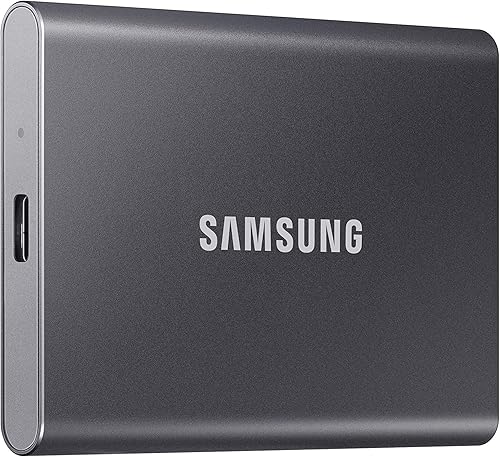
Samsung T7 Portable SSD 1TB (USB 3.2 Gen 2)
A palm-sized NVMe SSD in a solid aluminum shell with read and write speeds up to 1,050 and 1,000MB/s. Fast enough to run games, light enough to forget it is in your bag.

Kingston XS1000 1TB External SSD (USB 3.2 Gen 2)
A truly pocket-sized SSD that still hits up to 1,050MB/s on a USB 3.2 Gen 2 port. A great value add-on for any gaming laptop.

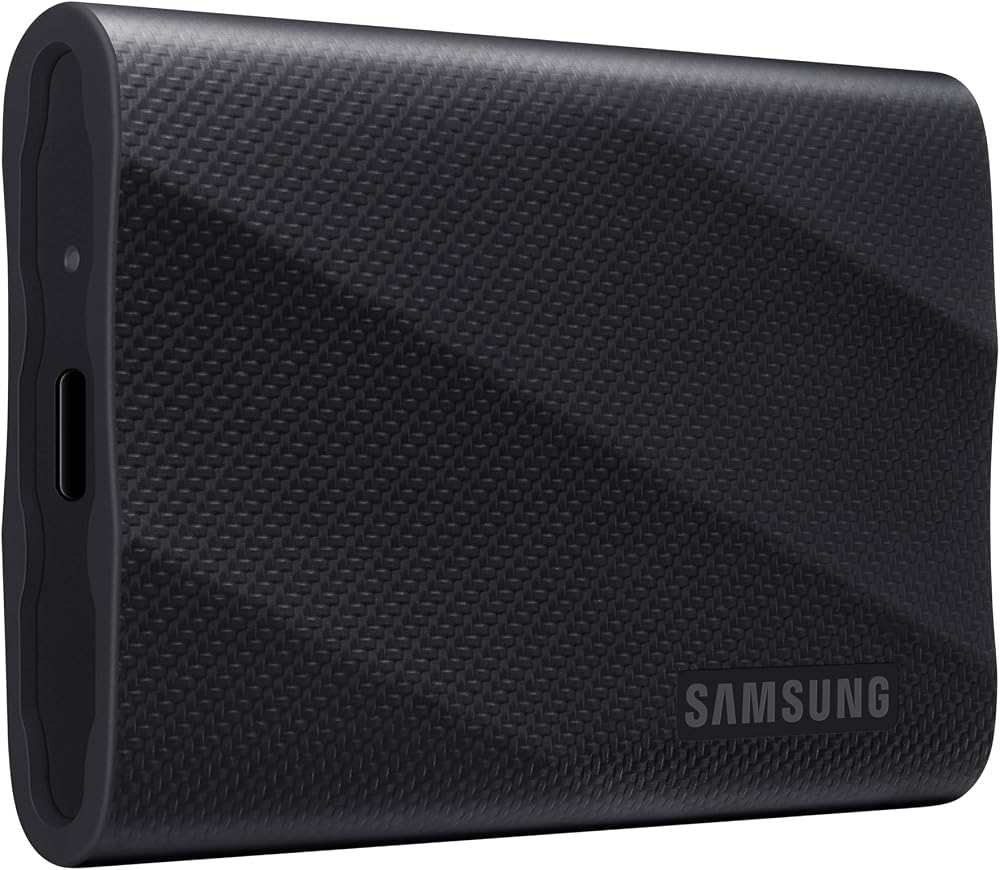
Samsung T7 Shield Portable SSD 1TB (USB 3.2 Gen 2)
The same fast NVMe performance as the T7, wrapped in a rugged shell with an IP65 rating for water and dust and drop protection up to 9.8 feet.

SanDisk 1TB Portable SSD (New Model, USB-C)
SanDisk's entry-level portable SSD reads at up to 1,000MB/s, which SanDisk rates as up to five times faster than old-school portable hard drives, in a slim, lightweight body.

WD 1TB My Passport SSD Portable External Solid State Drive
A fast NVMe portable SSD with password-enabled 256-bit AES hardware encryption, ideal if the drive holds school, work or personal files as well as games.

SSK 1TB Portable SSD (USB 3.2 Gen 2, USB-C and USB-A)
A lower-cost alternative to the big brands with 10Gbps speeds up to 1,050MB/s, a 2mm aluminum case for heat dissipation and both USB-C and USB-A cables in the box.
In-Depth Reviews
1. Samsung T7: The Best Budget External SSD Overall
The Samsung T7 has been the default recommendation for portable SSDs for years, and it still earns the top spot. Inside is PCIe NVMe storage that reaches up to 1,050MB/s read and 1,000MB/s write over USB 3.2 Gen 2, which Samsung says is almost twice as fast as the older T5. On a gaming laptop with a 10Gbps USB port, that is fast enough to keep a second Steam library on the drive and play directly from it.
The aluminum unibody feels solid and is rated for drops up to 6 feet. It is sold from 500GB to 4TB, with 1TB being the sweet spot for most budgets. The only real trade-off is the lack of a water or dust rating; if you need that, step up to the T7 Shield below.
2. Kingston XS1000: Best Pocket-Sized Value
The Kingston XS1000 is one of the smallest portable SSDs around, small enough to slip into a coin pocket. Despite the size, it delivers up to 1,050MB/s over USB 3.2 Gen 2, matching the Samsung T7 on paper.
It skips extras such as hardware encryption and a rugged rating, but if you want a fast, tiny drive that disappears into your laptop bag, it is one of the best values here. Kingston sells it in 1TB and 2TB sizes.
3. Samsung T7 Shield: Best Rugged SSD
If your drive travels in a backpack, to LAN parties or outdoors, the Samsung T7 Shield is worth the small premium over the standard T7. It adds an IP65 rating for water and dust resistance and drop protection up to 9.8 feet, while keeping the same up to 1,050MB/s read and 1,000MB/s write speeds.
Samsung Magician software lets you check drive health and install firmware updates. It comes in 1TB, 2TB and 4TB versions, and its rugged exterior is built for life on the go.
4. SanDisk Portable SSD: Best Affordable Name-Brand SSD
The new SanDisk Portable SSD is the brand's entry-level model and one of the lowest-cost ways to get a portable SSD from a major brand. It reads at up to 1,000MB/s, which SanDisk rates as up to five times faster than old-school portable hard drives, and it has no moving parts plus drop protection up to 2 meters.
It is slim, light and plug-and-play over USB-C. Because this is a new model, there are fewer owner reviews so far, and it does not list password protection, so choose the WD My Passport SSD if security matters.
5. WD My Passport SSD: Best for Security
The WD My Passport SSD is the pick when your drive holds more than games. It offers password-enabled 256-bit AES hardware encryption, so a lost drive does not expose your files, and NVMe speeds up to 1,050MB/s read and 1,000MB/s write.
It is shock and vibration resistant with drop protection up to 6.5 feet and connects over USB-C, with USB-A compatibility for older systems. It is sold from 500GB to 4TB. The main limitation is that the password features rely on WD's software.
6. SSK Portable SSD: Best Low-Cost Alternative
The SSK Portable SSD is a lesser-known brand, but it packs a lot into a low price: speeds up to 1,050MB/s read and 1,000MB/s write over USB 3.2 Gen 2, a 2mm aluminum case for cooling, an activity LED, and both USB-C and USB-A cables in the box.
SSK is open about how its SLC cache works: about 25% of the free capacity acts as high-speed cache, so very large single transfers can slow once the cache fills. That rarely matters for game files and everyday copies. If you want the most established support, though, the Samsung or WD drives are safer bets.
How to Choose the Best Budget External SSD
External SSD or Hard Drive?
A portable SSD is several times faster, silent and far more resistant to drops, which makes it the better choice for playing games from external storage and for travel. A hard drive is still much less expensive per terabyte, so it wins for bulk backups and media archives. If your laptop has a free M.2 slot, an internal NVMe SSD from our best budget hard drive guide is another option. If you need lots of space more than speed, see our guide to the best budget external hard drive.
Match the Drive to Your USB Port
USB speed matters as much as the drive. A 5Gbps USB 3.2 Gen 1 port limits most SSDs to well under their rated speed. A 10Gbps USB 3.2 Gen 2 port, common on modern gaming laptops, lets the drives here reach around 1,000MB/s. Faster 20Gbps (Gen 2x2) drives cost more and only pay off if your laptop has a matching port. Check your laptop's spec sheet before paying extra for speed you cannot use.
How Much Capacity Do You Need?
Many modern AAA games take 100GB to 150GB each, so 1TB holds a handful of big titles plus clips and files. Choose 2TB if you want a large second game library on the go. For budget buyers, 1TB is usually the best balance of price and space.
Playing Games From an External SSD
On a Windows gaming laptop you can add a Steam or Epic library on the external SSD and play directly from it with load times far closer to an internal SSD than a hard drive. On PS5, USB storage can play PS4 games and store PS5 games, which must be moved back to internal storage to play; Sony's PS5 USB extended storage guide lists a 250GB minimum and 8TB maximum. On Xbox Series X and S, previous-generation games can be played directly from an external USB drive, while Microsoft says Series X|S Optimized games should be played from the internal SSD or an official Storage Expansion Card, according to Xbox Wire.
Durability, Security and Cache
Look for drop ratings if the drive will travel, and an IP65 rating like the Samsung T7 Shield if it may get wet or dusty. If you store personal or work files, choose hardware encryption such as the WD My Passport SSD. Lower-cost drives often rely on a smaller cache, so sustained transfers of huge files may slow down partway through.
Quick Setup Tips
- Use the fastest port: plug the SSD into a 10Gbps USB-C or USB-A port, not a 5Gbps port or an unpowered hub.
- Pick the right format: exFAT works on both Windows and Mac, NTFS is fine for Windows only, and consoles format the drive themselves.
- Add a game library: in Steam, open Settings, then Storage, and add a library on the SSD to move games without re-downloading.
- Keep it updated: use the maker's app, such as Samsung Magician, to check drive health and install firmware updates.
- Eject before unplugging: always use Safely Remove Hardware to avoid corrupted files.
Frequently Asked Questions
What is the best budget external SSD in 2026?
The Samsung T7 is our top pick for most people thanks to its up to 1,050MB/s speed, sturdy aluminum body and wide range of capacities. The Kingston XS1000 is a great value if you want the smallest possible drive, and the Samsung T7 Shield is best if you need water and dust resistance.
Is an external SSD worth it for a gaming laptop?
Yes, if you are running out of space. A portable SSD on a 10Gbps USB port can hold a second game library with fast load times, and it is far more durable than a portable hard drive when you travel.
Can I play games directly from an external SSD?
On a Windows PC you can install and play Steam, Epic and other PC games from an external SSD. On PS5 you can play PS4 games from USB storage, and on Xbox Series X|S you can play previous-generation games from USB storage, while Series X|S Optimized games should be played from internal storage or an official expansion card.
Why does my 1TB SSD show about 931GB in Windows?
Drive makers count 1TB as 1,000,000,000,000 bytes, while Windows measures in binary units, so the same space appears as roughly 931GB. Nothing is missing.
Why is my external SSD slower than advertised?
The most common reason is a slower USB port or cable. Rated speeds of around 1,000MB/s need a 10Gbps USB 3.2 Gen 2 port. Very large transfers can also slow down once a drive's cache fills.
The Bottom Line
The Samsung T7 is the best budget external SSD for most people in 2026, with fast NVMe speeds, a tough aluminum body and capacities from 500GB to 4TB. Choose the Kingston XS1000 for the smallest drive and great value, the Samsung T7 Shield for water and dust resistance, the SanDisk Portable SSD for a low-cost name brand, the WD My Passport SSD for hardware encryption, or the SSK Portable SSD as a low-cost alternative. Need more space than speed? Our best budget external hard drive guide covers the lowest-cost terabytes.