
Heads up: we may earn a commission when you buy through links on this page, at no extra cost to you. As an Amazon Associate we earn from qualifying purchases. How we make money
Short on time? Our top pick is ASUS Vivobook S16 Snapdragon, ASUS Vivobook S14 OLED takes Best Lightweight OLED Pick, while Apple MacBook Air 13 M5 takes Best for Everyday Classes.
- Best Battery Life ASUS Vivobook S16 Snapdragon Check price
- Best Lightweight OLED Pick ASUS Vivobook S14 OLED Check price
- Best for Everyday Classes Apple MacBook Air 13 M5 Check price
Shopping on Amazon? Get it faster with Prime
Free fast delivery on eligible items above, Prime-only deals and Prime Video. New members can try it free for 30 days and cancel anytime.
The best student laptop 2026 should handle lectures, late library sessions, and group projects without slowing down. This guide covers six 2026 models for students who type, take handwritten notes, and study on the move.
We compared battery life, weight, screens, and note-taking features across the six models. Each one fits a different way of working through the school year. We checked each Amazon listing on October 25, 2026 and used only the specs the maker or seller lists. We do not list exact prices because Amazon prices change in real time. Use the buttons to see the current price and availability on Amazon before you buy. Scores are our editorial scores out of 10, not Amazon customer ratings.
Best Student Laptops at a Glance
| Award | Laptop | Key Spec | Why It Fits | Score |
|---|---|---|---|---|
| Best Battery Life | ASUS Vivobook S16 Snapdragon | 31-hour battery | It runs up to 31 hours and recharges to 60 percent in 49 minutes for full school days. | 9.2/10 |
| Best Lightweight OLED Pick | ASUS Vivobook S14 OLED | 3.09-pound OLED | It pairs a 14-inch OLED screen with up to 29 hours of battery in a 3.09-pound frame. | 8.8/10 |
| Best for Everyday Classes | Apple MacBook Air 13 M5 | 2.71-pound M5 | It weighs 2.71 pounds and runs up to 18 hours for lectures, the library, and the bus. | 8.4/10 |
| Best for Heavy Multitasking | Apple MacBook Pro CTO M5 Pro | 48GB memory | It holds 48GB of memory for large projects, many open apps, and long research sessions. | 8.0/10 |
| Best Convertible for Notes | Lenovo Yoga 7i 2-in-1 | 360-degree touchscreen | It folds flat for handwritten notes and opens back up for typing essays and slides. | 7.6/10 |
| Best Dual Screen Pick | ASUS Zenbook Duo 386H | Dual OLED screens | It gives you two touchscreens for notes beside readings, drafts, and lecture video. | 7.2/10 |

ASUS Vivobook S16 Laptop (2026), 16” 16:10 WUXGA OLED Display Display, Snapdragon® X2 Elite Processor, Adreno™ GPU, 16 GB RAM, 1TB SSD
It suits students who spend long days away from an outlet and want one machine for every class. It runs up to 31 hours, recharges to 60 percent in 49 minutes, and carries a backlit keyboard with two USB4 Type-C ports. Its 16-inch screen takes more room on a small lecture desk than a smaller laptop.

ASUS Vivobook S14 Laptop (2026), 14” 16:10 WUXGA OLED Display, Intel® Core™ Ultra 7 355 Processor, Intel® Graphics, 32GB RAM, 1TB SSD
It suits students who carry a laptop everywhere and want a bright screen for reading and video. It weighs 3.09 pounds, runs up to 29 hours, and recharges to 60 percent in 49 minutes. Its screen has no touchscreen, so handwritten notes need a separate tablet or paper.
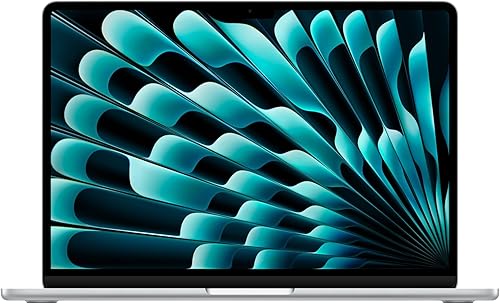
Apple 2026 MacBook Air 13-inch Laptop with M5 chip, 13.6-inch Liquid Retina Display, 16GB Unified Memory, 512GB SSD
It suits students who want a light Mac for lectures, the library, and everyday writing. It weighs 2.71 pounds, runs up to 18 hours of video streaming, and has a 12MP Center Stage camera. Its 512GB of storage can feel tight once large class projects and media pile up.

Apple 14-inch MacBook Pro CTO Laptop with M5 Pro Chip, 15-Core CPU, 16-Core GPU, 48GB Unified Memory, 1TB SSD Storage, Standard Display
It suits students who juggle coding, editing, and research with many apps open at once. It pairs 48GB of unified memory with a backlit keyboard and a 70W USB-C adapter. Its 1TB of storage can fill up fast with large video and photo libraries.

Lenovo Yoga 7i 2-in-1 Laptop 2026, 16'' 2K IPS Touchscreen
It suits students who take handwritten notes and want one device for class and homework. Its 360-degree hinge turns the screen into a tablet, and it runs up to 15 hours with Wi-Fi 7. Its 300-nit screen can look dim in bright sunlight, so shade helps outdoors.

ASUS Zenbook Duo Laptop (2026), Dual 14” OLED 3K 144Hz Touch Display, Intel Core Ultra 9 Processor 386H, Intel Graphics, 32GB RAM, 1TB SSD
It suits students who keep notes open beside readings and want extra screen space everywhere. Its dual screens reach up to 1000 nits in HDR, and a sleeve and stylus come included. Its two-screen design takes up more bag space than a single-screen laptop.
In-Depth Reviews
1. Can One Laptop Last a Full School Day?
A long battery matters more than raw speed when lectures, the library, and study groups fill the day. The Vivobook S16 Snapdragon runs up to 31 hours, while the Vivobook S14 reaches up to 29 hours, so either one can skip the outlet hunt. A quick top-up helps too, since both recharge to 60 percent in 49 minutes between classes.
Weight decides how much that battery matters on foot. The MacBook Air weighs 2.71 pounds, so it slips into a bag beside books and a water bottle. The Vivobook S14 weighs 3.09 pounds, which still feels light for a 14-inch machine with a 70Wh battery.
2. Is a Touchscreen Worth It for Class Notes?
A touchscreen turns a laptop into a notebook when the hinge folds flat. The Yoga 7i bends a full 360 degrees, so you can write on its 16-inch touchscreen and then flip it back for typing. The Zenbook Duo takes a different route with two touchscreens, so readings can stay open on one screen while notes fill the other. If you type every note, the Vivobook S14 shows that a sharp OLED screen without touch still works well for reading and writing.
3. ASUS Vivobook S16 Snapdragon: Best Battery Life
The ASUS Vivobook S16 Snapdragon has a Snapdragon X2 Elite processor, 16GB of RAM and a 1TB SSD, with a 16-inch WUXGA OLED screen and a 70Wh battery. It suits students who spend long days away from an outlet and want one machine for every class. It runs up to 31 hours, recharges to 60 percent in 49 minutes, and carries a backlit keyboard with two USB4 Type-C ports. Its 16-inch screen takes more room on a small lecture desk than a smaller laptop.
4. ASUS Vivobook S14 OLED: Best Lightweight OLED Pick
The ASUS Vivobook S14 OLED has an Intel Core Ultra 7 355 processor, 32GB of RAM and a 1TB SSD, with a 14-inch WUXGA OLED screen and a 70Wh battery. It suits students who carry a laptop everywhere and want a bright screen for reading and video. It weighs 3.09 pounds, runs up to 29 hours, and recharges to 60 percent in 49 minutes. Its screen has no touchscreen, so handwritten notes need a separate tablet or paper.
5. Apple MacBook Air 13 M5: Best for Everyday Classes
The Apple MacBook Air 13 M5 has an Apple M5 chip, 16GB of unified memory and a 512GB SSD, with a 13.6-inch Liquid Retina display and a 66.5-watt-hour battery. It suits students who want a light Mac for lectures, the library, and everyday writing. It weighs 2.71 pounds, runs up to 18 hours of video streaming, and has a 12MP Center Stage camera. Its 512GB of storage can feel tight once large class projects and media pile up.
6. Apple MacBook Pro CTO M5 Pro: Best for Heavy Multitasking
The Apple MacBook Pro CTO M5 Pro has an Apple M5 Pro chip with a 15-core CPU and a 16-core GPU, 48GB of unified memory and a 1TB SSD, with a 14-inch 3024x1964 display. It suits students who juggle coding, editing, and research with many apps open at once. It pairs 48GB of unified memory with a backlit keyboard and a 70W USB-C adapter. Its 1TB of storage can fill up fast with large video and photo libraries.
7. Lenovo Yoga 7i 2-in-1: Best Convertible for Notes
The Lenovo Yoga 7i 2-in-1 has an Intel Core Ultra 5 226V processor, 16GB of LPDDR5X memory and a 1TB SSD, with a 16-inch 1920x1200 touchscreen and a 71Wh battery. It suits students who take handwritten notes and want one device for class and homework. Its 360-degree hinge turns the screen into a tablet, and it runs up to 15 hours with Wi-Fi 7. Its 300-nit screen can look dim in bright sunlight, so shade helps outdoors.
8. ASUS Zenbook Duo 386H: Best Dual Screen Pick
The ASUS Zenbook Duo 386H has an Intel Core Ultra 9 386H processor, 32GB of RAM and a 1TB SSD, with dual 14-inch OLED 3K 144Hz touchscreens and a 99Wh battery. It suits students who keep notes open beside readings and want extra screen space everywhere. Its dual screens reach up to 1000 nits in HDR, and a sleeve and stylus come included. Its two-screen design takes up more bag space than a single-screen laptop.
How to Choose the Best Student Laptop 2026
Battery first
Look for a battery that covers lectures, the library, and evening study without a charger.
Carry weight
Choose a light build you can carry across campus with books all day.
Note style
Decide if you write notes by hand or type them before choosing a screen.
Storage room
Keep room for class files, photos, and projects so storage never slows you down.
Quick Setup Tips
- Charge overnight: Plug in each night so the first lecture starts with a full battery.
- Pack light: Carry only the charger and cables you need for the day ahead.
- Save notes twice: Keep class notes in two places so one lost file never costs a grade.
- Test the keyboard: Type a full page before term starts to check comfort for long essays.
- Check the live price: use the buttons to see the current price on Amazon
Frequently Asked Questions
What is the best student laptop 2026 for battery life?
The Vivobook S16 Snapdragon runs up to 31 hours, the longest battery in this guide.
Which laptop is the lightest here?
The MacBook Air weighs 2.71 pounds, the lightest in this guide.
Which laptop has the most memory?
The MacBook Pro CTO holds 48GB of unified memory for heavy multitasking.
Which laptop works best for handwritten notes?
The Yoga 7i folds flat with a 16-inch touchscreen for writing by hand.
Which laptop gives me two screens for study?
The Zenbook Duo has dual 14-inch OLED touchscreens for notes beside readings.
The Bottom Line
The best student laptop 2026 for most students is the Vivobook S16 Snapdragon, with up to 31 hours of battery and a bright 16-inch OLED screen. The Vivobook S14 and the MacBook Air make strong alternates, with the first bringing long battery life in a 14-inch OLED build and the second bringing a 2.71-pound frame for everyday classes.