Heads up: we may earn a commission when you buy through links on this page, at no extra cost to you. As an Amazon Associate we earn from qualifying purchases. How we make money
Short on time? Our top pick is Lenovo Yoga 9i 2-in-1 4K OLED, Lenovo Yoga 7i 2-in-1 14 OLED takes Best OLED 2-in-1 for Less, while HP OmniBook X Flip 16 takes Best 16-Inch Editing 2-in-1.
- Best 2 in 1 Laptop for Video Editing Lenovo Yoga 9i 2-in-1 4K OLED Check price
- Best OLED 2-in-1 for Less Lenovo Yoga 7i 2-in-1 14 OLED Check price
- Best 16-Inch Editing 2-in-1 HP OmniBook X Flip 16 Check price
Shopping on Amazon? Get it faster with Prime
Free fast delivery on eligible items above, Prime-only deals and Prime Video. New members can try it free for 30 days and cancel anytime.
The best 2 in 1 laptop for video editing puts color-accurate screens and touch control in one flexible machine. Convertibles do not have big NVIDIA GPUs, so they suit 1080p and light 4K work, social video and quick edits on the go rather than long 4K projects.
We picked four convertibles with strong screens for editing. We checked each Amazon listing in October 2026 and used only the specs the maker or seller lists. We do not list exact prices because Amazon prices change in real time. Use the buttons to see the current price and availability on Amazon before you buy. Scores are our editorial scores out of 10, not Amazon customer ratings.
Best 2-in-1 Laptops for Video Editing at a Glance
| Award | Laptop | Graphics | Why It Fits | Score |
|---|---|---|---|---|
| Best 2 in 1 Laptop for Video Editing | Lenovo Yoga 9i 2-in-1 4K OLED | Arc 140V | Arc 140V, 4K OLED | 9.1/10 |
| Best OLED 2-in-1 for Less | Lenovo Yoga 7i 2-in-1 14 OLED | Intel Arc | Intel Arc, OLED | 8.8/10 |
| Best 16-Inch Editing 2-in-1 | HP OmniBook X Flip 16 | Arc 140V | Arc 140V, DCI-P3 | 8.6/10 |
| Best 2-in-1 for Sketching and Edits | Lenovo Yoga 7i 2-in-1 16 | Arc 140V | Arc 140V, pen | 8.3/10 |
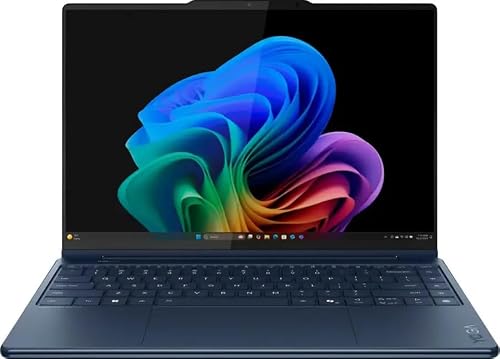
Lenovo Yoga 9i 2-in-1 Aura Edition, 14-inch 4K OLED Touchscreen, Intel Core Ultra 7 258V, 32GB RAM, 1TB SSD, Yoga Pen
A 14-inch 4K OLED with 100% DCI-P3 and 32GB of memory.

Lenovo Yoga 7i 2-in-1 14-inch Laptop, OLED Touchscreen, Intel Core Ultra 5, 16GB LPDDR5X, 512GB SSD, Pen
An OLED convertible with a pen at a lower price.

HP OmniBook X Flip 16 2-in-1 Laptop, Intel Core Ultra 7 256V, 16GB LPDDR5x, 1TB SSD, 16-inch 2K 120Hz Touch
A 16-inch 120Hz touchscreen with 100% DCI-P3 and a 1TB SSD.

Lenovo Yoga 7i 2-in-1 16-inch Laptop, Intel Core Ultra 7 256V, 16GB LPDDR5X, 1TB SSD, Yoga Pen
A 16-inch screen, Yoga Pen and two Thunderbolt 4 ports.
In-Depth Reviews
1. What a 2-in-1 Can Edit
Intel's Arc graphics accelerate video encoding and decoding, so 1080p and short 4K edits in apps like CapCut, Premiere Pro and DaVinci Resolve run well. Long 4K timelines and heavy effects are where a laptop with an NVIDIA RTX GPU pulls ahead; see our budget video editing laptops.
Screen quality is the convertible's strength. The Yoga 9i's 4K OLED and the OmniBook X Flip 16's 100% DCI-P3 panel show color far better than typical budget screens.
2. Lenovo Yoga 9i 2-in-1 4K OLED: Best 2 in 1 Laptop for Video Editing
The Lenovo Yoga 9i 2-in-1 4K OLED has an Intel Core Ultra 7 258V, 32GB of memory and a 1TB SSD, with a 14-inch 4K OLED touchscreen covering 100% DCI-P3, a Yoga Pen with tilt and pressure, Thunderbolt and USB4 ports and Wi-Fi 7. A 14-inch 4K OLED with 100% DCI-P3 and 32GB of memory.
3. Lenovo Yoga 7i 2-in-1 14 OLED: Best OLED 2-in-1 for Less
The Lenovo Yoga 7i 2-in-1 14 OLED has an Intel Core Ultra 5, 16GB of LPDDR5X and a 512GB SSD, with a 14-inch 1920 x 1200 OLED touchscreen at 400 nits, a 360-degree hinge, a Lenovo Digital Pen, Thunderbolt 4 and Wi-Fi 7. An OLED convertible with a pen at a lower price.
4. HP OmniBook X Flip 16: Best 16-Inch Editing 2-in-1
The HP OmniBook X Flip 16 has an Intel Core Ultra 7 256V with Arc 140V graphics, 16GB of LPDDR5x-8533 and a 1TB Gen4 SSD, with a 16-inch 1920 x 1200 IPS touchscreen at 120Hz, 400 nits and 100% DCI-P3, in a 3.06 lb, 0.58 inch body with a stylus. A 16-inch 120Hz touchscreen with 100% DCI-P3 and a 1TB SSD.
5. Lenovo Yoga 7i 2-in-1 16: Best 2-in-1 for Sketching and Edits
The Lenovo Yoga 7i 2-in-1 16 has an Intel Core Ultra 7 256V with Arc 140V graphics, 16GB of LPDDR5X and a 1TB SSD, with a 16-inch WUXGA touchscreen, a Yoga Pen, two Thunderbolt 4 ports, Wi-Fi 7 and Windows 11 Pro. A 16-inch screen, Yoga Pen and two Thunderbolt 4 ports.
How to Choose a 2-in-1 for Video Editing
Screen
OLED or 100% DCI-P3 screens help you judge color.
Memory
16GB for 1080p; 32GB, as on the Yoga 9i, for heavier work.
Storage
1TB SSDs hold more footage; use Thunderbolt external SSDs for projects.
Pen
A pen helps with precise trims and masking.
Quick Setup Tips
- Use tablet mode for reading: fold the screen back to read or sketch
- Turn on palm rejection: it keeps pen notes clean
- Keep the pen charged: most pens use a rechargeable battery or USB-C
- Use a sleeve: glossy touchscreens scratch in bags
- Check the live price: use the buttons to see the current price on Amazon
Frequently Asked Questions
What is the best 2 in 1 laptop for video editing?
The Lenovo Yoga 9i 2-in-1 with a 4K OLED, 32GB of memory and a 1TB SSD.
Can a 2-in-1 edit 4K video?
Yes for short projects; long 4K timelines are better on an RTX laptop.
Is OLED good for video editing?
Yes. OLED shows deep blacks and wide color.
Do I need 32GB for editing on a 2-in-1?
16GB works for 1080p; 32GB helps with 4K.
Is a touchscreen useful for editing?
It helps with scrubbing, trimming and pen-based masking.
The Bottom Line
The Lenovo Yoga 9i 2-in-1 is the best 2 in 1 laptop for video editing in our check. Choose the Yoga 7i 14 OLED for less, or the HP OmniBook X Flip 16 for a bigger color-accurate screen.