Heads up: we may earn a commission when you buy through links on this page, at no extra cost to you. As an Amazon Associate we earn from qualifying purchases. How we make money
Short on time? Our top pick is Crucial P310 1TB, Crucial P310 2TB takes Best Big Upgrade, while TEAMGROUP MP44S 2TB takes Best 2TB Alternative.
- Best Steam Deck SSD Upgrade Crucial P310 1TB Check price
- Best Big Upgrade Crucial P310 2TB Check price
- Best 2TB Alternative TEAMGROUP MP44S 2TB Check price
Shopping on Amazon? Get it faster with Prime
Free fast delivery on eligible items above, Prime-only deals and Prime Video. New members can try it free for 30 days and cancel anytime.
A Steam Deck SSD upgrade is one of the most useful changes you can make to the handheld. A bigger internal drive keeps more games on fast NVMe storage, and it is especially helpful on 64GB and 256GB LCD models.
This guide covers what to buy and what the job involves. The swap steps summarize the iFixit Steam Deck SSD replacement guide and Valve"s SteamOS recovery instructions; follow those originals while you work. Opening your Deck is at your own risk. We do not list prices because Amazon prices change in real time; use the buttons to see the current price and availability. Scores are our editorial scores out of 10, not Amazon customer ratings.
Best Drives for a Steam Deck SSD Upgrade
| Award | Drive | Capacity | Upgrade Path | Score |
|---|---|---|---|---|
| Best Steam Deck SSD Upgrade | Crucial P310 1TB (2230) | 1TB | 64GB, 256GB or 512GB Decks | 9.1/10 |
| Best Big Upgrade | Crucial P310 2TB (2230) | 2TB | Any Deck, including 1TB models | 8.9/10 |
| Best 2TB Alternative | TEAMGROUP MP44S 2TB | 2TB | Cooler operation | 8.6/10 |
| Best Small Budget Upgrade | Fikwot FX953 500GB (2230) | 500GB | 64GB LCD Decks | 8.2/10 |

Crucial P310 1TB M.2 2230 SSD, PCIe Gen4 NVMe
A 1TB M.2 2230 drive listed for Steam Deck, with reads up to 7,100MB/s, a low power draw and a 5-year warranty.
Crucial P310 2TB M.2 2230 SSD, PCIe Gen4 NVMe
The same Crucial P310 design at 2TB, the largest size we found that lists the Steam Deck.
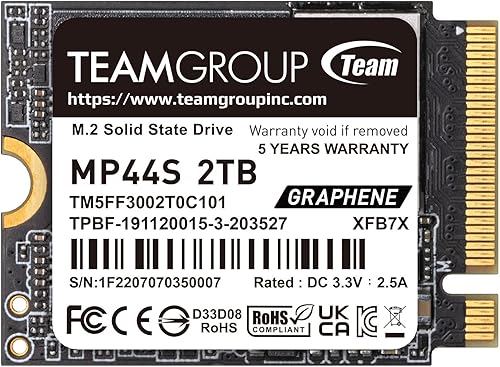
TEAMGROUP MP44S 2TB M.2 2230 PCIe 4.0 NVMe SSD
TEAMGROUP's 2TB 2230 with a graphene heat label, described as a top choice for Steam Deck capacity upgrades.

Fikwot FX953 500GB M.2 2230 NVMe SSD, PCIe Gen 4x4
A 500GB 2230 drive listed for Steam Deck, a low-cost jump for 64GB owners, with 5-year or 160TBW warranty.
In-Depth Reviews
1. Should You Upgrade Your Steam Deck SSD?
Upgrade if you often delete games to make space, or if your Deck has 64GB or 256GB of storage. If you mainly play smaller titles, a microSD card may be enough; Valve includes a UHS-I microSD slot on every model.
Pick the size by your current Deck: 500GB or 1TB for 64GB models, 1TB for 256GB models, and 2TB for 512GB or 1TB models.
2. What You Need Before You Start
You need an M.2 2230 NVMe SSD, the right small screwdrivers and a way to reinstall SteamOS. Valve's SteamOS recovery instructions cover reinstalling SteamOS on a drive.
Back up anything that is not synced, such as screenshots or saves from non-Steam games.
3. Key Swap Steps From iFixit
iFixit recommends discharging the battery below 25% and removing the microSD card before opening the Deck, because a card left in place can snap the back cover.
Inside, iFixit notes the board shield can stick to the thermal pads underneath. iFixit notes that the original SSD's ESD shielding must be transferred to the replacement drive, and that the fan cable should not be pinched when you reassemble.
After the hardware swap, use Valve's recovery instructions to install SteamOS. iFixit also notes the buttons and touchpads may not register at first after re-imaging, so use the touchscreen during setup.
4. Crucial P310 1TB and 2TB
The Crucial P310 1TB and Crucial P310 2TB read at up to 7,100MB/s and write at up to 6,000MB/s. Crucial lists the Steam Deck and says the drive is engineered for low power draw.
5. TEAMGROUP MP44S 2TB and Fikwot FX953 500GB
The TEAMGROUP MP44S 2TB is the 2TB alternative with a graphene label. For 64GB Steam Deck owners on a tight budget, the Fikwot FX953 500GB is a small but meaningful jump.
Steam Deck SSD Upgrade Checklist
Buy M.2 2230 NVMe
The iFixit Steam Deck SSD replacement guide describes the original as a single-sided M.2 2230 drive.
Check Steam Deck Support
Every drive here names the Steam Deck on its listing.
Read the Recovery Steps First
Go through Valve's recovery instructions before you open the Deck.
Keep the Old Drive
A USB enclosure turns it into portable storage.
Compare Sizes
See our best SSD for Steam Deck and best 2TB SSD for Steam Deck guides.
Quick Setup Tips
- Work on a soft, clean surface: it protects the screen
- Discharge below 25%: iFixit recommends this first
- Remove the microSD card: before opening the back cover
- Move the ESD shield: transfer it to the new drive
- Check the live price: use the buttons to see the current price on Amazon
Frequently Asked Questions
Is a Steam Deck SSD upgrade hard?
It is a small-screw job that most careful users can do with the iFixit guide, plus a SteamOS reinstall.
What SSD do I need for a Steam Deck SSD upgrade?
An M.2 2230 NVMe drive. The Crucial P310 1TB is our top pick.
Do I need to reinstall SteamOS?
Yes. Use Valve's SteamOS recovery instructions after installing the new drive.
Why don't the buttons work after re-imaging?
iFixit notes controls may not register at first after re-imaging; use the touchscreen during setup.
Can I upgrade a 64GB Steam Deck?
Yes. Even a 500GB 2230 drive is a big jump from 64GB.
The Bottom Line
For most owners, the Crucial P310 1TB is the best Steam Deck SSD upgrade. Go with the Crucial P310 2TB if you already have 512GB or 1TB, and follow iFixit and Valve's recovery guide during the swap.