

Heads up: we may earn a commission when you buy through links on this page, at no extra cost to you. As an Amazon Associate we earn from qualifying purchases. How we make money
Short on time? Our top pick is Acer Aspire 14 Ultra 7, HP OmniBook 17 Ultra 7 takes Best Battery, while HP OmniBook 3 14 Ryzen 7 takes Best Compact Storage.
- Best Overall Acer Aspire 14 Ultra 7 Check price
- Best Battery HP OmniBook 17 Ultra 7 Check price
- Best Compact Storage HP OmniBook 3 14 Ryzen 7 Check price
Shopping on Amazon? Get it faster with Prime
Free fast delivery on eligible items above, Prime-only deals and Prime Video. New members can try it free for 30 days and cancel anytime.
The best laptop for office work needs enough memory, roomy storage and a comfortable screen, because documents, video calls and many browser tabs run all day. We compared six in-stock laptops, from a light 14-inch model to a 17.3-inch big-screen model.
Each laptop was ranked on memory, storage, screen, battery life and ports, with extra weight on all-day comfort. We checked each Amazon listing on November 2, 2026 and used only the specs the maker or seller lists. We do not list exact prices because Amazon prices change in real time. Use the buttons to see the current price and availability on Amazon before you buy. Scores are our editorial scores out of 10, not Amazon customer ratings.
Best Laptops for Office Work at a Glance
| Award | Laptop | Key Spec | Why It Fits | Score |
|---|---|---|---|---|
| Best Overall | Acer Aspire 14 Ultra 7 | 32GB, 2TB, 3.09 lbs | A 3.09 lb body with 32GB of memory and a 2TB drive suits workers on the move. | 9.2/10 |
| Best Battery | HP OmniBook 17 Ultra 7 | 17.3-inch touchscreen, 19-hour battery | A 17.3-inch touchscreen with up to 19 hours of battery life suits long days. | 9.0/10 |
| Best Compact Storage | HP OmniBook 3 14 Ryzen 7 | 14-inch touchscreen, 2TB SSD | A 14-inch touchscreen with 32GB of DDR5 and a 2TB drive suits a compact setup. | 8.8/10 |
| Best Memory Value | Lenovo V15 Ryzen 7 40GB | 40GB RAM, 1TB SSD | 40GB of RAM and a 1TB drive handle many apps and browser tabs at once. | 8.5/10 |
| Best Everyday Value | Dell 15.6 Ultra 7 Touchscreen | 16GB DDR5, 1TB SSD | 16GB of DDR5 and a 1TB drive with a touchscreen cover everyday office tasks. | 8.2/10 |
| Best Security Features | ASUS Vivobook 15 i9 Laptop | Core i9, fingerprint reader | A Core i9 processor with a fingerprint reader and webcam shield suits shared spaces. | 7.9/10 |
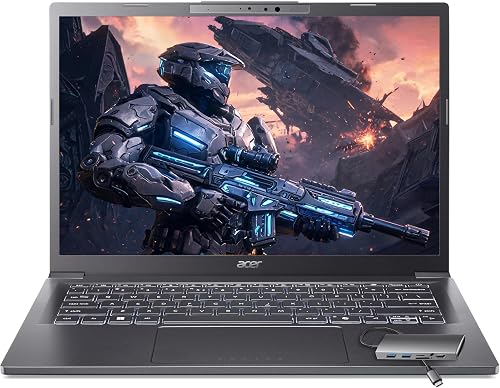
Acer Aspire Laptop 2026, Touchscreen, Intel Ultra 7 258V, 32GB RAM+2TB SSD
Workers who commute or split time between home and a client site will like the 3.09 lb body and the 2TB drive. Wi-Fi 6E helps with stable video calls, and the included USB hub adds HDMI, USB and Ethernet ports. The trade-off is a compact 14-inch screen.

HP OmniBook Touchscreen 17.3"Laptop Intel Ultra 7 355, 32GB DDR5 1TB SSD
Office workers who spend long days on spreadsheets will like the large screen and the numeric keypad. Up to 19 hours of battery life suits days away from an outlet. The trade-off is a large body that is less compact to carry.

HP OmniBook 3 14"Touchscreen 2K Laptop, AMD Ryzen 7 250, 32GB DDR5 2TB SSD
Workers who want a thin, light laptop will like the 14-inch touchscreen and up to 16 hours of battery life. The 2TB drive holds large document libraries. The trade-off is a screen that stays at 60Hz.

Lenovo V-Series V15 Business Laptop, 15.6" FHD Display, AMD Ryzen 7 Processor, 40GB RAM, 1TB SSD, Numeric Keypad, HDMI, RJ45, Webcam, Wi-Fi
Office workers who keep many apps and browser tabs open will like the 40GB of RAM and the 1TB drive. HDMI and RJ45 ports suit a desk with a monitor and a wired network. The trade-off is a plain Full HD screen.

Dell 15.6" FHD Touchscreen Business Laptop, Powerful Intel 12-core Ultra 7 255U (Up to 5.2 GHz), 16GB DDR5 RAM, 1TB SSD, Backlit Keyboard
Office workers who want a touchscreen and a backlit keyboard will like the anti-glare panel and the USB-C port with Power Delivery. Windows 11 Pro adds business features. The trade-off is 16GB of memory.

ASUS Vivobook 15 Laptop, 15.6" FHD, Intel Core i9-13900H, 32GB RAM, 1TB SSD, Physical Webcam Shield, Backlit Keyboard, Fingerprint Reader
Office workers who want added privacy will like the fingerprint reader and the physical webcam shield. The backlit keyboard suits dim rooms, and the 3.8 lb body is easy to carry. The trade-off is DDR4 memory.
In-Depth Reviews
1. What Specs Matter for an Office Work Laptop?
Office work leans on memory, storage and a comfortable screen more than on a graphics card. Check memory first, then the screen size, battery life and ports.
The Lenovo V15 offers 40GB of RAM and a 1TB drive. The HP OmniBook 17 offers a 17.3-inch screen with a numeric keypad.
2. Is a Touchscreen Useful for Office Work?
It helps with tapping, scrolling and signing documents, and the Acer Aspire 14, HP OmniBook 3 14 and Dell 15.6 all use touchscreens.
3. Acer Aspire 14 Ultra 7: Best Overall
The Acer Aspire 14 Ultra 7 has an Intel Core Ultra 7 258V processor with Intel Arc 140V graphics, 32GB of LPDDR5X and a 2TB PCIe SSD, with a 14-inch 1920 x 1200 touchscreen. Workers who commute or split time between home and a client site will like the 3.09 lb body and the 2TB drive. Wi-Fi 6E helps with stable video calls, and the included USB hub adds HDMI, USB and Ethernet ports. The trade-off is a compact 14-inch screen.
4. HP OmniBook 17 Ultra 7: Best Battery
The HP OmniBook 17 Ultra 7 has an Intel Core Ultra 7 355 processor with 8 cores, 32GB of DDR5 and a 1TB SSD, with a 17.3-inch 1920 x 1080 anti-glare touchscreen. Office workers who spend long days on spreadsheets will like the large screen and the numeric keypad. Up to 19 hours of battery life suits days away from an outlet. The trade-off is a large body that is less compact to carry.
5. HP OmniBook 3 14 Ryzen 7: Best Compact Storage
The HP OmniBook 3 14 Ryzen 7 has an AMD Ryzen 7 processor with AMD Radeon graphics, 32GB of DDR5 and a 2TB SSD, with a 14-inch 1920 x 1200 touchscreen. Workers who want a thin, light laptop will like the 14-inch touchscreen and up to 16 hours of battery life. The 2TB drive holds large document libraries. The trade-off is a screen that stays at 60Hz.
6. Lenovo V15 Ryzen 7 40GB: Best Memory Value
The Lenovo V15 Ryzen 7 40GB has an AMD Ryzen 7 5825U processor with 8 cores and 16 threads, 40GB of RAM and a 1TB PCIe SSD, with a 15.6-inch 1920 x 1080 screen. Office workers who keep many apps and browser tabs open will like the 40GB of RAM and the 1TB drive. HDMI and RJ45 ports suit a desk with a monitor and a wired network. The trade-off is a plain Full HD screen.
7. Dell 15.6 Ultra 7 Touchscreen: Best Everyday Value
The Dell 15.6 Ultra 7 Touchscreen has an Intel Core Ultra 7 255U processor, 16GB of DDR5 and a 1TB SSD, with a 15.6-inch 1920 x 1080 anti-glare touchscreen. Office workers who want a touchscreen and a backlit keyboard will like the anti-glare panel and the USB-C port with Power Delivery. Windows 11 Pro adds business features. The trade-off is 16GB of memory.
8. ASUS Vivobook 15 i9 Laptop: Best Security Features
The ASUS Vivobook 15 i9 Laptop has an Intel Core i9-13900H processor, 32GB of DDR4 and a 1TB SSD, with a 15.6-inch 1920 x 1080 non-touch screen. Office workers who want added privacy will like the fingerprint reader and the physical webcam shield. The backlit keyboard suits dim rooms, and the 3.8 lb body is easy to carry. The trade-off is DDR4 memory.
How to Choose a Laptop for Office Work
Memory
Pick 16GB at minimum and 32GB if you keep many apps and tabs open.
Screen size
Choose 14 inches for a compact laptop and 17 inches for long spreadsheet sessions.
Battery
Look for a model made for all-day use if you work away from a desk.
Ports
Check for HDMI and USB-C if you connect a monitor or dock.
Quick Setup Tips
- Power mode: Use the battery saver profile when you work unplugged.
- Updates: Keep Windows up to date before you start a busy week.
- Backups: Back up documents to the cloud or an external drive regularly.
- Display settings: Adjust brightness and scaling so text stays easy to read.
- Check the live price: use the buttons to see the current price on Amazon
Frequently Asked Questions
What is the best laptop for office work?
The Acer Aspire 14 leads this list with 32GB of memory, a 2TB drive and a 3.09 lb body.
How much RAM do I need for office work?
Start with 16GB, as on the Dell 15.6. The Lenovo V15 offers 40GB for heavy multitasking.
Which pick has up to 19 hours of battery life?
The HP OmniBook 17 has up to 19 hours of battery life.
Which picks have a touchscreen?
The Acer Aspire 14, HP OmniBook 17, HP OmniBook 3 14 and Dell 15.6 all use touchscreens.
Which pick has security features?
The ASUS Vivobook 15 includes a fingerprint reader and a physical webcam shield.
The Bottom Line
The best laptop for office work pick for most shoppers is the Acer Aspire 14, with the HP OmniBook 17 and HP OmniBook 3 14 as strong alternates. Check the buttons for the current price before you buy.




