

Heads up: we may earn a commission when you buy through links on this page, at no extra cost to you. As an Amazon Associate we earn from qualifying purchases. How we make money
Short on time? Our top pick is HP OMEN 16 RTX 5060 OLED, ASUS TUF Gaming F16 RTX 5060 takes Best Balance, while Lenovo Legion LOQ RTX 5050 takes Best Mid-Range.
- Best Screen HP OMEN 16 RTX 5060 OLED Check price
- Best Balance ASUS TUF Gaming F16 RTX 5060 Check price
- Best Mid-Range Lenovo Legion LOQ RTX 5050 Check price
Shopping on Amazon? Get it faster with Prime
Free fast delivery on eligible items above, Prime-only deals and Prime Video. New members can try it free for 30 days and cancel anytime.
The best laptop for esports puts a fast screen, a dependable graphics card and solid cooling first, because steady frame rates matter more than flashy extras. We compared six in-stock gaming laptops, from an RTX 3050 starter to an RTX 5060 with a 165Hz OLED display.
Each laptop was ranked on refresh rate, graphics card, RAM, storage and cooling, with extra weight on responsiveness for fast competitive titles. We checked each Amazon listing on November 2, 2026 and used only the specs the maker or seller lists. We do not list exact prices because Amazon prices change in real time. Use the buttons to see the current price and availability on Amazon before you buy. Scores are our editorial scores out of 10, not Amazon customer ratings.
Best Laptops for Esports at a Glance
| Award | Laptop | Key Spec | Why It Fits | Score |
|---|---|---|---|---|
| Best Screen | HP OMEN 16 RTX 5060 OLED | 165Hz OLED, RTX 5060 | A 165Hz OLED panel with 0.2ms response suits fast competitive titles. | 9.3/10 |
| Best Balance | ASUS TUF Gaming F16 RTX 5060 | 165Hz IPS, 32GB DDR5 | A 165Hz IPS screen with 32GB of DDR5 balances speed and memory. | 9.0/10 |
| Best Mid-Range | Lenovo Legion LOQ RTX 5050 | RTX 5050, G-Sync | A G-Sync screen with an RTX 5050 and 24GB of memory covers ranked play. | 8.8/10 |
| Best Upgrade Path | Acer Nitro V RTX 4050 | 165Hz, RTX 4050 | A 165Hz screen and two memory slots leave room to add RAM later. | 8.6/10 |
| Best Storage Value | Lenovo LOQ RTX 4050 | RTX 4050, 2TB drive | An RTX 4050 with a 2TB drive and a G-SYNC screen suits a single title focus. | 8.4/10 |
| Best Starter | HP Victus 15.6 RTX 3050 | RTX 3050, 144Hz IPS | An RTX 3050 with 16GB of RAM and a 144Hz screen suits lighter titles. | 8.1/10 |
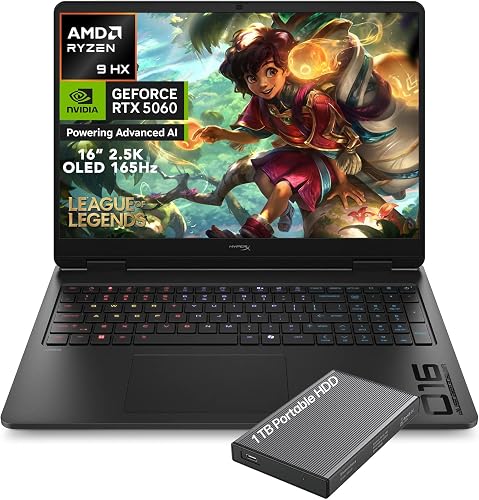
HP HyperX OMEN Gaming Laptop 2026, Ryzen 9 8940HX, NVIDIA GeForce RTX 5060
Players who want very quick pixel response and sharp detail will like the OLED panel. OMEN Tempest Cooling and self-cleaning fans help keep performance steady over long sessions. The trade-off is 16GB of RAM, which suits gaming but leaves little room for heavy streaming.

ASUS TUF Gaming F16 Laptop, NVIDIA RTX 5060 (Beat RTX 4070), Intel 14th Core i7-14650HX, 16" FHD+ 165Hz Anti-Glare LCD, WiFi 6E
Players who stream or record while competing get memory and storage to spare. The panel covers 100% sRGB, and 2nd Gen Arc Flow fans plus dust filters support steady cooling. The trade-off is Full HD class resolution.

Lenovo Legion LOQ, 144Hz, NVIDIA® GeForce RTX™ 5050, 24GB Memory, 1TB Storage, G-Sync - Luna Grey
Players who want G-Sync to remove tearing and a roomy memory pool will like it. Hyperchamber cooling with copper heat pipes supports long sessions. The trade-off is a 144Hz panel rather than a faster one.

Acer Nitro V Gaming Laptop, Intel Core i5-13420H Processor, NVIDIA GeForce RTX 4050 Laptop GPU, 15.6" FHD IPS 165Hz Display, 8GB DDR5
Players who want a quick screen now and an easy memory step later will like the two DDR5 slots, which accept up to 32GB. Wi-Fi 6 covers online play. The trade-off is 8GB of RAM out of the box.

Lenovo LOQ Gaming Laptop, GeForce RTX 4050, AMD Ryzen 5 7235HS Processor
Players who keep several competitive games installed will like the storage. The 300 nit anti-glare panel supports G-SYNC, and HDMI plus Ethernet cover wired play. The trade-off is a 4-core processor.

HP Victus 15.6" Gaming Laptop, Intel Core i5-13420H, NVIDIA GeForce RTX3050 6GB GPU, FHD 144Hz IPS, 16GB DDR4 RAM, 512GB SSD, HDMI, USB-C
Players moving up from a basic laptop who play lighter competitive titles will like the dedicated card. HDMI 2.1, Ethernet and Wi-Fi 6 are on board. The trade-off is DDR4 memory and a smaller drive.
In-Depth Reviews
1. What Makes a Laptop Good for Esports?
Competitive titles reward responsiveness, so start with the screen. The OLED panel on the HP OMEN 16 and the IPS screen on the ASUS TUF Gaming F16 both run at 165Hz, which looks smoother than a basic display.
Then match the graphics card to the games you play. Many esports titles run well on an RTX 4050 or RTX 3050, while an RTX 5060 gives extra headroom for newer releases.
2. Do You Need 32GB of RAM for Esports?
Many players do fine with 16GB, but 24GB or 32GB helps if you stream, record or keep chat open. The Lenovo Legion LOQ offers 24GB and the ASUS TUF Gaming F16 offers 32GB.
3. HP OMEN 16 RTX 5060 OLED: Best Screen
The HP OMEN 16 RTX 5060 OLED has an AMD Ryzen 9 8940HX processor, a GeForce RTX 5060 with 8GB of GDDR7, 16GB of DDR5 and a 1TB PCIe Gen4 SSD, with a 16-inch 2560 x 1600 OLED screen at 165Hz. Players who want very quick pixel response and sharp detail will like the OLED panel. OMEN Tempest Cooling and self-cleaning fans help keep performance steady over long sessions. The trade-off is 16GB of RAM, which suits gaming but leaves little room for heavy streaming.
4. ASUS TUF Gaming F16 RTX 5060: Best Balance
The ASUS TUF Gaming F16 RTX 5060 has an Intel Core i7-14650HX processor, a GeForce RTX 5060 with 8GB of graphics memory, 32GB of DDR5 and a 2TB SSD, with a 16-inch 1920 x 1200 screen at 165Hz. Players who stream or record while competing get memory and storage to spare. The panel covers 100% sRGB, and 2nd Gen Arc Flow fans plus dust filters support steady cooling. The trade-off is Full HD class resolution.
5. Lenovo Legion LOQ RTX 5050: Best Mid-Range
The Lenovo Legion LOQ RTX 5050 has an Intel Core i7-13650HX processor, a GeForce RTX 5050 with 8GB of graphics memory, 24GB of memory and a 1TB drive, with a 15.6-inch Full HD IPS screen at 144Hz. Players who want G-Sync to remove tearing and a roomy memory pool will like it. Hyperchamber cooling with copper heat pipes supports long sessions. The trade-off is a 144Hz panel rather than a faster one.
6. Acer Nitro V RTX 4050: Best Upgrade Path
The Acer Nitro V RTX 4050 has an Intel Core i5-13420H processor, a GeForce RTX 4050 with 6GB of graphics memory, 8GB of DDR5 and a 512GB Gen 4 SSD, with a 15.6-inch Full HD IPS screen at 165Hz. Players who want a quick screen now and an easy memory step later will like the two DDR5 slots, which accept up to 32GB. Wi-Fi 6 covers online play. The trade-off is 8GB of RAM out of the box.
7. Lenovo LOQ RTX 4050: Best Storage Value
The Lenovo LOQ RTX 4050 has an AMD Ryzen 5 7235HS processor with 4 cores, a GeForce RTX 4050 with 6GB of GDDR6 and a 2TB drive, with a 15.6-inch Full HD IPS screen at 144Hz. Players who keep several competitive games installed will like the storage. The 300 nit anti-glare panel supports G-SYNC, and HDMI plus Ethernet cover wired play. The trade-off is a 4-core processor.
8. HP Victus 15.6 RTX 3050: Best Starter
The HP Victus 15.6 RTX 3050 has an Intel Core i5-13420H processor with 8 cores, a GeForce RTX 3050 with 6GB of graphics memory, 16GB of DDR4 and a 512GB SSD, with a 15.6-inch Full HD IPS screen at 144Hz. Players moving up from a basic laptop who play lighter competitive titles will like the dedicated card. HDMI 2.1, Ethernet and Wi-Fi 6 are on board. The trade-off is DDR4 memory and a smaller drive.
How to Choose a Laptop for Esports
Refresh rate
Choose 144Hz as a floor and look for 165Hz if your graphics card can keep up.
Graphics card
An RTX 4050 handles many esports titles, while an RTX 5060 adds headroom.
Memory
Pick 16GB to start and more if you stream or record.
Cooling
Look for dual fans and heat pipes so frame rates stay steady in long sessions.
Quick Setup Tips
- Power mode: Keep the charger connected and use the performance profile in matches.
- Display settings: Set the screen to its highest refresh rate in Windows after you unbox the laptop.
- Wired connection: Use an Ethernet cable when you play ranked matches for steadier ping.
- Mouse: Pair the laptop with a wired gaming mouse for lower input delay.
- Check the live price: use the buttons to see the current price on Amazon
Frequently Asked Questions
What is the best laptop for esports?
The HP OMEN 16 leads this list with an RTX 5060 and a 165Hz OLED screen.
Is 144Hz enough for esports?
Yes, 144Hz suits much of competitive play, and the Lenovo Legion LOQ offers it with G-Sync.
Can I add more RAM to the Acer Nitro V?
The Acer Nitro V has two DDR5 slots that accept up to 32GB.
Is an RTX 3050 good enough for esports?
The HP Victus 15.6 uses an RTX 3050 and suits lighter competitive titles.
Which picks include a 2TB drive?
The ASUS TUF Gaming F16 and Lenovo LOQ both include 2TB of storage.
The Bottom Line
The best laptop for esports pick for most shoppers is the HP OMEN 16, with the ASUS TUF Gaming F16 and Lenovo Legion LOQ as strong alternates. Check the buttons for the current price before you buy.





