

Heads up: we may earn a commission when you buy through links on this page, at no extra cost to you. As an Amazon Associate we earn from qualifying purchases. How we make money
Short on time? Our top pick is ASUS Vivobook S 14 OLED, LG gram 14 Laptop takes Best Portable Pick, while Dell XPS 13 9350 takes Best Compact Pick.
- Best Overall ASUS Vivobook S 14 OLED Check price
- Best Portable Pick LG gram 14 Laptop Check price
- Best Compact Pick Dell XPS 13 9350 Check price
Shopping on Amazon? Get it faster with Prime
Free fast delivery on eligible items above, Prime-only deals and Prime Video. New members can try it free for 30 days and cancel anytime.
The best student laptop under $1500 should carry you through papers, group projects and late study sessions without slowing down. This guide is for students who want a premium build, plenty of memory and a laptop that travels well within that budget.
We compared processors, memory, storage, screens and weight from each laptop's own specs. Every pick runs an Intel Core Ultra or AMD Ryzen processor with integrated graphics, so these suit study work rather than gaming. We checked each Amazon listing on October 27, 2026 and used only the specs the maker or seller lists. We do not list exact prices because Amazon prices change in real time. Use the buttons to see the current price and availability on Amazon before you buy. Scores are our editorial scores out of 10, not Amazon customer ratings.
Student Laptops Under $1500 at a Glance
| Award | Laptop | Key Spec | Why It Fits | Score |
|---|---|---|---|---|
| Best Overall | ASUS Vivobook S 14 OLED | 32GB, OLED, 2.9 pounds | 32GB of RAM, a 100% DCI-P3 OLED and a 75Wh battery in a 2.9-pound build. | 9.4/10 |
| Best Portable Pick | LG gram 14 Laptop | 2.5 pounds, 72Wh | The lightest pick at 2.5 pounds, rated for up to 32 hours of video playback. | 9.1/10 |
| Best Compact Pick | Dell XPS 13 9350 | 13.4-inch, 120Hz | The smallest screen here at 13.4 inches, with 500 nits and a 120Hz panel. | 8.8/10 |
| Best Touchscreen Pick | Dell 16 Plus | Core Ultra 9 288V | A 16-inch touchscreen, a Core Ultra 9 288V and 32GB of RAM for busy multitaskers. | 8.5/10 |
| Best Business-Class Pick | Dell Pro 14 PC14250 | 32GB, 3 pounds | Ethernet, HDMI 2.1 and Thunderbolt 4 join 32GB of DDR5, all in a 3-pound body. | 8.2/10 |
| Best Low Blue Light Pick | HP ProBook 4 G1i | 16-inch, 32GB | A 16-inch anti-glare IPS screen with low blue light for long reading sessions. | 7.9/10 |

ASUS Vivobook S 14 OLED Laptop, 14" FHD+, Ultra 7 258V, 32GB DDR5, 1TB SSD
It suits most majors, from writing to design, because it balances memory, color and carry weight. The 75Wh battery is rated for up to 27 hours of use. The trade-off is integrated Intel Arc Graphics, so it is not built for demanding games.

LG gram 14" Lightweight Laptop, 16GB RAM, 1TB SSD
It suits commuters and students who move between buildings all day. At 2.5 pounds, it is the lightest laptop in this guide, and its 72Wh battery is rated for up to 32 hours of video playback. The trade-off is 16GB of memory, half of what the top pick offers.

Dell XPS 13 9350 Laptop, 13.4" FHD+, Intel Ultra 7 256V, 16GB DDR5, 1TB SSD
It suits you if you want a small, premium machine with a haptic glass touchpad and Windows 11 Pro. Its 500-nit screen stays readable in bright classrooms. The trade-off is the 13.4-inch screen, the smallest here, which feels tight for side-by-side documents.

Dell 16 Plus Laptop 16" WUXGA Touch Intel 8-core Ultra 9 288V (Up to 48 Tops) 32GB RAM 1TB SSD Backlit Fingerprint Wi-Fi7 for Creator Desig
It suits you if you want a large touch display for annotating slides and running several apps side by side. Intel Arc 140V graphics, Wi-Fi 7 and a fingerprint reader round out a strong study setup. The trade-off is a 4.1-pound weight, which you will feel on long walks across campus.
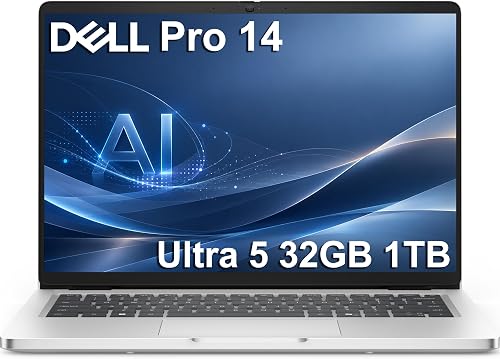
Dell Pro 14 PC14250 Business Laptop, Intel Ultra 5 235U, 32GB DDR5, 1TB SSD
It suits business and engineering students who plug into labs, projectors and wired networks. The 55Wh battery supports rapid charging, and the chassis passes MIL-STD testing. The trade-off is 300 nits of brightness, which can wash out near a sunny window.

HP ProBook 4 G1i 16" Notebook - WUXGA - 60 Hz - Intel Core Ultra 7 255U - 32 GB - 512 GB SSD - English Keyboard - Pike Silver - Intel Chip
It suits you if you read long PDFs and want an anti-glare, low blue light panel. Windows 11 Pro and a fingerprint reader add security for school accounts. The trade-off is the 512GB SSD, so large media files fill it fast.
In-Depth Reviews
1. What Can You Get in a Student Laptop for Under $1500?
This budget buys premium touches such as OLED panels, Wi-Fi 7 and thin, light builds. Four of the six picks carry 32GB of RAM, and five ship with a 1TB SSD.
You can also find long battery ratings at this level. The ASUS Vivobook S 14 OLED has a 75Wh battery, and the LG gram 14 Laptop is rated for up to 32 hours of video playback.
2. Should Students Pick a 13-Inch, 14-Inch or 16-Inch Laptop?
A small screen is easier to carry from class to class. The Dell XPS 13 9350 has the smallest screen here at 13.4 inches and weighs 2.6 pounds.
A 16-inch screen gives more room for spreadsheets and split windows. The Dell 16 Plus and the HP ProBook 4 G1i each offer a 16-inch display, with the Dell adding touch.
3. ASUS Vivobook S 14 OLED: Best Overall
The ASUS Vivobook S 14 OLED has a Core Ultra 7 258V, 32GB of RAM and a 1TB SSD, with a 1920 x 1200 OLED. It suits most majors, from writing to design, because it balances memory, color and carry weight. The 75Wh battery is rated for up to 27 hours of use. The trade-off is integrated Intel Arc Graphics, so it is not built for demanding games.
4. LG gram 14 Laptop: Best Portable Pick
The LG gram 14 Laptop has an AMD Ryzen processor, 16GB of LPDDR5x and a 1TB NVMe SSD, with a 14-inch IPS screen. It suits commuters and students who move between buildings all day. At 2.5 pounds, it is the lightest laptop in this guide, and its 72Wh battery is rated for up to 32 hours of video playback. The trade-off is 16GB of memory, half of what the top pick offers.
5. Dell XPS 13 9350: Best Compact Pick
The Dell XPS 13 9350 has a Core Ultra 7 256V, 16GB of DDR5 and a 1TB SSD, with a 13.4-inch screen at 120Hz. It suits you if you want a small, premium machine with a haptic glass touchpad and Windows 11 Pro. Its 500-nit screen stays readable in bright classrooms. The trade-off is the 13.4-inch screen, the smallest here, which feels tight for side-by-side documents.
6. Dell 16 Plus: Best Touchscreen Pick
The Dell 16 Plus has a Core Ultra 9 288V with 8 cores, 32GB of RAM and a 1TB SSD, with a 16-inch touchscreen. It suits you if you want a large touch display for annotating slides and running several apps side by side. Intel Arc 140V graphics, Wi-Fi 7 and a fingerprint reader round out a strong study setup. The trade-off is a 4.1-pound weight, which you will feel on long walks across campus.
7. Dell Pro 14 PC14250: Best Business-Class Pick
The Dell Pro 14 PC14250 has a Core Ultra 5 235U with 12 cores, 32GB DDR5 and a 1TB SSD, with a 14-inch anti-glare screen. It suits business and engineering students who plug into labs, projectors and wired networks. The 55Wh battery supports rapid charging, and the chassis passes MIL-STD testing. The trade-off is 300 nits of brightness, which can wash out near a sunny window.
8. HP ProBook 4 G1i: Best Low Blue Light Pick
The HP ProBook 4 G1i has a Core Ultra 7 255U, 32GB of RAM and a 512GB SSD, with a 16-inch IPS screen. It suits you if you read long PDFs and want an anti-glare, low blue light panel. Windows 11 Pro and a fingerprint reader add security for school accounts. The trade-off is the 512GB SSD, so large media files fill it fast.
How to Choose a Student Laptop Under $1500
Memory
Choose 32GB if you multitask heavily, while 16GB still handles notes and browsing well.
Storage
A 1TB SSD holds coursework, photos and apps with room to spare.
Weight
Under 3 pounds makes daily carry easy if you walk a lot on campus.
Screen
Pick an anti-glare or OLED panel based on where you study most.
Quick Setup Tips
- Check student offers: Look for school software deals before you buy extra apps.
- Back up early: Set up cloud or external backups in the first week of class.
- Share one charger: A compact USB-C charger can cover your laptop and phone if both use USB-C.
- Mind the operating system: Windows 11 Pro adds BitLocker and Remote Desktop, which some programs require.
- Check the live price: use the buttons to see the current price on Amazon
Frequently Asked Questions
What is the best student laptop under $1500?
The ASUS Vivobook S 14 OLED is our top pick, with 32GB of RAM, a 1TB SSD and a 100% DCI-P3 OLED screen.
Which pick is lightest?
The LG gram 14 Laptop is the lightest at 2.5 pounds.
Which pick has the smallest screen for tight desks?
The Dell XPS 13 9350 has the smallest screen here at 13.4 inches.
Do any picks have a touchscreen?
Yes, the Dell 16 Plus has a 16-inch 1920 x 1200 touchscreen.
Can these laptops run games?
Every pick, including the HP ProBook 4 G1i, uses integrated graphics, so these suit study work over gaming.
The Bottom Line
The best student laptop under $1500 pick for most shoppers is the ASUS Vivobook S 14 OLED, with 32GB of RAM and a 100% DCI-P3 OLED. Choose the LG gram 14 Laptop for a 2.5-pound carry, or the Dell 16 Plus for a large touchscreen.





