

Heads up: we may earn a commission when you buy through links on this page, at no extra cost to you. As an Amazon Associate we earn from qualifying purchases. How we make money
Short on time? Our top pick is Acer Swift X 14, Lenovo Legion 5a 2026 takes Best for Face-Cam Streams, while GIGABYTE AERO X16 takes Best for Creative Majors.
- Best Overall Acer Swift X 14 Check price
- Best for Face-Cam Streams Lenovo Legion 5a 2026 Check price
- Best for Creative Majors GIGABYTE AERO X16 Check price
Shopping on Amazon? Get it faster with Prime
Free fast delivery on eligible items above, Prime-only deals and Prime Video. New members can try it free for 30 days and cancel anytime.
The best student laptop for streaming has to run your stream at night and your lectures by day. This guide is for students who go live with games or study sessions and still carry a laptop to class. Each pick pairs an NVIDIA GeForce RTX card with a front camera, so you can stream without a desktop.
We compared graphics, webcam features, memory, storage, screens and carry weight using each laptop's own specs. The order favors builds that can also handle a full day on campus. We checked each Amazon listing on October 27, 2026 and used only the specs the maker or seller lists. We do not list exact prices because Amazon prices change in real time. Use the buttons to see the current price and availability on Amazon before you buy. Scores are our editorial scores out of 10, not Amazon customer ratings.
Student Streaming Laptops at a Glance
| Award | Laptop | Key Spec | Why It Fits | Score |
|---|---|---|---|---|
| Best Overall | Acer Swift X 14 | RTX 4060, 3.3 pounds | Light enough for class, with a 1080p webcam and noise reduction for clean streams. | 9.4/10 |
| Best for Face-Cam Streams | Lenovo Legion 5a 2026 | RTX 5060, 5MP webcam | A 5MP webcam with a privacy e-shutter and an 80Whr battery suit long broadcasts. | 9.1/10 |
| Best for Creative Majors | GIGABYTE AERO X16 | RTX 5070, 165Hz | A body just 0.65 inches thick holds an RTX 5070 and a 2560 x 1600 screen. | 8.8/10 |
| Best Graphics Pick | MSI Vector 16 HX | RTX 5070 Ti | The strongest GPU in this guide, an RTX 5070 Ti with 12GB, for heavy game streams. | 8.5/10 |
| Solid RTX 5060 Choice | MSI Cyborg 15 | RTX 5060, 16GB | Pairs an RTX 5060 with 16GB of DDR5 and a 1TB SSD for saved clips. | 8.2/10 |
| Easy Entry Pick | MSI Thin Gaming Laptop | RTX 4060, 16GB | A simple start in streaming with an RTX 4060, 16GB of RAM and an RJ45 port. | 7.9/10 |

Acer Swift X 14 Laptop, 14.5" OLED 2880 x 1800 120Hz Calman Verified, Intel Core Ultra 7 Processor 155H, NVIDIA GeForce RTX 4060
At 3.3 pounds, it is the lightest laptop here, so it rides along to lectures without strain. Its 1080p webcam uses Acer PurifiedView and PurifiedVoice 2.0 with a triple microphone array. The trade-off is graphics power, since its RTX 4060 is not as strong as the GPU in the MSI Vector 16 HX.
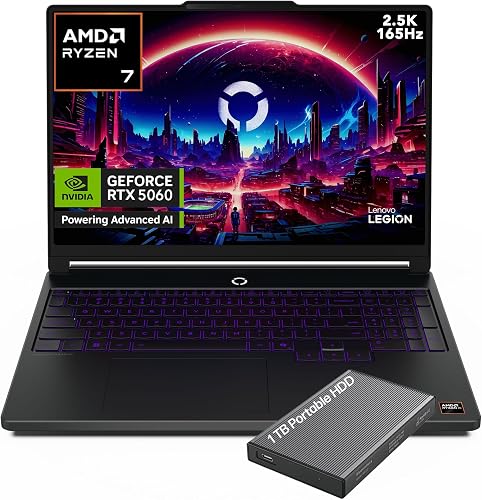
Lenovo Legion 5a 2026 Gaming Laptop, Ryzen 7 250, NVIDIA GeForce RTX 5060
It suits you if your face is on camera, since the 5MP webcam has a privacy e-shutter. The 80Whr battery supports USB-C fast charging between classes. The trade-off is a 4.1-pound weight, which adds more bag load than the lighter picks here.

GIGABYTE AERO X16 - AMD Ryzen GeForce RTX 5070 16" Laptop
It suits creative majors who stream and edit, thanks to 100% sRGB coverage on the 16:10 panel. At 0.65 inches thick, it slides into a backpack sleeve with ease. The trade-off is 4.2 pounds, which you will notice on a walk across campus.

msi Vector 16 HX 16” 144Hz FHD+ Gaming Laptop: Intel Core Ultra 7-255HX, NVIDIA Geforce RTX 5070Ti, 16GB DDR5, 512GB NVMe SSD
It suits you if you stream demanding games and want the strongest GPU in this guide. Thunderbolt 5 helps with fast external drives for saved broadcasts. The trade-off is a 6-pound weight, which makes it more of a desk machine than a class laptop.

msi Cyborg 15 Thin & Light Gaming Laptop 15.6” FHD 144Hz, RTX 5060, Intel Core 7-240H, 16GB DDR5, 1TB SSD, Wi-Fi 6E, Windows 11 Pro
It suits you if you want an RTX 5060 and Windows 11 Pro in one plain package. The 1TB SSD leaves room for game installs and saved clips. The trade-off is a 1080p screen that looks less sharp than the panels on the Lenovo Legion 5a 2026 and GIGABYTE AERO X16.

msi Thin 15.6" FHD Gaming Laptop, Intel Core i5-13420H, NVIDIA GeForce RTX 4060, 16GB RAM 512GB PCIe SSD, 256gb 9H Docking Station
It suits first-time streamers who want a dedicated card and plenty of wired ports. You get one USB-C, three USB-A, HDMI and an RJ45 port for a capture setup. The trade-off is the 512GB SSD, so you will need to clear old recordings often.
In-Depth Reviews
1. Do You Need a Dedicated GPU to Stream From a Laptop?
Game streaming asks the laptop to run the game and encode video at the same time. Every pick here carries an NVIDIA GeForce RTX card, so the graphics chip can share that load with the processor.
The MSI Vector 16 HX has the strongest GPU in this guide, an RTX 5070 Ti with 12GB of GDDR7. For lighter streams of indie games or study sessions, the Acer Swift X 14 pairs an RTX 4060 with a 3.3-pound build.
2. What Webcam and Screen Help a Student Streamer?
A face cam builds a connection with viewers, so camera features matter. The Lenovo Legion 5a 2026 has a 5MP webcam with a privacy e-shutter, which is handy in a shared dorm room.
The Acer Swift X 14 answers with a 1080p webcam and a triple microphone array for clear voice. For screen space, the GIGABYTE AERO X16 and the MSI Vector 16 HX each offer a 16-inch display.
3. Acer Swift X 14: Best Overall
The Acer Swift X 14 has a Core Ultra 7 155H, 16GB of LPDDR5X, a 1TB SSD and an RTX 4060, with a 14.5-inch OLED. At 3.3 pounds, it is the lightest laptop here, so it rides along to lectures without strain. Its 1080p webcam uses Acer PurifiedView and PurifiedVoice 2.0 with a triple microphone array. The trade-off is graphics power, since its RTX 4060 is not as strong as the GPU in the MSI Vector 16 HX.
4. Lenovo Legion 5a 2026: Best for Face-Cam Streams
The Lenovo Legion 5a 2026 has a Ryzen 7 250, an RTX 5060 with 8GB of GDDR7 and a 1TB SSD, with a 15.3-inch OLED. It suits you if your face is on camera, since the 5MP webcam has a privacy e-shutter. The 80Whr battery supports USB-C fast charging between classes. The trade-off is a 4.1-pound weight, which adds more bag load than the lighter picks here.
5. GIGABYTE AERO X16: Best for Creative Majors
The GIGABYTE AERO X16 has an AMD Ryzen processor, two 16GB DDR5 modules, a 1TB SSD and an RTX 5070, with a 16-inch screen. It suits creative majors who stream and edit, thanks to 100% sRGB coverage on the 16:10 panel. At 0.65 inches thick, it slides into a backpack sleeve with ease. The trade-off is 4.2 pounds, which you will notice on a walk across campus.
6. MSI Vector 16 HX: Best Graphics Pick
The MSI Vector 16 HX has a Core Ultra 7 255HX, 16GB DDR5, a 512GB SSD and an RTX 5070 Ti, with a 16-inch screen. It suits you if you stream demanding games and want the strongest GPU in this guide. Thunderbolt 5 helps with fast external drives for saved broadcasts. The trade-off is a 6-pound weight, which makes it more of a desk machine than a class laptop.
7. MSI Cyborg 15: Solid RTX 5060 Choice
The MSI Cyborg 15 has a Core 7 240H, 16GB of DDR5, a 1TB SSD and an RTX 5060, with a 15.6-inch 1080p screen. It suits you if you want an RTX 5060 and Windows 11 Pro in one plain package. The 1TB SSD leaves room for game installs and saved clips. The trade-off is a 1080p screen that looks less sharp than the panels on the Lenovo Legion 5a 2026 and GIGABYTE AERO X16.
8. MSI Thin Gaming Laptop: Easy Entry Pick
The MSI Thin Gaming Laptop has a Core i5-13420H, 16GB of RAM, a 512GB SSD and an RTX 4060, with a 15.6-inch IPS screen. It suits first-time streamers who want a dedicated card and plenty of wired ports. You get one USB-C, three USB-A, HDMI and an RJ45 port for a capture setup. The trade-off is the 512GB SSD, so you will need to clear old recordings often.
How to Choose a Streaming Laptop for School
Graphics
Pick an RTX card so games and stream encoding do not fight over the processor.
Memory
Aim for 16GB of RAM so the game, streaming software and chat run together.
Webcam
Look for a 1080p or 5MP camera if your face appears on stream.
Weight
Under 4 pounds is easy for daily class carry, while heavier models suit a desk setup.
Quick Setup Tips
- Go wired: Plug into Ethernet for a steadier upload than Wi-Fi in a busy dorm.
- Offload recordings: Move old VODs to an external drive to keep your SSD free.
- Stream plugged in: Keep the charger connected during long streams so the laptop can hold full performance.
- Upgrade your mic: A headset mic often sounds clearer than built-in microphones in a noisy room.
- Check the live price: use the buttons to see the current price on Amazon
Frequently Asked Questions
What is the best student laptop for streaming?
The Acer Swift X 14 is the top pick, pairing an RTX 4060 and a 1080p webcam with a 3.3-pound build.
Which pick is lightest for carrying to class?
The Acer Swift X 14 is the lightest at 3.3 pounds.
Which laptop has the strongest graphics for game streaming?
The MSI Vector 16 HX has the strongest GPU here, an RTX 5070 Ti with 12GB of GDDR7.
Is 16GB of RAM enough to stream and study?
For most game and study streams, 16GB works well, as on the MSI Cyborg 15. The GIGABYTE AERO X16 uses two 16GB DDR5 modules if you want extra room.
Is there a pick with a webcam privacy shutter?
Yes, the Lenovo Legion 5a 2026 has a 5MP webcam with a privacy e-shutter.
The Bottom Line
The best student laptop for streaming pick for most shoppers is the Acer Swift X 14, thanks to its 3.3-pound build and clear 1080p webcam. If you want more camera detail, choose the Lenovo Legion 5a 2026, and for heavy game streams, pick the MSI Vector 16 HX.





