Heads up: we may earn a commission when you buy through links on this page, at no extra cost to you. As an Amazon Associate we earn from qualifying purchases. How we make money
Short on time? Our top pick is ASUS ProArt KD300, Logitech MX Keys S takes Best Typing Feel, while Logickeyboard Titan DaVinci takes Best for DaVinci Resolve.
- Best Overall ASUS ProArt KD300 Check price
- Best Typing Feel Logitech MX Keys S Check price
- Best for DaVinci Resolve Logickeyboard Titan DaVinci Check price
Shopping on Amazon? Get it faster with Prime
Free fast delivery on eligible items above, Prime-only deals and Prime Video. New members can try it free for 30 days and cancel anytime.
The best wireless keyboard for video editing puts shortcuts and controls under your fingers so you can cut footage faster without a tangle of cables.
We compared shortcut printing, dials, touch panels and wireless modes across six in-stock boards and controllers. We checked each Amazon listing on November 3, 2026 and used only the specs the maker or seller lists. We do not list exact prices because Amazon prices change in real time. Use the buttons to see the current price and availability on Amazon before you buy. Scores are our editorial scores out of 10, not Amazon customer ratings.
Best Wireless Keyboards for Video Editing at a Glance
| Award | Keyboard | Key Spec | Why It Fits | Score |
|---|---|---|---|---|
| Best Overall | ASUS ProArt KD300 | 65% low profile, touch panel | It suits editors who want a slim board with a touch panel, hot keys and up to 5 paired devices. | 9.4/10 |
| Best Typing Feel | Logitech MX Keys S | Low profile, Smart Actions | Pick this board for a quiet laptop-like feel and Smart Actions that chain repeated edits. | 9.2/10 |
| Best for DaVinci Resolve | Logickeyboard Titan DaVinci | Mac, visual shortcuts | It suits Mac editors who want DaVinci Resolve shortcuts printed on backlit keys. | 9.0/10 |
| Best for Premiere Pro | Logickeyboard Titan Premiere | Mac, visual shortcuts | Choose this board for Adobe Premiere Pro shortcuts printed on backlit Mac keys. | 8.8/10 |
| Best Editing Dial | ULANZI D100H | Haptic dial, BLE 5.0 | It suits editors who want a haptic dial for scrubbing and color grading beside a keyboard. | 8.5/10 |
| Best Value Shortcut Pad | XPPen Mini Keydial ACK05 | Click dial, Bluetooth 5.0 | Choose this small pad for a click dial and four sets of shortcuts at a modest tier. | 8.2/10 |

ASUS ProArt Wireless Keyboard KD300, Tri-Mode (BT/2.4GHz/Wired), up to 5 Devices, RX Red Low-Profile Switch, Aluminum Top Cover
The ASUS ProArt KD300 suits editors who want a slim creator board with customizable controls. Gear Link customizes the touch panel and hot keys with six setting profiles, and the board pairs with up to 5 devices over wired USB, RF 2.4 GHz and Bluetooth. The trade-off is a compact 65% layout.
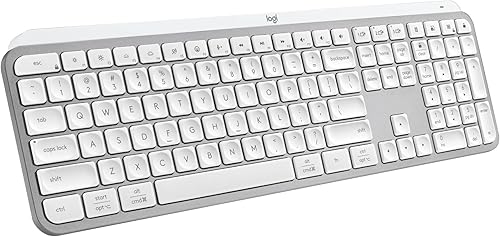
Logitech MX Keys S Wireless Keyboard Low Profile Fluid Precise - Pale Grey
The Logitech MX Keys S suits editors who want a quiet laptop-like typing feel. Smart Actions in Logi Options+ chain several actions into one keystroke, which helps with repeated edits, and the board pairs with up to 3 devices. The trade-off is that it is a typing keyboard with no dial.

Logickeyboard Titan Wireless Backlit Keyboard for Davinci Resolve - Mac
The Logickeyboard Titan for DaVinci Resolve suits Mac editors who want shortcuts printed on the keys. Visual keyboard shortcuts and backlit keys help you find commands quickly, and Bluetooth plus USB-C cover wireless and wired use. The trade-off is a Mac edition built around one editing app.
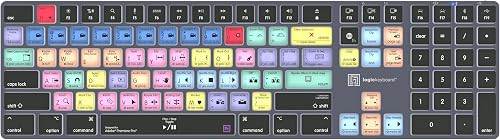
Logickeyboard Titan Wireless Backlit Keyboard for Adobe Premiere Pro - Mac
The Logickeyboard Titan for Premiere Pro suits Mac editors who want shortcuts printed on the keys. Visual keyboard shortcuts and backlit keys help you find commands quickly, and Bluetooth plus USB-C cover wireless and wired use. The trade-off is a Mac edition built around one editing app.

ULANZI D100H Wireless Video Editing Keyboard with Dial Knob
The ULANZI D100H suits editors who want a dial for scrubbing through footage. Offline mode stores presets on the device, and online mode connects to Ulanzi Studio, with presets for CapCut and DaVinci Resolve. The trade-off is that it is a control pad rather than a full keyboard.

XPPen Mini Keydial ACK05 Wireless Shortcut Keyboard Bluetooth Programmable Express Remote Control with Dial & Customized Express Keys for D
The XPPen Mini Keydial ACK05 suits editors who want a small shortcut pad beside the keyboard. The dial clicks as you turn it, and four sets of shortcuts switch with a single key press. The trade-off is that you must download the driver to customize keys.
In-Depth Reviews
1. What Makes a Wireless Keyboard Good for Video Editing?
Shortcuts matter more than raw speed. Shortcut printing, as on the Logickeyboard Titan DaVinci, helps you find commands without memorizing every combination.
If you edit on a slim board, the ASUS ProArt KD300 adds a touch panel and hot keys through Gear Link.
2. Do You Need a Shortcut Pad or Dial?
A dial speeds up scrubbing and fine adjustments, while a keyboard handles typing and titles. The ULANZI D100H and XPPen Mini Keydial ACK05 work as pads beside your main keyboard.
3. ASUS ProArt KD300: Best Overall
The ASUS ProArt KD300 has a 65% low-profile layout, a touch panel, ASUS RX Red low-profile optical switches and an aluminum top cover. The ASUS ProArt KD300 suits editors who want a slim creator board with customizable controls. Gear Link customizes the touch panel and hot keys with six setting profiles, and the board pairs with up to 5 devices over wired USB, RF 2.4 GHz and Bluetooth. The trade-off is a compact 65% layout.
4. Logitech MX Keys S: Best Typing Feel
The Logitech MX Keys S has a low-profile design with spherically-dished keys, backlit keys that light as your hands approach and Smart Actions shortcuts. The Logitech MX Keys S suits editors who want a quiet laptop-like typing feel. Smart Actions in Logi Options+ chain several actions into one keystroke, which helps with repeated edits, and the board pairs with up to 3 devices. The trade-off is that it is a typing keyboard with no dial.
5. Logickeyboard Titan DaVinci: Best for DaVinci Resolve
The Logickeyboard Titan DaVinci has a wireless Mac layout built for DaVinci Resolve with backlit keys, visual keyboard shortcuts, Bluetooth and a rechargeable battery. The Logickeyboard Titan for DaVinci Resolve suits Mac editors who want shortcuts printed on the keys. Visual keyboard shortcuts and backlit keys help you find commands quickly, and Bluetooth plus USB-C cover wireless and wired use. The trade-off is a Mac edition built around one editing app.
6. Logickeyboard Titan Premiere: Best for Premiere Pro
The Logickeyboard Titan Premiere has a wireless Mac layout built for Adobe Premiere Pro with backlit keys, visual keyboard shortcuts, Bluetooth and a rechargeable battery. The Logickeyboard Titan for Premiere Pro suits Mac editors who want shortcuts printed on the keys. Visual keyboard shortcuts and backlit keys help you find commands quickly, and Bluetooth plus USB-C cover wireless and wired use. The trade-off is a Mac edition built around one editing app.
7. ULANZI D100H: Best Editing Dial
The ULANZI D100H has a stepless aluminum dial with haptic feedback, customizable keys, an offline mode and a 1000mAh battery. The ULANZI D100H suits editors who want a dial for scrubbing through footage. Offline mode stores presets on the device, and online mode connects to Ulanzi Studio, with presets for CapCut and DaVinci Resolve. The trade-off is that it is a control pad rather than a full keyboard.
8. XPPen Mini Keydial ACK05: Best Value Shortcut Pad
The XPPen Mini Keydial ACK05 has a compact shortcut remote with a click dial, Bluetooth 5.0 and a 1000 mAh battery. The XPPen Mini Keydial ACK05 suits editors who want a small shortcut pad beside the keyboard. The dial clicks as you turn it, and four sets of shortcuts switch with a single key press. The trade-off is that you must download the driver to customize keys.
How to Choose a Wireless Keyboard for Video Editing
Shortcuts
Look for printed shortcuts or Smart Actions if you repeat the same edits, as with the Logitech MX Keys S.
Software support
Check which editing app the board is built for, like the Logickeyboard Titan Premiere.
Dial control
Pick a dial for scrubbing and fine adjustments, as on the ULANZI D100H.
Connection
Choose a board that pairs with several devices, as the ASUS ProArt KD300 does.
Quick Setup Tips
- Setup: Install the maker's software first and update the firmware.
- Pairing: Pair each device one at a time and note which is which.
- Shortcuts: Map the edits you repeat often first and refine the rest as you go.
- Compatibility: Check that the board supports your computer and editing app before you order.
- Check the live price: use the buttons to see the current price on Amazon
Frequently Asked Questions
What is the best wireless keyboard for video editing?
The ASUS ProArt KD300 leads this list with a touch panel, hot keys and multi-device pairing.
Which wireless keyboard is made for DaVinci Resolve?
The Logickeyboard Titan DaVinci is a wireless Mac keyboard built for DaVinci Resolve.
Which wireless keyboard is made for Premiere Pro?
The Logickeyboard Titan Premiere is a wireless Mac keyboard built for Adobe Premiere Pro.
Is there a dial for scrubbing footage?
Yes, the ULANZI D100H has a haptic dial with offline presets.
Which pick is a quiet typing keyboard?
The Logitech MX Keys S offers a quiet laptop-like typing feel.
The Bottom Line
The best wireless keyboard for video editing pick for most shoppers is the ASUS ProArt KD300, with the Logitech MX Keys S and Logickeyboard Titan DaVinci as strong alternates. Check the buttons for the current price before you buy.