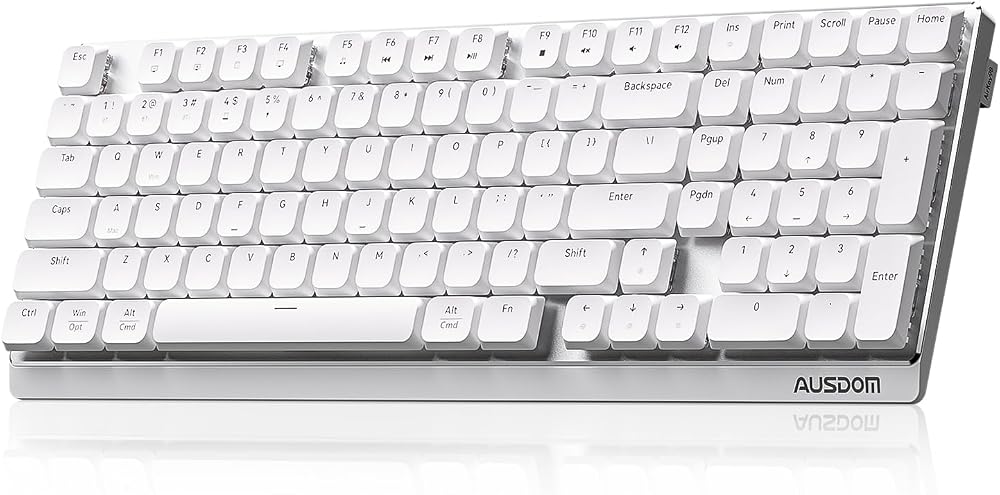

Heads up: we may earn a commission when you buy through links on this page, at no extra cost to you. As an Amazon Associate we earn from qualifying purchases. How we make money
Short on time? Our top pick is Logitech G316 X 98, Redragon K673 PRO takes Best Wireless Knob, while AULA F75 Wireless takes Best Five Device Pick.
- Best Overall Logitech G316 X 98 Check price
- Best Wireless Knob Redragon K673 PRO Check price
- Best Five Device Pick AULA F75 Wireless Check price
Shopping on Amazon? Get it faster with Prime
Free fast delivery on eligible items above, Prime-only deals and Prime Video. New members can try it free for 30 days and cancel anytime.
The best gaming keyboard for video editing pairs shortcut keys and a dial or knob with a layout that fits next to a mouse.
Editors lean on keyboard shortcuts for cuts, markers and playback, so we favored programmable keys and onboard controls. The Logitech G316 X 98 leads with a dial, a numpad and G HUB macros. We checked each Amazon listing on October 30, 2026 and used only the specs the maker or seller lists. We do not list exact prices because Amazon prices change in real time. Use the buttons to see the current price and availability on Amazon before you buy. Scores are our editorial scores out of 10, not Amazon customer ratings.
6 Picks at a Glance
| Award | Keyboard | Key Spec | Why It Fits | Score |
|---|---|---|---|---|
| Best Overall | Logitech G316 X 98 | 98% layout with dial, numpad and G HUB macros | It suits editors who want a numpad for timecode entry and macros for editing shortcuts in a compact frame. | 9.8/10 |
| Best Wireless Knob | Redragon K673 PRO | Wireless gasket board with scroll knob | Choose this wireless board if you edit on a laptop and a desktop and want one knob for volume. | 9.6/10 |
| Best Five Device Pick | AULA F75 Wireless | 75% wireless board with mode knob | Pick this board if you switch between up to five devices during an edit. | 9.4/10 |
| Best Quiet Typing | Epomaker x Aula F75 Gasket | 75% leaf-spring gasket board with five-layer padding | Choose this board if you record voiceovers near your desk and want lower typing noise. | 9.2/10 |
| Best Full Size Macro Pick | Redragon K580 Wired | Full size board with five macro keys and volume roller | It suits you if you want dedicated keys for cuts and markers on a full size board. | 9.0/10 |
| Best Budget Pick | Redragon K512 Membrane | Membrane board with six macro keys and media wheel | Choose this membrane board if you want six macro keys and a media wheel for the lowest setup effort. | 8.8/10 |

Logitech G316 X 98 Mechanical Gaming Keyboard (Linear) - Black
The Logitech G316 X 98 suits editors who also play competitive games. Its dial controls volume, brightness and media, and G HUB lets you create macros and change key assignments. The trade-off is a wired connection with no wireless mode.

Redragon K673 PRO Wireless 81-Key RGB Gasket Gaming Keyboard, Scroll Knob
The Redragon K673 PRO suits editors who move between a laptop, a PC and a tablet. Its knob adjusts backlight brightness and media playback, and Pro software programs macros with custom keybindings. The trade-off is no number pad on the compact frame.

AULA F75 75% Wireless Mechanical Keyboard, Hot Swappable Creamy Keyboard, Pre-lubed Linear Switches, 2.4GHz/Type-C/BT5.0
The AULA F75 Wireless suits editors who use a laptop for rough cuts and a desktop for exports. Its knob switches between gaming and office modes and adjusts lighting, and it connects to up to five devices. The trade-off is a driver download for music rhythm lighting effects.
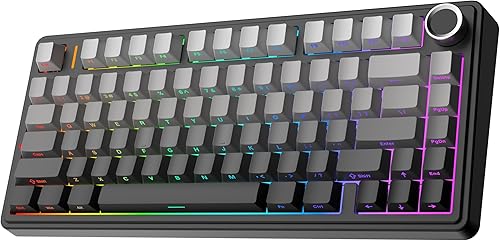
EPOMAKER x Aula F75 Gasket Mechanical Keyboard, BT/2.4GHz/USB-C, RGB (Black Gradient, LEOBOG Reaper Switch)
The Epomaker x Aula F75 Gasket suits editors who narrate their own videos. Its five-layer padding with Poron foam reduces typing noise, and a multimedia knob fine-tunes playback settings. The trade-off is no dedicated macro keys.

Redragon K580 Wired RGB Mechanical Gaming Keyboard, Macro Key & Media Wheel
The Redragon K580 Wired suits editors on a budget who want shortcuts stored inside the keyboard. Its G1 to G5 keys record combos on the fly, and it adds a volume roller and media controls. The trade-off is clicky Outemu Blue switches that can be loud near a microphone.

Redragon K512 RGB Membrane Gaming Keyboard, 6 Macro Keys & Easy Media Wheel
The Redragon K512 Membrane suits students who learn editing and play games on one PC. Its G1 to G6 keys record shortcuts without drivers, and a magnetic wrist rest supports long sessions. The trade-off is a membrane feel instead of mechanical switches.
In-Depth Reviews
1. Do you need macro keys for video editing?
Macro keys turn a multi-key shortcut into one press, which helps with repeat edits. The Redragon K580 Wired stores five combos and the Redragon K512 Membrane stores six, with no software needed.
If you prefer to remap regular keys, software does the job. The Logitech G316 X 98 builds macros in G HUB, and the Redragon K673 PRO uses its Pro software.
2. Is a knob or dial useful when you edit?
A knob puts volume and media playback under one finger while you review clips. The Epomaker x Aula F75 Gasket and the Redragon K673 PRO both use a knob for this.
A dial with a display adds visual feedback. The Logitech G316 X 98 pairs its dial with an LED dot-matrix display for report rate, volume and brightness.
3. Logitech G316 X 98: Best Overall
The Logitech G316 X 98 has a 98% layout with an LED dot-matrix display and a dial. The Logitech G316 X 98 suits editors who also play competitive games. Its dial controls volume, brightness and media, and G HUB lets you create macros and change key assignments. The trade-off is a wired connection with no wireless mode.
4. Redragon K673 PRO: Best Wireless Knob
The Redragon K673 PRO has a gasket-mounted layout with a single control knob. The Redragon K673 PRO suits editors who move between a laptop, a PC and a tablet. Its knob adjusts backlight brightness and media playback, and Pro software programs macros with custom keybindings. The trade-off is no number pad on the compact frame.
5. AULA F75 Wireless: Best Five Device Pick
The AULA F75 Wireless has a 75% layout with a multi-function control knob. The AULA F75 Wireless suits editors who use a laptop for rough cuts and a desktop for exports. Its knob switches between gaming and office modes and adjusts lighting, and it connects to up to five devices. The trade-off is a driver download for music rhythm lighting effects.
6. Epomaker x Aula F75 Gasket: Best Quiet Typing
The Epomaker x Aula F75 Gasket has a 75% layout with a leaf-spring gasket structure. The Epomaker x Aula F75 Gasket suits editors who narrate their own videos. Its five-layer padding with Poron foam reduces typing noise, and a multimedia knob fine-tunes playback settings. The trade-off is no dedicated macro keys.
7. Redragon K580 Wired: Best Full Size Macro Pick
The Redragon K580 Wired has a full size layout with five dedicated macro keys. The Redragon K580 Wired suits editors on a budget who want shortcuts stored inside the keyboard. Its G1 to G5 keys record combos on the fly, and it adds a volume roller and media controls. The trade-off is clicky Outemu Blue switches that can be loud near a microphone.
8. Redragon K512 Membrane: Best Budget Pick
The Redragon K512 Membrane has a full size membrane layout with a media wheel. The Redragon K512 Membrane suits students who learn editing and play games on one PC. Its G1 to G6 keys record shortcuts without drivers, and a magnetic wrist rest supports long sessions. The trade-off is a membrane feel instead of mechanical switches.
How to Choose a Gaming Keyboard for Video Editing
Number pad
Keep a numpad if you type timecodes, as the Logitech G316 X 98 does in a 98% frame.
Shortcuts
Count the commands you repeat; the Redragon K580 Wired gives you five macro keys.
Noise
Pick quiet linear switches if you record audio; the Epomaker x Aula F75 Gasket uses five layers of padding.
Devices
If you edit on more than one machine, check how many devices it saves; the AULA F75 Wireless handles up to five.
Quick Setup Tips
- Macros: Map your ripple delete and add marker shortcuts in G HUB on the Logitech G316 X 98.
- Modes: Switch the AULA F75 Wireless knob to office mode while you edit.
- Charging: Keep a USB-C cable near the Redragon K673 PRO so you can switch to wired mode during long exports.
- Wrist rest: Attach the magnetic wrist rest on the Redragon K512 Membrane for long timeline sessions.
- Price: Check the current price of the Logitech G316 X 98 on Amazon before you buy.
Frequently Asked Questions
What makes a gaming keyboard good for video editing?
Look for programmable keys, a knob or dial, and a layout that leaves room for your mouse. The Logitech G316 X 98 covers all three in a 98% frame.
Does the Logitech G316 X 98 have a numpad?
Yes, its 98% layout keeps a numpad in a compact footprint. The Logitech G316 X 98 also adds a dial and display.
Can the Redragon K673 PRO connect wirelessly?
Yes, it works over Bluetooth, 2.4GHz wireless or USB-C. The Redragon K673 PRO switches devices without re-pairing.
How many devices can the AULA F75 connect to?
It connects to up to five devices at the same time. Switch between them on the AULA F75 Wireless with shortcut keys or the side button.
Do the Redragon K580 macro keys need software?
No, its G1 to G5 keys record combos without software. The Redragon K580 Wired also has hot-swap sockets.
The Bottom Line
The best gaming keyboard for video editing pick for most shoppers is the Logitech G316 X 98. Choose the Redragon K673 PRO when you edit on several devices and want a wireless knob board. Choose the Redragon K580 Wired when you want dedicated macro keys on a full size board.