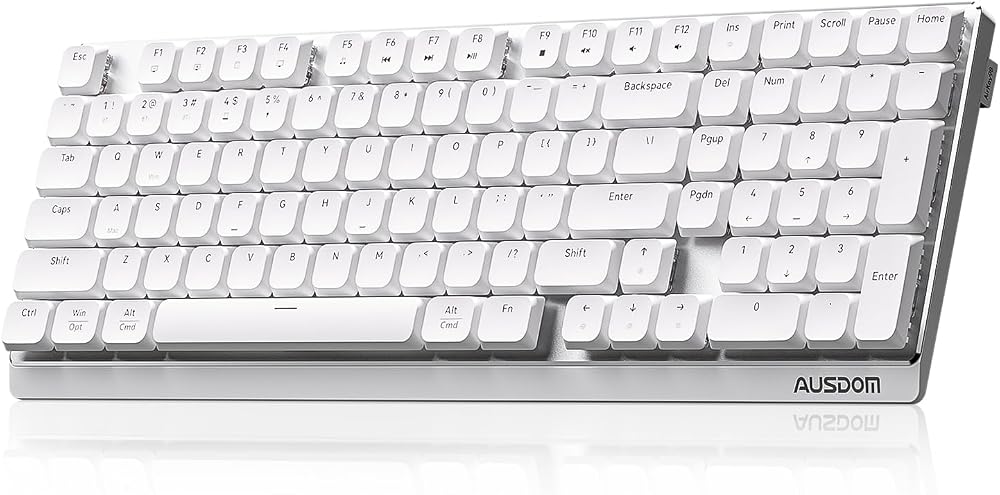
Heads up: we may earn a commission when you buy through links on this page, at no extra cost to you. As an Amazon Associate we earn from qualifying purchases. How we make money
Short on time? Our top pick is Keychron K10 Max, Keychron V1 Max takes Best 75% With Knob, while Keychron V5 Max takes Best 96% Layout.
- Best Overall Keychron K10 Max Check price
- Best 75% With Knob Keychron V1 Max Check price
- Best 96% Layout Keychron V5 Max Check price
Shopping on Amazon? Get it faster with Prime
Free fast delivery on eligible items above, Prime-only deals and Prime Video. New members can try it free for 30 days and cancel anytime.
The best keyboard under $150 now brings wireless modes, hot-swap sockets and full remapping that used to cost far more.
Every pick here stays at or under $150 as of this update, and prices move, so check the buttons for the current price. The Keychron K10 Max leads as a full-size QMK board with tri-mode connections. We checked each Amazon listing on October 30, 2026 and used only the specs the maker or seller lists. We do not list exact prices because Amazon prices change in real time. Use the buttons to see the current price and availability on Amazon before you buy. Scores are our editorial scores out of 10, not Amazon customer ratings.
6 Picks at a Glance
| Award | Keyboard | Key Spec | Why It Fits | Score |
|---|---|---|---|---|
| Best Overall | Keychron K10 Max | Full-size QMK wireless board with brown switches | It suits people who want a full layout, wireless modes and any key remapped in a browser. | 9.8/10 |
| Best 75% With Knob | Keychron V1 Max | 75% gasket board with a custom knob | Choose this compact board if you want a knob and a smaller frame than full size. | 9.6/10 |
| Best 96% Layout | Keychron V5 Max | 96% wireless board with number pad | Pick this board if you want a number pad without a full size frame. | 9.4/10 |
| Best Full Size With Knob | Keychron V6 Max | 100% gasket board with programmable knob | Choose this full-size board if you want a knob and banana switches. | 9.2/10 |
| Best Screen Board | AULA S98 Pro Wireless | 96% wireless board with LCD and knob | It suits you if you want a status screen, a knob and five saved devices. | 9.0/10 |
| Best Budget | Redragon K530 Pro Draconic | 60% tri-mode board with brown switches | Choose this small board if you want wireless and hot-swap sockets for a low price. | 8.8/10 |

Keychron K10 Max QMK Wireless Custom Mechanical Full-Size Keyboard
The Keychron K10 Max suits office workers who also game in the evening. Its pre-lubed tactile brown switches hot-swap with most 3pin and 5pin MX switches, and the Keychron Launcher web app remaps keys on macOS, Windows or Linux. The trade-off is a wide frame that needs desk room.

Keychron V1 Max QMK Wireless Mechanical Keyboard
The Keychron V1 Max suits Mac users who also work on Windows. It comes with a system toggle and extra keycaps for both, and connects to up to 3 devices over Bluetooth 5.1. The trade-off is no number pad.
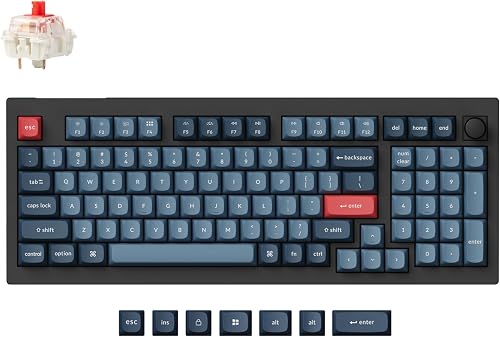
Keychron V5 Max Custom Wireless Mechanical Keyboard
The Keychron V5 Max suits people who enter figures often but have a smaller desk. Sound-absorbing foam softens typing, and every switch hot-swaps without soldering. The trade-off is 1000 Hz polling.

Keychron V6 Max Wireless QMK Mechanical Keyboard 2.4 GHz & Bluetooth
The Keychron V6 Max suits people who want a soft-feeling full-size board with a gasket design. Its banana switches give an early tactile bump, and sound-absorbing foam softens each press. The trade-off is a large frame.

AULA S98 Pro Wireless Mechanical Gaming Keyboard with Screen, Knob, 96 Keys
The AULA S98 Pro Wireless suits people who switch between a PC, a laptop and a tablet. Its screen shows date, time and battery level, and a 5000mah battery keeps it running. The trade-off is a driver download for remapping.

Redragon K530 Pro Draconic 60% Wireless RGB Mechanical Keyboard, BT/2.4Ghz/Wired 3-Mode 61 Keys Compact Gaming Keyboard w/Hot-Swap Socket
The Redragon K530 Pro Draconic suits gamers who want more mouse room on a budget. A side switch picks 2.4Ghz or one of two Bluetooth devices, and the sockets take 3-pin or 5-pin switches. The trade-off is no arrow keys or function row.
In-Depth Reviews
1. Which layout size should you buy?
Full size and 96% boards keep a number pad for spreadsheets and data. The Keychron K10 Max uses a full layout, while the Keychron V5 Max fits a number pad into a 96% frame.
Smaller boards free desk space for a mouse. The Keychron V1 Max uses 75%, and the Redragon K530 Pro Draconic goes down to 60%.
2. Do you need a knob or a screen?
A knob makes volume and scrolling quick. The Keychron V1 Max and the Keychron V6 Max both include one.
A screen shows status like battery and connection. The AULA S98 Pro Wireless adds an LCD next to its knob.
3. Keychron K10 Max: Best Overall
The Keychron K10 Max has a 100% layout with IXPE and EPDM acoustic foams. The Keychron K10 Max suits office workers who also game in the evening. Its pre-lubed tactile brown switches hot-swap with most 3pin and 5pin MX switches, and the Keychron Launcher web app remaps keys on macOS, Windows or Linux. The trade-off is a wide frame that needs desk room.
4. Keychron V1 Max: Best 75% With Knob
The Keychron V1 Max has a 75% layout with a gasket mount and a knob. The Keychron V1 Max suits Mac users who also work on Windows. It comes with a system toggle and extra keycaps for both, and connects to up to 3 devices over Bluetooth 5.1. The trade-off is no number pad.
5. Keychron V5 Max: Best 96% Layout
The Keychron V5 Max has a 96% layout with a number pad and gasket design. The Keychron V5 Max suits people who enter figures often but have a smaller desk. Sound-absorbing foam softens typing, and every switch hot-swaps without soldering. The trade-off is 1000 Hz polling.
6. Keychron V6 Max: Best Full Size With Knob
The Keychron V6 Max has a full-size 100% layout with a programmable knob. The Keychron V6 Max suits people who want a soft-feeling full-size board with a gasket design. Its banana switches give an early tactile bump, and sound-absorbing foam softens each press. The trade-off is a large frame.
7. AULA S98 Pro Wireless: Best Screen Board
The AULA S98 Pro Wireless has a 96% layout with a smart LCD screen. The AULA S98 Pro Wireless suits people who switch between a PC, a laptop and a tablet. Its screen shows date, time and battery level, and a 5000mah battery keeps it running. The trade-off is a driver download for remapping.
8. Redragon K530 Pro Draconic: Best Budget
The Redragon K530 Pro Draconic has a 60% layout with a hot-swap PCB. The Redragon K530 Pro Draconic suits gamers who want more mouse room on a budget. A side switch picks 2.4Ghz or one of two Bluetooth devices, and the sockets take 3-pin or 5-pin switches. The trade-off is no arrow keys or function row.
How to Choose a Keyboard in This Price Range
Layout
Decide on a number pad first; the Keychron V5 Max keeps one in a 96% frame.
Remapping
Look for QMK or a web app; the Keychron K10 Max uses Keychron Launcher.
Devices
Count the devices you switch between; the AULA S98 Pro Wireless saves up to five.
Switches
Hot-swap sockets let you change feel later, as on the Redragon K530 Pro Draconic.
Quick Setup Tips
- Keycaps: Swap in the Mac keycaps and flip the system toggle on the Keychron V1 Max for macOS.
- Knob: Assign the knob to zoom or scroll in Keychron Launcher on the Keychron V6 Max.
- Screen: Use the knob on the AULA S98 Pro Wireless to move between saved devices.
- Side switch: Set the side switch on the Redragon K530 Pro Draconic before you pair a new device.
- Price: Check the current price of the Keychron K10 Max on Amazon before you buy.
Frequently Asked Questions
What should you look for in a keyboard under $150?
Look for the layout, wireless modes and remapping. The Keychron K10 Max brings all three to a full-size board.
Does the Keychron V1 Max work with Windows?
Yes, it has a system toggle and keycaps for macOS and Windows. The Keychron V1 Max also supports Linux.
What polling rate does the Keychron V5 Max reach?
It reaches 1000 Hz in 2.4 GHz and wired modes. The Keychron V5 Max also pairs up to 3 devices over Bluetooth.
What does the AULA S98 Pro screen show?
It shows date, time, battery level and connection status. The AULA S98 Pro Wireless also has a multi-function knob.
Is the Redragon K530 Pro Draconic wireless?
Yes, it offers BT and 2.4Ghz wireless plus USB-C. The Redragon K530 Pro Draconic toggles devices with a side switch.
The Bottom Line
The best keyboard under $150 pick for most shoppers is the Keychron K10 Max. Choose the Keychron V1 Max when you want a 75% board with a knob. Choose the Redragon K530 Pro Draconic when you want a small wireless board for less.