Heads up: we may earn a commission when you buy through links on this page, at no extra cost to you. As an Amazon Associate we earn from qualifying purchases. How we make money
Short on time? Our top pick is WD My Book 16TB Desktop, Seagate One Touch 16TB Desktop takes Best USB-C Desktop, while Seagate Expansion Desktop 8TB takes Best Simple Desktop.
- Best Overall WD My Book 16TB Desktop Check price
- Best USB-C Desktop Seagate One Touch 16TB Desktop Check price
- Best Simple Desktop Seagate Expansion Desktop 8TB Check price
Shopping on Amazon? Get it faster with Prime
Free fast delivery on eligible items above, Prime-only deals and Prime Video. New members can try it free for 30 days and cancel anytime.
The best hard drive for backup is a drive you will actually plug in every week, big enough to hold a full copy of your computer with room to spare. This guide is for families, home offices and students who want a simple, reliable second copy of their files.
We looked at capacity, included backup software, encryption, power needs, warranty and how easily each drive works with Windows and Mac. We checked each Amazon listing on October 24, 2026 and used only the specs the maker or seller lists. We do not list exact prices because Amazon prices change in real time. Use the buttons to see the current price and availability on Amazon before you buy. Scores are our editorial scores out of 10, not Amazon customer ratings.
Best Backup Hard Drives at a Glance
| Award | Drive | Key Spec | Why It Fits | Score |
|---|---|---|---|---|
| Best Overall | WD My Book 16TB Desktop | 16TB 256-bit AES | Backup software, password protection and encryption suit whole-home backups. | 9.3/10 |
| Best USB-C Desktop | Seagate One Touch 16TB Desktop | 16TB USB-C | A single USB-C cord and Rescue Data Recovery Services suit modern laptops. | 8.9/10 |
| Best Simple Desktop | Seagate Expansion Desktop 8TB | 8TB USB 3.0 | Drag-and-drop saving and automatic recognition suit first-time backup users. | 8.5/10 |
| Best Portable Backup | WD My Passport 4TB Portable | 4TB encrypted | Ransomware defense software and a 3-year warranty suit laptop owners. | 8.1/10 |
| Best Plug and Play | Toshiba Canvio Basics 4TB | 4TB USB 3.0 | No software and no power cord suit quick Windows backups. | 7.7/10 |
| Best Portable Capacity | WD Elements Portable 5TB | 5TB USB 3.0 | Five terabytes in a portable drive suit big photo libraries. | 7.3/10 |

WD 16TB My Book Desktop External Hard Drive, USB 3.0, External HDD with Password Protection and Backup Software - WDBBGB0160HBK-NESN
The My Book 16TB suits households and small offices that want one large drive for every computer, with scheduled backups and password protection. It works with PC and Mac. It needs wall power, so it is meant to stay on a desk.
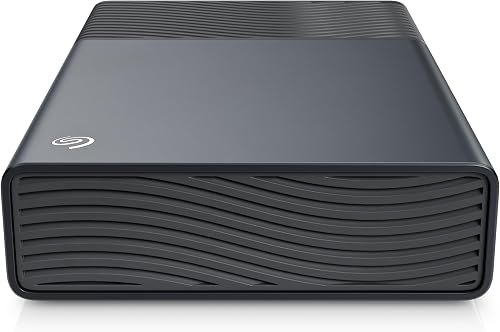
Seagate 16TB One Touch Desktop Hard Drive, USB-C (STNB16000400)
The One Touch 16TB suits people with newer laptops who want a big backup drive on a single USB-C cord, keeping the desk tidy. It includes a two-year limited warranty and Rescue Data Recovery Services. It weighs 1176 g, so it is a desk drive rather than a bag drive.

Seagate 8TB Expansion Desktop Hard Drive, USB 3.0 (STKP8000400)
The Expansion Desktop 8TB suits anyone new to backups, since files save by drag and drop and Windows and Mac computers recognize it automatically. Rescue Data Recovery Services and a 2 Year Manufacturer warranty are included. Time Machine users must reformat it first.

WD 4TB My Passport, Portable External Hard Drive, Black, Backup Software with Defense Against ransomware, and Password Protection
The My Passport 4TB suits laptop owners who want backups they can take to work or school. Its slim design fits in a bag, and it carries a 3-year limited warranty. It holds less than the desktop drives here.
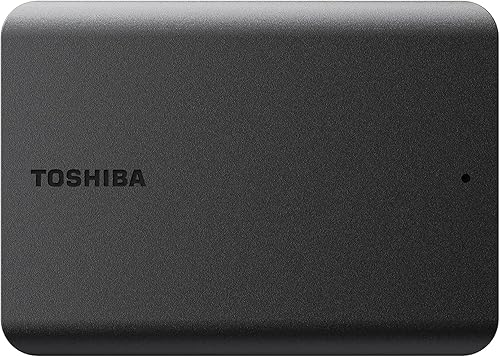
Toshiba Canvio Basics 4TB Portable External Hard Drive USB 3.0, Black - HDTB540XK3CA
The Canvio Basics suits Windows users who want plug and play backups with no software and no AC power cord. Its matte finish resists smudges, and it weighs 7.7 ounces. Mac users must reformat it, and the 1 year standard limited warranty is the shortest here.

Western Digital WD 5TB Elements Portable External Hard Drive for Windows, USB 3.2 Gen 1/USB 3.0 for PC & Mac
The Elements Portable 5TB suits people who want the most room in a portable drive, for photo libraries and full laptop copies. It is plug-and-play ready for Windows and carries a 2 year Limited Warranty. It skips the backup software and encryption of the My Passport.
In-Depth Reviews
1. Desktop or portable drive for backups
Desktop drives like the WD My Book 16TB hold several computers" worth of files and suit a home office where the drive stays put. Portable drives like the WD My Passport 4TB fit in a bag and suit people who back up a single laptop.
If you want one copy away from home, a portable drive is easier to keep at work or with family, which protects your files from fire, theft or a flood.
2. How big should a backup drive be
Choose a drive at least twice the size of the data you want to protect. That leaves room for older versions of files, which backup software keeps so you can roll back a mistake or a ransomware attack.
3. WD My Book 16TB Desktop: Best Overall
The WD My Book 16TB Desktop has 16TB of desktop storage over SuperSpeed USB (5 Gbps) with 256-bit AES hardware encryption, an AC adapter and backup software. The My Book 16TB suits households and small offices that want one large drive for every computer, with scheduled backups and password protection. It works with PC and Mac. It needs wall power, so it is meant to stay on a desk.
4. Seagate One Touch 16TB Desktop: Best USB-C Desktop
The Seagate One Touch 16TB Desktop has 16TB of desktop storage at 7200 rpm with a USB 3.0 Type C connection. The One Touch 16TB suits people with newer laptops who want a big backup drive on a single USB-C cord, keeping the desk tidy. It includes a two-year limited warranty and Rescue Data Recovery Services. It weighs 1176 g, so it is a desk drive rather than a bag drive.
5. Seagate Expansion Desktop 8TB: Best Simple Desktop
The Seagate Expansion Desktop 8TB has 8TB of desktop storage over USB 3.0 with a power adapter. The Expansion Desktop 8TB suits anyone new to backups, since files save by drag and drop and Windows and Mac computers recognize it automatically. Rescue Data Recovery Services and a 2 Year Manufacturer warranty are included. Time Machine users must reformat it first.
6. WD My Passport 4TB Portable: Best Portable Backup
The WD My Passport 4TB Portable has 4TB of portable storage over USB 3.0 with password protection, hardware encryption and backup software with defense against ransomware. The My Passport 4TB suits laptop owners who want backups they can take to work or school. Its slim design fits in a bag, and it carries a 3-year limited warranty. It holds less than the desktop drives here.
7. Toshiba Canvio Basics 4TB: Best Plug and Play
The Toshiba Canvio Basics 4TB has 4TB of portable storage over USB 3.0 at 5400 rpm, pre-formatted NTFS for Windows PCs. The Canvio Basics suits Windows users who want plug and play backups with no software and no AC power cord. Its matte finish resists smudges, and it weighs 7.7 ounces. Mac users must reformat it, and the 1 year standard limited warranty is the shortest here.
8. WD Elements Portable 5TB: Best Portable Capacity
The WD Elements Portable 5TB has 5TB of portable storage over SuperSpeed USB 3.2 Gen 1 (5Gbps). The Elements Portable 5TB suits people who want the most room in a portable drive, for photo libraries and full laptop copies. It is plug-and-play ready for Windows and carries a 2 year Limited Warranty. It skips the backup software and encryption of the My Passport.
How to Choose a Hard Drive for Backup
Capacity
Pick at least double the space your files use today.
Software
Built-in backup tools make weekly copies automatic.
Encryption
Password protection keeps a lost drive from exposing files.
Power
Desktop drives need an outlet, while portable drives travel easily.
Quick Setup Tips
- Schedule backups: Set your software to run weekly so you never forget.
- Unplug after backing up: Disconnect the drive so ransomware cannot reach it.
- Test a restore: Open a few backed-up files each month to confirm they work.
- Keep one copy offsite: Store a second drive at work or with family.
- Check the live price: use the buttons to see the current price on Amazon
Frequently Asked Questions
What is the best hard drive for backup?
The WD My Book 16TB is our top choice, with backup software, password protection and 256-bit AES hardware encryption.
Do I need a desktop drive or a portable one?
Desktop drives hold more for several computers, while portable drives like the My Passport suit one laptop.
Will these drives work with a Mac?
Most work with Mac, though the Canvio Basics and the Expansion need reformatting first, including for Time Machine.
Which drive protects against ransomware?
The WD My Passport 4TB includes backup software with defense against ransomware.
Which backup drive needs no power outlet?
The Canvio Basics 4TB lists no external AC power cord, so it runs from its USB cable.
The Bottom Line
The best hard drive for backup in most homes is the WD My Book 16TB. The Seagate One Touch 16TB is the cleaner USB-C desktop setup, and the WD My Passport 4TB is the best way to back up a laptop on the go.