Heads up: we may earn a commission when you buy through links on this page, at no extra cost to you. As an Amazon Associate we earn from qualifying purchases. How we make money
Short on time? Our top pick is Keychron K2 HE, AULA F99 Wireless takes Best Wireless 96%, while Redragon K550 Wired takes Best for Macros.
- Best Overall Keychron K2 HE Check price
- Best Wireless 96% AULA F99 Wireless Check price
- Best for Macros Redragon K550 Wired Check price
Shopping on Amazon? Get it faster with Prime
Free fast delivery on eligible items above, Prime-only deals and Prime Video. New members can try it free for 30 days and cancel anytime.
The best gaming keyboard for programming gives you macro keys or full remapping for code, plus fast switches for games after work.
We matched each pick to a coding habit, from shortcut heavy IDE work to typing on a Mac and a PC. The Keychron K2 HE leads with web remapping and three connection modes. We checked each Amazon listing on October 30, 2026 and used only the specs the maker or seller lists. We do not list exact prices because Amazon prices change in real time. Use the buttons to see the current price and availability on Amazon before you buy. Scores are our editorial scores out of 10, not Amazon customer ratings.
6 Picks at a Glance
| Award | Keyboard | Key Spec | Why It Fits | Score |
|---|---|---|---|---|
| Best Overall | Keychron K2 HE | 75% magnetic board with web remapping | It suits coders who switch between macOS and Windows and want every key remapped in a browser. | 9.8/10 |
| Best Wireless 96% | AULA F99 Wireless | 96% layout with arrows, number area and tri-mode | Choose this compact board if you want a number area for data work and links to up to five devices. | 9.6/10 |
| Best for Macros | Redragon K550 Wired | Full size board with G1 to G12 macro keys | Pick this wired board if you want a column of macro keys for build, test and commit commands. | 9.4/10 |
| Best Hot-Swap Wired | Redragon K580 Wired | Full size board with hot-swap sockets | Choose this board if you want to swap switches later and keep five macro keys for shortcuts. | 9.2/10 |
| Best Wired Magnetic TKL | Keychron C3 HE TKL | Wired TKL with magnetic switches and rapid trigger | Choose this wired TKL if you want magnetic switches and web remapping on a smaller budget. | 9.0/10 |
| Best Value Macro Pick | Redragon K512 Membrane | Full size membrane board with six macro keys | Choose this membrane board if you want six macro keys that work with no software installed. | 8.8/10 |

Keychron K2 HE Wireless Magnetic Hall Effect Custom Keyboard 75% Layout
The Keychron K2 HE suits developers who work on a laptop and a desktop through the day. Its Launcher web configurator handles key remapping, macros and actuation points from 0.2 to 3.8 mm, and rapid trigger helps in fast games. The trade-off is keycap legends that are not shine-through and can be hard to see in low light.

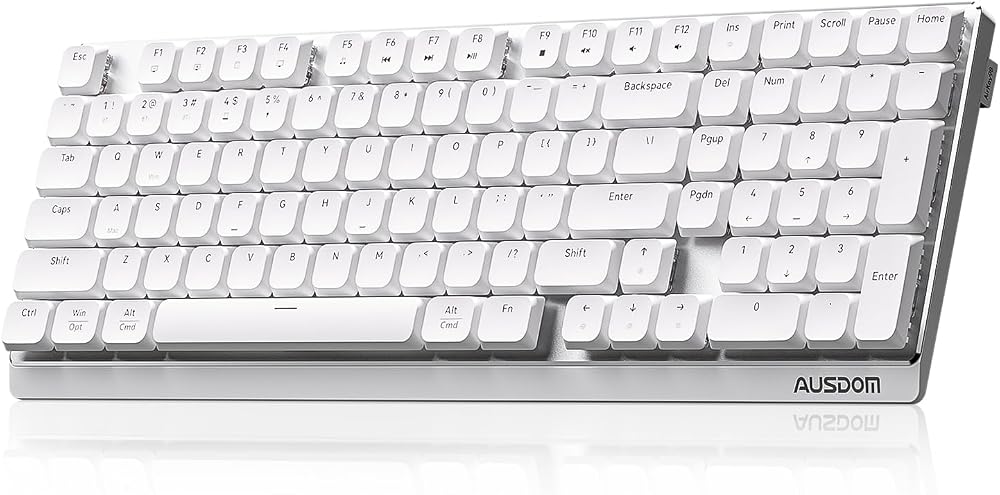
AULA F99 Wireless Mechanical Keyboard, Tri-Mode BT5.0/2.4GHz/USB-C Hot Swappable Custom Keyboard, Pre-lubed Linear Switches
The AULA F99 Wireless suits coders who want a number area without a full size frame. It connects over BT5.0, 2.4GHz or USB, and keys support macro recording and custom functions. The trade-off is no dedicated macro keys, so macros sit on regular keys.

Redragon K550 RGB Gaming Keyboard, 104 Keys + 12 Macro G Keys Wired Mechanical Keyboard w/Aluminum Top Plate, Custom Clicky Purple Switch
The Redragon K550 Wired suits coders who run the same commands many times a day. Its twelve onboard macro keys work on the fly without software, and a USB pass-through port keeps a mouse cable close. The trade-off is clicky purple switches that may be loud in a shared office.

Redragon K580 Wired RGB Mechanical Gaming Keyboard, Macro Key & Media Wheel
The Redragon K580 Wired suits coders who want to try new switches without soldering. Its G1 to G5 keys record combos on the board, and full anti-ghosting keeps fast key combos accurate. The trade-off is stock Outemu Blue switches with an audible click.

Keychron C3 HE TKL Wired Mechanical Keyboard (80% Layout), Magnetic Switches with Adjustable Actuation, Rapid Trigger, QMK/Launcher Web Programmable, RGB Backli
The Keychron C3 HE TKL suits coders who want Hall Effect switches without wireless extras. Its web-based Launcher remaps keys, builds macros and updates firmware, and each key can take its own actuation point. The trade-off is a wired only connection.

Redragon K512 RGB Membrane Gaming Keyboard, 6 Macro Keys & Easy Media Wheel
The Redragon K512 Membrane suits students who code and game on one PC. Its G1 to G6 keys record shortcuts on the fly without drivers, and 26 anti-ghosting keys handle game combos. The trade-off is a softer membrane feel instead of mechanical switches.
In-Depth Reviews
1. Macro keys or full remapping for coding?
Dedicated macro keys put repeat commands one press away. The Redragon K550 Wired has twelve, while the Redragon K512 Membrane records six without software.
Full remapping lets you move any key, which helps if you code in Vim or use custom layers. The Keychron K2 HE handles this in a browser through the Launcher web app.
2. Do switches matter for long coding sessions?
Linear and magnetic switches feel smooth and stay quieter than clicky ones. The AULA F99 Wireless ships with pre-lubed linear switches and five layers of sound filling.
Clicky switches give clear feedback but can bother people nearby. The Redragon K580 Wired uses Outemu Blue switches, and its hot-swap sockets let you change them later.
3. Keychron K2 HE: Best Overall
The Keychron K2 HE has a 75% layout with Gateron magnetic switches. The Keychron K2 HE suits developers who work on a laptop and a desktop through the day. Its Launcher web configurator handles key remapping, macros and actuation points from 0.2 to 3.8 mm, and rapid trigger helps in fast games. The trade-off is keycap legends that are not shine-through and can be hard to see in low light.
4. AULA F99 Wireless: Best Wireless 96%
The AULA F99 Wireless has a 96% layout with a gasket structure. The AULA F99 Wireless suits coders who want a number area without a full size frame. It connects over BT5.0, 2.4GHz or USB, and keys support macro recording and custom functions. The trade-off is no dedicated macro keys, so macros sit on regular keys.
5. Redragon K550 Wired: Best for Macros
The Redragon K550 Wired has a full size layout with an aluminum top plate. The Redragon K550 Wired suits coders who run the same commands many times a day. Its twelve onboard macro keys work on the fly without software, and a USB pass-through port keeps a mouse cable close. The trade-off is clicky purple switches that may be loud in a shared office.
6. Redragon K580 Wired: Best Hot-Swap Wired
The Redragon K580 Wired has a full size layout with five dedicated macro keys. The Redragon K580 Wired suits coders who want to try new switches without soldering. Its G1 to G5 keys record combos on the board, and full anti-ghosting keeps fast key combos accurate. The trade-off is stock Outemu Blue switches with an audible click.
7. Keychron C3 HE TKL: Best Wired Magnetic TKL
The Keychron C3 HE TKL has a tenkeyless 80% layout with magnetic switches. The Keychron C3 HE TKL suits coders who want Hall Effect switches without wireless extras. Its web-based Launcher remaps keys, builds macros and updates firmware, and each key can take its own actuation point. The trade-off is a wired only connection.
8. Redragon K512 Membrane: Best Value Macro Pick
The Redragon K512 Membrane has a full size membrane layout with a magnetic wrist rest. The Redragon K512 Membrane suits students who code and game on one PC. Its G1 to G6 keys record shortcuts on the fly without drivers, and 26 anti-ghosting keys handle game combos. The trade-off is a softer membrane feel instead of mechanical switches.
How to Choose a Gaming Keyboard for Coding
Remapping
Look for a tool that remaps any key; the Keychron K2 HE uses the Launcher web configurator.
Layout
Keep a number area if you work with data, as the AULA F99 Wireless does in a 96% frame.
Macro keys
Count the dedicated keys you need; the Redragon K550 Wired offers twelve.
Actuation
Adjustable actuation helps you avoid typos, and the Keychron C3 HE TKL lets you set a point for each key.
Quick Setup Tips
- Keycaps: Swap in the Mac keycaps that come with the Keychron K2 HE when you code on macOS.
- Devices: Pair your work laptop and home PC to the AULA F99 Wireless and switch with FN key combinations.
- Macros: Record your build and test commands to G1 and G2 on the Redragon K580 Wired to run them with one press.
- Ports: Plug your mouse into the USB pass-through port on the Redragon K550 Wired to keep cables short.
- Price: Check the current price of the Keychron K2 HE on Amazon before you buy.
Frequently Asked Questions
What makes a gaming keyboard good for programming?
Look for remapping, macro keys and switches you can type on all day. The Keychron K2 HE combines web remapping with adjustable magnetic switches.
Does the Redragon K550 need software for macros?
No, its G1 to G12 keys record macros without any software. The Redragon K550 Wired also supports optional software for lighting modes.
How many devices can the AULA F99 connect to?
It connects to up to five devices. Switch between them on the AULA F99 Wireless by pressing FN key combinations.
How do you remap the Keychron C3 HE TKL?
Use the web-based Launcher app in any browser. The Keychron C3 HE TKL also supports QMK customization.
Can you change the switches on the Redragon K580?
Yes, its sockets accept almost any switch without soldering. The Redragon K580 Wired ships with Outemu Blue switches.
The Bottom Line
The best gaming keyboard for programming pick for most shoppers is the Keychron K2 HE. Choose the Redragon K550 Wired when you want twelve macro keys for repeat commands. Choose the AULA F99 Wireless when you need a number area and up to five paired devices.