
Heads up: we may earn a commission when you buy through links on this page, at no extra cost to you. As an Amazon Associate we earn from qualifying purchases. How we make money
Short on time? Our top pick is RK ROYAL KLUDGE S98, EPOMAKER X Aula F75 MAX takes Best Compact Screen, while ASUS ProArt KD300 takes Best Touch Panel.
- Best Overall RK ROYAL KLUDGE S98 Check price
- Best Compact Screen EPOMAKER X Aula F75 MAX Check price
- Best Touch Panel ASUS ProArt KD300 Check price
Shopping on Amazon? Get it faster with Prime
Free fast delivery on eligible items above, Prime-only deals and Prime Video. New members can try it free for 30 days and cancel anytime.
The best wireless keyboard for streaming puts volume, shortcuts and status info within reach while keeping cables off your desk and out of your camera frame.
We compared displays, knobs, macro keys, touch panels and wireless modes across six in-stock boards. We checked each Amazon listing on November 3, 2026 and used only the specs the maker or seller lists. We do not list exact prices because Amazon prices change in real time. Use the buttons to see the current price and availability on Amazon before you buy. Scores are our editorial scores out of 10, not Amazon customer ratings.
Best Wireless Keyboards for Streaming at a Glance
| Award | Keyboard | Key Spec | Why It Fits | Score |
|---|---|---|---|---|
| Best Overall | RK ROYAL KLUDGE S98 | 96% layout, smart display | It suits streamers who want a smart display and a knob with three connection modes. | 9.3/10 |
| Best Compact Screen | EPOMAKER X Aula F75 MAX | 75% layout, TFT screen | Pick this board for a compact 75% frame with a customizable screen and a knob. | 9.1/10 |
| Best Touch Panel | ASUS ProArt KD300 | 65% low profile, touch panel | Choose this slim board for a touch panel, hot keys and pairing with up to 5 devices. | 8.9/10 |
| Best Macro Remapping | Keychron K4 Ultra 8K | 96% layout, Launcher macros | It suits streamers who want macros and remapping on a fast wireless board. | 8.7/10 |
| Best Macro Keys | Redragon K580 PRO | Macro keys, media wheel | Choose this board for dedicated macro keys and a media wheel with tri-mode wireless. | 8.4/10 |
| Best Value Knob | Redragon K673 PRO | Gasket build, scroll knob | Pick this board for a simple scroll knob and a quiet gasket feel at a modest tier. | 8.1/10 |

RK ROYAL KLUDGE S98 Wireless Mechanical Keyboard w/Smart Display & Knob
The RK ROYAL KLUDGE S98 suits streamers who want status info and controls on the keyboard. The smart display shows custom GIFs, date, connection mode and battery status, and the knob adjusts volume, brightness and RGB mode. The trade-off is a top mount build that feels firmer than a gasket board.

EPOMAKER X Aula F75 MAX Wireless Mechanical Keyboard with TFT Screen and Knob, Hot Swappable, RGB Backlight
The EPOMAKER X Aula F75 MAX suits streamers who want a compact board with a screen and knob. The customizable screen and knob add quick control, and wireless and wired modes cover several setups. The trade-off is a 75% layout that drops some keys.

ASUS ProArt Wireless Keyboard KD300, Tri-Mode (BT/2.4GHz/Wired), up to 5 Devices, RX Red Low-Profile Switch, Aluminum Top Cover
The ASUS ProArt KD300 suits streamers who want a slim board with a touch panel. Gear Link customizes the touch panel and hot keys with six setting profiles, and the board pairs with up to 5 devices. The trade-off is a compact 65% layout.

Keychron K4 Ultra Wireless Custom Mechanical Keyboard, 8000 Hz polling rate
The Keychron K4 Ultra 8K suits streamers who want macros and remapping on a wireless board. ZMK firmware and the Keychron Launcher create macros and remap keys, and Bluetooth 5.2 pairs with up to 3 devices. The trade-off is a setup that lives in the Keychron Launcher web app.
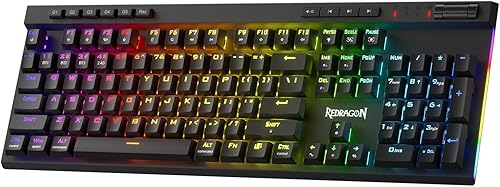
Redragon K580 PRO Wireless RGB Gaming Keyboard, Macro G Keys & Media Wheel
The Redragon K580 PRO suits streamers who want macro keys without extra gear. The macro keys save ability rotations on the keyboard with no software, and the media wheel handles volume and playback. The trade-off is that deeper macros and RGB effects need the companion software.

Redragon K673 PRO Wireless 81-Key RGB Gasket Gaming Keyboard, Scroll Knob
The Redragon K673 PRO suits streamers who want a simple knob and a quiet gasket feel. A single knob adjusts backlight brightness and media playback, and tri-mode connectivity switches between USB-C, Bluetooth and 2.4GHz. The trade-off is that advanced macros need the pro software.
In-Depth Reviews
1. What Makes a Wireless Keyboard Good for Streaming?
Quick controls matter more than raw speed. A smart display, as on the RK ROYAL KLUDGE S98, shows status info while a knob handles volume.
If you want a screen in a compact frame, the EPOMAKER X Aula F75 MAX pairs a customizable screen with a knob.
2. Is a Wireless Keyboard Good for Streaming?
Wireless boards keep cables out of your camera frame, while wired boards skip charging. The Keychron K4 Ultra 8K offers 2.4 GHz wireless and wired modes at 8000 Hz.
3. RK ROYAL KLUDGE S98: Best Overall
The RK ROYAL KLUDGE S98 has a 96% top mount layout, a smart display, a knob, hot-swappable sockets and double-shot PBT keycaps. The RK ROYAL KLUDGE S98 suits streamers who want status info and controls on the keyboard. The smart display shows custom GIFs, date, connection mode and battery status, and the knob adjusts volume, brightness and RGB mode. The trade-off is a top mount build that feels firmer than a gasket board.
4. EPOMAKER X Aula F75 MAX: Best Compact Screen
The EPOMAKER X Aula F75 MAX has a 75% layout with a TFT screen, a knob, hot-swappable sockets and a gasket build. The EPOMAKER X Aula F75 MAX suits streamers who want a compact board with a screen and knob. The customizable screen and knob add quick control, and wireless and wired modes cover several setups. The trade-off is a 75% layout that drops some keys.
5. ASUS ProArt KD300: Best Touch Panel
The ASUS ProArt KD300 has a 65% low-profile layout, a touch panel, ASUS RX Red low-profile optical switches and an aluminum top cover. The ASUS ProArt KD300 suits streamers who want a slim board with a touch panel. Gear Link customizes the touch panel and hot keys with six setting profiles, and the board pairs with up to 5 devices. The trade-off is a compact 65% layout.
6. Keychron K4 Ultra 8K: Best Macro Remapping
The Keychron K4 Ultra 8K has a 96% layout, 8000 Hz polling in 2.4 GHz and wired modes, pre-lubed Keychron Apex switches and hot-swappable sockets. The Keychron K4 Ultra 8K suits streamers who want macros and remapping on a wireless board. ZMK firmware and the Keychron Launcher create macros and remap keys, and Bluetooth 5.2 pairs with up to 3 devices. The trade-off is a setup that lives in the Keychron Launcher web app.
7. Redragon K580 PRO: Best Macro Keys
The Redragon K580 PRO has a set of dedicated macro keys, a media wheel, tri-mode connectivity and hot-swappable sockets. The Redragon K580 PRO suits streamers who want macro keys without extra gear. The macro keys save ability rotations on the keyboard with no software, and the media wheel handles volume and playback. The trade-off is that deeper macros and RGB effects need the companion software.
8. Redragon K673 PRO: Best Value Knob
The Redragon K673 PRO has a compact gasket layout, a scroll knob, tri-mode connectivity and hot-swappable sockets. The Redragon K673 PRO suits streamers who want a simple knob and a quiet gasket feel. A single knob adjusts backlight brightness and media playback, and tri-mode connectivity switches between USB-C, Bluetooth and 2.4GHz. The trade-off is that advanced macros need the pro software.
How to Choose a Wireless Keyboard for Streaming
Display
Look for a screen if you want status info at a glance, as on the RK ROYAL KLUDGE S98.
Macros
Pick dedicated macro keys if you run repeated actions, like the Redragon K580 PRO.
Knob
Choose a knob for quick volume and lighting control, as on the Redragon K673 PRO.
Software
Check the software before you buy, since touch panels and hot keys often live in an app such as Gear Link on the ASUS ProArt KD300.
Quick Setup Tips
- Setup: Install the maker's software first and update the firmware.
- Cables: Check where the USB-C port sits so the cable stays out of your camera frame.
- Pairing: Pair each device one at a time and note which is which.
- Keycaps: Check the keycaps and switches match what you ordered when you unpack the board.
- Check the live price: use the buttons to see the current price on Amazon
Frequently Asked Questions
What is the best wireless keyboard for streaming?
The RK ROYAL KLUDGE S98 leads this list with a smart display, a knob and three connection modes.
Which wireless keyboard has macro keys?
The Redragon K580 PRO has dedicated macro keys and a media wheel.
Which wireless keyboard has a touch panel?
The ASUS ProArt KD300 has a touch panel with hot key customization.
Which wireless keyboard has a screen in a compact frame?
The EPOMAKER X Aula F75 MAX uses a 75% layout with a customizable screen.
Which wireless keyboard supports macros in a browser app?
The Keychron K4 Ultra 8K uses the Keychron Launcher web app.
The Bottom Line
The best wireless keyboard for streaming pick for most shoppers is the RK ROYAL KLUDGE S98, with the EPOMAKER X Aula F75 MAX and ASUS ProArt KD300 as strong alternates. Check the buttons for the current price before you buy.