
Heads up: we may earn a commission when you buy through links on this page, at no extra cost to you. As an Amazon Associate we earn from qualifying purchases. How we make money
Short on time? Our top pick is Logitech G515 Lightspeed TKL, Razer BlackWidow V4 TKL Wireless takes Best Battery Life, while Razer DeathStalker V2 Pro TKL takes Best Low Profile Optical.
- Best Overall Logitech G515 Lightspeed TKL Check price
- Best Battery Life Razer BlackWidow V4 TKL Wireless Check price
- Best Low Profile Optical Razer DeathStalker V2 Pro TKL Check price
Shopping on Amazon? Get it faster with Prime
Free fast delivery on eligible items above, Prime-only deals and Prime Video. New members can try it free for 30 days and cancel anytime.
The best wireless keyboard for gaming pairs a fast dongle connection with long battery life and switches you trust in a match.
We compared wireless modes, battery life, switch types and layouts across six in-stock boards. We checked each Amazon listing on November 3, 2026 and used only the specs the maker or seller lists. We do not list exact prices because Amazon prices change in real time. Use the buttons to see the current price and availability on Amazon before you buy. Scores are our editorial scores out of 10, not Amazon customer ratings.
Best Wireless Keyboards for Gaming at a Glance
| Award | Keyboard | Key Spec | Why It Fits | Score |
|---|---|---|---|---|
| Best Overall | Logitech G515 Lightspeed TKL | Slim TKL, LIGHTSPEED | It suits players who want a slim tenkeyless board with LIGHTSPEED wireless and a low-profile feel. | 9.4/10 |
| Best Battery Life | Razer BlackWidow V4 TKL Wireless | TKL, 980 hr battery | Pick this board for up to 980 hours of battery, a roller and a shared mouse dongle. | 9.2/10 |
| Best Low Profile Optical | Razer DeathStalker V2 Pro TKL | Optical, 200 hr battery | Choose this board for slim linear optical switches and up to 200 hours of battery. | 9.0/10 |
| Best Magnetic Switches | Keychron K4 HE | 96% layout, rapid trigger | It suits players who want adjustable magnetic switches, rapid trigger and a number pad. | 8.8/10 |
| Best Screen and Knob | AULA S98 Pro | 96% layout, LCD screen | Choose this board for a smart LCD screen, a knob and three connection modes at a modest tier. | 8.5/10 |
| Best Value Creamy | LEOBOG A98 Creamy | 96% layout, knob | It suits players who want a roomy wireless board with a knob and a soft gasket feel. | 8.2/10 |
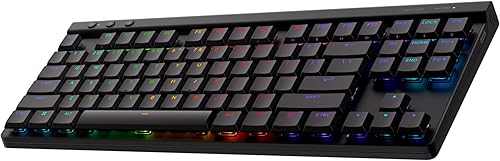
Logitech G515 Lightspeed TKL Wireless Gaming Keyboard (Linear) - Black
The Logitech G515 Lightspeed TKL suits players who want a slim wireless board with a low-profile feel. KEYCONTROL customizes every key, and the battery lasts up to 36 hours of continuous use. The trade-off is that battery life varies with use conditions.
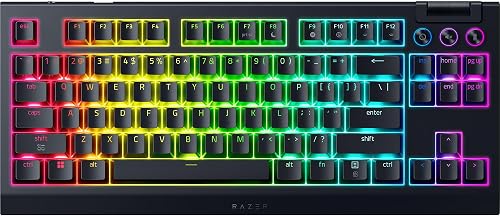
Razer BlackWidow V4 TKL Wireless Gaming Keyboard, Orange Switches
The Razer BlackWidow V4 TKL Wireless suits players who want long battery life and a roller. HyperSpeed 2.4 GHz wireless pairs a compatible Razer mouse to the same dongle, and Bluetooth covers other devices. The trade-off is that dongle sharing works with a compatible Razer mouse only.

Razer DeathStalker V2 Pro TKL Wireless Gaming Keyboard: Low Profile Optical Switches Linear Red - HyperSpeed Wireless & Bluetooth - Chroma
The Razer DeathStalker V2 Pro TKL suits players who want a slim optical board with long battery life. HyperSpeed 2.4GHz or Bluetooth 5.0 connects up to 3 devices, and the battery lasts up to 200 hours. The trade-off is a higher price tier than several picks.
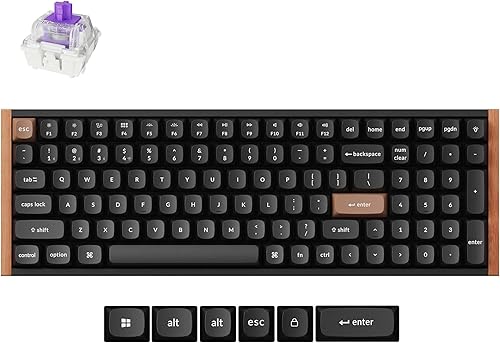
Keychron K4 HE 96% Wireless Hall Effect Keyboard with Number Pad, Rapid Trigger Magnetic Switches, QMK Launcher, 2.4GHz/Bluetooth/Wired
The Keychron K4 HE suits players who want adjustable magnetic switches and rapid trigger. The actuation range is customizable from 0.2mm to 3.8mm, and the Keychron Launcher fine-tunes the magnetic sensors. The trade-off is a setup that lives in the web configurator.

AULA S98 Pro Wireless Mechanical Gaming Keyboard with Screen, Knob, 96 Keys
The AULA S98 Pro suits players who want a screen and a knob at a modest tier. BT5.0, 2.4GHz and USB-C modes cover several devices, and the software sets lighting and keys. The trade-off is linear switches as shipped.

LEOBOG A98 Wireless Creamy Mechanical Gaming Keyboard with Number Pad Knob
The LEOBOG A98 Creamy suits players who want a roomy wireless board with a knob. The board pairs with up to 5 devices over BT5.0, 2.4GHz or USB-C, and five layers of sound damping soften the sound. The trade-off is a gasket feel that is softer than a direct-mount board.
In-Depth Reviews
1. What Makes a Wireless Keyboard Good for Gaming?
A dongle mode matters more than raw battery numbers. The Logitech G515 Lightspeed TKL uses LIGHTSPEED wireless for its fast mode, with Bluetooth as a backup.
If you want one dongle for keyboard and mouse, the Razer BlackWidow V4 TKL Wireless pairs a compatible Razer mouse to the same dongle.
2. Is Bluetooth Good Enough for Gaming?
Bluetooth works well for casual play and switching devices, while a dongle mode suits fast games. Boards like the Keychron K4 HE offer 2.4GHz wireless and wired modes at 1000Hz.
3. Logitech G515 Lightspeed TKL: Best Overall
The Logitech G515 Lightspeed TKL has a slim tenkeyless layout, low-profile GL linear switches, double-shot PBT keycaps and LIGHTSPEED wireless with Bluetooth. The Logitech G515 Lightspeed TKL suits players who want a slim wireless board with a low-profile feel. KEYCONTROL customizes every key, and the battery lasts up to 36 hours of continuous use. The trade-off is that battery life varies with use conditions.
4. Razer BlackWidow V4 TKL Wireless: Best Battery Life
The Razer BlackWidow V4 TKL Wireless has a TKL layout with a top-mounted stainless-steel plate, hot-swappable sockets, a multi-function roller and Chroma RGB. The Razer BlackWidow V4 TKL Wireless suits players who want long battery life and a roller. HyperSpeed 2.4 GHz wireless pairs a compatible Razer mouse to the same dongle, and Bluetooth covers other devices. The trade-off is that dongle sharing works with a compatible Razer mouse only.
5. Razer DeathStalker V2 Pro TKL: Best Low Profile Optical
The Razer DeathStalker V2 Pro TKL has a TKL layout with low-profile linear optical switches, an aluminum top plate, a multi-function roller and laser-etched keycaps. The Razer DeathStalker V2 Pro TKL suits players who want a slim optical board with long battery life. HyperSpeed 2.4GHz or Bluetooth 5.0 connects up to 3 devices, and the battery lasts up to 200 hours. The trade-off is a higher price tier than several picks.
6. Keychron K4 HE: Best Magnetic Switches
The Keychron K4 HE has a 96% layout with a number pad, Gateron double-rail magnetic switches, hot-swappable sockets and a wood accent frame. The Keychron K4 HE suits players who want adjustable magnetic switches and rapid trigger. The actuation range is customizable from 0.2mm to 3.8mm, and the Keychron Launcher fine-tunes the magnetic sensors. The trade-off is a setup that lives in the web configurator.
7. AULA S98 Pro: Best Screen and Knob
The AULA S98 Pro has a 96% layout, a smart LCD screen with a multi-function knob, a gasket mount and hot-swappable sockets. The AULA S98 Pro suits players who want a screen and a knob at a modest tier. BT5.0, 2.4GHz and USB-C modes cover several devices, and the software sets lighting and keys. The trade-off is linear switches as shipped.
8. LEOBOG A98 Creamy: Best Value Creamy
The LEOBOG A98 Creamy has a 96% layout with a number pad, a volume knob, hot-swappable sockets and a gasket-mounted structure. The LEOBOG A98 Creamy suits players who want a roomy wireless board with a knob. The board pairs with up to 5 devices over BT5.0, 2.4GHz or USB-C, and five layers of sound damping soften the sound. The trade-off is a gasket feel that is softer than a direct-mount board.
How to Choose a Wireless Keyboard for Gaming
Wireless mode
Look for a dongle mode for fast games, as on the Logitech G515 Lightspeed TKL.
Battery
Pick long battery life if you hate charging, like the Razer BlackWidow V4 TKL Wireless.
Switch type
Choose optical or magnetic switches for fast response, as on the Razer DeathStalker V2 Pro TKL.
Extras
Look for a screen or knob if you want quick control, as on the AULA S98 Pro.
Quick Setup Tips
- Setup: Install the maker's software first and update the firmware.
- Pairing: Pair the dongle first and test the connection before a match.
- Charging: Charge the board fully before you rely on it for a long session.
- Keycaps: Check the keycaps and switches match what you ordered when you unpack the board.
- Check the live price: use the buttons to see the current price on Amazon
Frequently Asked Questions
What is the best wireless keyboard for gaming?
The Logitech G515 Lightspeed TKL leads this list with LIGHTSPEED wireless and a slim low-profile build.
Which wireless keyboard offers long battery life?
The Razer BlackWidow V4 TKL Wireless is rated for up to 980 hours.
Which wireless keyboard has adjustable switches?
The Keychron K4 HE has magnetic switches with an adjustable actuation range.
Which wireless keyboard has a screen?
The AULA S98 Pro has a smart LCD screen and a knob.
Which wireless keyboard has optical switches?
The Razer DeathStalker V2 Pro TKL uses low-profile linear optical switches.
The Bottom Line
The best wireless keyboard for gaming pick for most shoppers is the Logitech G515 Lightspeed TKL, with the Razer BlackWidow V4 TKL Wireless and Razer DeathStalker V2 Pro TKL as strong alternates. Check the buttons for the current price before you buy.