
Heads up: we may earn a commission when you buy through links on this page, at no extra cost to you. As an Amazon Associate we earn from qualifying purchases. How we make money
Short on time? Our top pick is Razer DeathStalker V2 Pro TKL, Logitech G515 Lightspeed TKL takes Best Tactile Wireless, while Razer BlackWidow V4 Low Profile TKL takes Best Battery Life.
- Best Overall Razer DeathStalker V2 Pro TKL Check price
- Best Tactile Wireless Logitech G515 Lightspeed TKL Check price
- Best Battery Life Razer BlackWidow V4 Low Profile TKL Check price
Shopping on Amazon? Get it faster with Prime
Free fast delivery on eligible items above, Prime-only deals and Prime Video. New members can try it free for 30 days and cancel anytime.
The best low profile keyboard for gaming keeps your wrists low and flat while short key travel speeds up each press.
We compared slim optical and mechanical switches, layouts and battery life for players who want a thin board. The Razer DeathStalker V2 Pro TKL leads with linear optical switches and up to 200 hours of battery. We checked each Amazon listing on October 30, 2026 and used only the specs the maker or seller lists. We do not list exact prices because Amazon prices change in real time. Use the buttons to see the current price and availability on Amazon before you buy. Scores are our editorial scores out of 10, not Amazon customer ratings.
6 Picks at a Glance
| Award | Keyboard | Key Spec | Why It Fits | Score |
|---|---|---|---|---|
| Best Overall | Razer DeathStalker V2 Pro TKL | Slim TKL with low-profile linear optical switches | It suits players who want a thin wireless TKL with fast, smooth keys. | 9.8/10 |
| Best Tactile Wireless | Logitech G515 Lightspeed TKL | Slim TKL with GL Brown tactile switches | Choose this TKL if you want tactile feedback and up to 15 functions per key. | 9.6/10 |
| Best Battery Life | Razer BlackWidow V4 Low Profile TKL | Slim TKL with Orange tactile switches and roller | Pick this TKL if you want long battery life and a clickable roller. | 9.4/10 |
| Best Premium Build | Logitech G915 TKL | Aluminum alloy TKL with GL Tactile switches | Choose this TKL if you want a thin aircraft-grade aluminum board. | 9.2/10 |
| Best Macro Value | Redragon K618 PRO | Ultra-thin wireless board with a 4x5 macro zone | It suits you if you want many macro keys on a slim board at a low price. | 9.0/10 |
| Best Wired Aluminum | Cherry MX 10.0N RGB | 0.87 inch thin board with MX Low Profile Speed switches | Choose this wired board if you want a metal case and quiet linear switches. | 8.8/10 |

Razer DeathStalker V2 Pro TKL Wireless Gaming Keyboard: Low Profile Optical Switches Linear Red - HyperSpeed Wireless & Bluetooth - Chroma
The Razer DeathStalker V2 Pro TKL suits FPS players who want more mouse room and a flat hand position. Its linear optical switches have a shorter actuation height, and HyperSpeed Wireless pairs with Bluetooth 5.0 for 3 devices. The trade-off is no adjustable actuation.
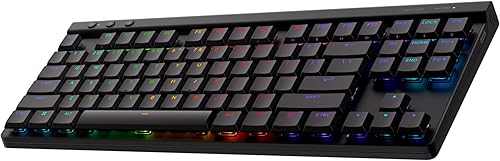
Logitech G515 Lightspeed TKL Wireless Gaming Keyboard (Tactile) - Black
The Logitech G515 Lightspeed TKL suits players who like a bump on each press. KEYCONTROL programs up to 15 functions per key, and one USB receiver can pair a compatible Logitech mouse too. The trade-off is up to 36 hours of play per charge.

Razer BlackWidow V4 Low Profile TKL HyperSpeed Wireless Gaming Keyboard: Orange Mechanical Switches - 2.4GHz Wireless & Bluetooth - Multi-F
The Razer BlackWidow V4 Low Profile TKL suits players who also type for work. Its Orange switches actuate at 1.6 mm with 45 g of force, and Power Saving Mode stretches battery life to 980 hours. The trade-off is a fixed actuation point.
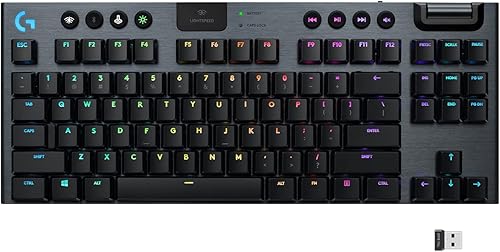
Logitech G915 TKL Tenkeyless Lightspeed Wireless RGB Mechanical Gaming Keyboard, Low Profile Switch Options, Lightsync RGB
The Logitech G915 TKL suits players who carry their board to friends and events. The USB receiver stores in the back, and switches sit at half the height of standard mechanical switches. The trade-off is 40 hours of play per charge.

Redragon K618 PRO Wireless Ultra-Thin Gaming Keyboard, Macro & Media Scroll
The Redragon K618 PRO suits MMO players who need many binds within reach. Its macro keys record combos with no software, and a one-touch switch toggles Win and Mac. The trade-off is a wide frame with the macro block.

Cherry MX 10.0N RGB Mechanical Keyboard MX Low Profile Speed switches, Aluminum housing
The Cherry MX 10.0N RGB suits players who want a wired board with a premium metal body. Cherry MX Low Profile Speed switches feel linear and quiet, and a fold-out aluminum bar sets the angle. The trade-off is a wired connection.
In-Depth Reviews
1. Optical or mechanical low profile switches?
Low profile optical switches use light to register a press and keep travel short. The Razer DeathStalker V2 Pro TKL uses linear optical switches.
Low profile mechanical switches come in linear, tactile and clicky feels. The Logitech G515 Lightspeed TKL uses GL Brown tactile switches, and the Cherry MX 10.0N RGB uses MX Low Profile Speed linear switches.
2. How long should a slim gaming keyboard last on battery?
Battery life varies widely across slim boards. The Razer BlackWidow V4 Low Profile TKL reaches up to 980 hours in Power Saving Mode, while the Razer DeathStalker V2 Pro TKL lists up to 200 hours.
Some boards trade battery for lighting. The Logitech G515 Lightspeed TKL lists up to 36 hours and the Logitech G915 TKL lists 40 hours.
3. Razer DeathStalker V2 Pro TKL: Best Overall
The Razer DeathStalker V2 Pro TKL has a tenkeyless layout with an ultra-slim casing. The Razer DeathStalker V2 Pro TKL suits FPS players who want more mouse room and a flat hand position. Its linear optical switches have a shorter actuation height, and HyperSpeed Wireless pairs with Bluetooth 5.0 for 3 devices. The trade-off is no adjustable actuation.
4. Logitech G515 Lightspeed TKL: Best Tactile Wireless
The Logitech G515 Lightspeed TKL has a slim tenkeyless layout with factory-lubed GL switches. The Logitech G515 Lightspeed TKL suits players who like a bump on each press. KEYCONTROL programs up to 15 functions per key, and one USB receiver can pair a compatible Logitech mouse too. The trade-off is up to 36 hours of play per charge.
5. Razer BlackWidow V4 Low Profile TKL: Best Battery Life
The Razer BlackWidow V4 Low Profile TKL has a tenkeyless layout with an 18.5mm front height. The Razer BlackWidow V4 Low Profile TKL suits players who also type for work. Its Orange switches actuate at 1.6 mm with 45 g of force, and Power Saving Mode stretches battery life to 980 hours. The trade-off is a fixed actuation point.
6. Logitech G915 TKL: Best Premium Build
The Logitech G915 TKL has a tenkeyless layout with aircraft-grade aluminum alloy. The Logitech G915 TKL suits players who carry their board to friends and events. The USB receiver stores in the back, and switches sit at half the height of standard mechanical switches. The trade-off is 40 hours of play per charge.
7. Redragon K618 PRO: Best Macro Value
The Redragon K618 PRO has an ultra-thin layout with a dedicated 4x5 macro zone. The Redragon K618 PRO suits MMO players who need many binds within reach. Its macro keys record combos with no software, and a one-touch switch toggles Win and Mac. The trade-off is a wide frame with the macro block.
8. Cherry MX 10.0N RGB: Best Wired Aluminum
The Cherry MX 10.0N RGB has an ultra-thin layout with aluminum housing. The Cherry MX 10.0N RGB suits players who want a wired board with a premium metal body. Cherry MX Low Profile Speed switches feel linear and quiet, and a fold-out aluminum bar sets the angle. The trade-off is a wired connection.
How to Choose a Low Profile Gaming Keyboard
Switches
Pick linear for speed or tactile for feedback; the Logitech G515 Lightspeed TKL uses tactile GL Brown.
Battery
Check runtime if you play long sessions; the Razer BlackWidow V4 Low Profile TKL lists up to 980 hours.
Macros
MMO players need binds; the Redragon K618 PRO adds a 4x5 macro zone.
Build
A metal case adds stability, as on the Cherry MX 10.0N RGB.
Quick Setup Tips
- Charging: Keep the detachable Type-C cable in the Razer DeathStalker V2 Pro TKL during long matches so you can play while it charges.
- Hotkeys: Use the three hotkeys on the Logitech G515 Lightspeed TKL to jump between LIGHTSPEED, Bluetooth and Game Mode.
- Dongle: Pair a compatible Razer mouse to the same dongle as the Razer BlackWidow V4 Low Profile TKL.
- Win and Mac: Press the one-touch switch on the Redragon K618 PRO when you move to a Mac.
- Price: Check the current price of the Razer DeathStalker V2 Pro TKL on Amazon before you buy.
Frequently Asked Questions
Are low profile keyboards good for gaming?
Yes, short key travel speeds up presses and keeps wrists flat. The Razer DeathStalker V2 Pro TKL pairs low profile optical switches with wireless play.
How many functions can each key hold on the Logitech G515 Lightspeed TKL?
KEYCONTROL programs up to 15 functions per key. The Logitech G515 Lightspeed TKL also has three hotkeys for connections and Game Mode.
What switch does the Razer BlackWidow V4 Low Profile TKL use?
It uses Orange mechanical switches with a 1.6 mm actuation point. The Razer BlackWidow V4 Low Profile TKL needs just 45 g of force per press.
Does the Redragon K618 PRO need software for macros?
No, its macro keys record combos without software. The Redragon K618 PRO offers Pro software for deeper remapping.
How thin is the Cherry MX 10.0N RGB?
It is just 0.87 inches thin. The Cherry MX 10.0N RGB also has an aluminum housing.
The Bottom Line
The best low profile keyboard for gaming pick for most shoppers is the Razer DeathStalker V2 Pro TKL. Choose the Razer BlackWidow V4 Low Profile TKL when battery life matters to you. Choose the Redragon K618 PRO when you want many macro keys for less.