Heads up: we may earn a commission when you buy through links on this page, at no extra cost to you. As an Amazon Associate we earn from qualifying purchases. How we make money
Short on time? Our top pick is Keychron V5 Max, NuPhy Air75 V3 takes Best Low Profile, while Keychron V6 Max takes Best Full Size.
- Best Overall Keychron V5 Max Check price
- Best Low Profile NuPhy Air75 V3 Check price
- Best Full Size Keychron V6 Max Check price
Shopping on Amazon? Get it faster with Prime
Free fast delivery on eligible items above, Prime-only deals and Prime Video. New members can try it free for 30 days and cancel anytime.
The best keyboard for programming lets you move keys where your hands expect them and switch between machines without fuss.
We focused on remapping tools, layouts and multi-device wireless for long coding days. The Keychron V5 Max leads with QMK, a 96% layout and a number pad. We checked each Amazon listing on October 30, 2026 and used only the specs the maker or seller lists. We do not list exact prices because Amazon prices change in real time. Use the buttons to see the current price and availability on Amazon before you buy. Scores are our editorial scores out of 10, not Amazon customer ratings.
6 Picks at a Glance
| Award | Keyboard | Key Spec | Why It Fits | Score |
|---|---|---|---|---|
| Best Overall | Keychron V5 Max | 96% QMK wireless board with number pad | It suits developers who want any key remapped on macOS, Windows or Linux. | 9.8/10 |
| Best Low Profile | NuPhy Air75 V3 | 13.2mm thin 75% board with knob | Choose this slim board if you code on a laptop and want to switch between five devices. | 9.6/10 |
| Best Full Size | Keychron V6 Max | Full-size QMK board with programmable knob | Pick this full-size board if you want a complete key set and a knob for scrolling or volume. | 9.4/10 |
| Best Macro Controls | VSDINSIDE VSD K1 Pro | Wired board with 6 LCD keys and 3 knobs | Choose this board if you want screen keys and knobs for build, run and deploy shortcuts. | 9.2/10 |
| Best Value 96% | AULA F99 Wireless | 96% wireless board with 8000mAh battery | It suits you if you want a number area and five device links at a lower price. | 9.0/10 |
| Best Budget | Kisnt KN85 Wireless | 75% wireless board with Bsun linear switches | Choose this compact board if you want tri-mode wireless and hot-swap sockets on a small budget. | 8.8/10 |
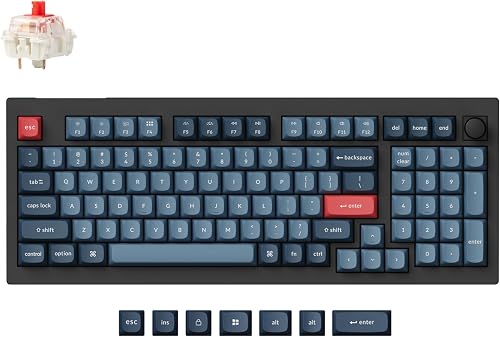
Keychron V5 Max Custom Wireless Mechanical Keyboard
The Keychron V5 Max suits developers who code and handle data in one setup. Keychron Launcher remaps any key or macro in a browser, and a system toggle with extra keycaps switches between Mac and Windows. The trade-off is that remapping needs a cable connection.

NuPhy Air75 V3 Mechanical Keyboard with Knob, White-Red Nano Switches
The NuPhy Air75 V3 suits developers who carry a keyboard between home and the office. NuPhyIO remaps keys and programs macros in a browser with no driver, and a removable knob controls volume. The trade-off is no number pad.

Keychron V6 Max Wireless QMK Mechanical Keyboard 2.4 GHz & Bluetooth
The Keychron V6 Max suits backend and data developers who want a 100% layout. Its banana switches give an early tactile bump, and Keychron Launcher remaps keys on macOS, Windows or Linux. The trade-off is a wide frame that takes more desk room.

VSD K1 Pro Programmable Macro Keyboard, Custom 6 LCD Keys & 3 Knobs
The VSDINSIDE VSD K1 Pro suits developers who run the same commands many times a day. VSD Craf software creates switchable pages of LCD keys and knobs, and any key can record macros. The trade-off is a wired only connection.

AULA F99 Wireless Mechanical Keyboard, Tri-Mode BT5.0/2.4GHz/USB-C Hot Swappable Custom Keyboard, Pre-lubed Linear Switches
The AULA F99 Wireless suits developers on a budget who still want arrows and a number area. It stores five devices across BT5.0, 2.4GHz and USB, and keys support macro recording. The trade-off is that device switching runs through FN key combinations.
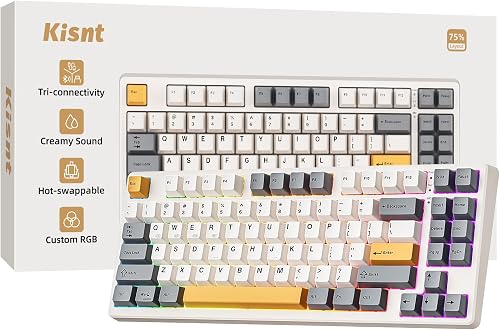
Kisnt KN85 Wireless Mechanical Keyboard, Bluetooth/2.4GHz/USB-C, Custom RGB Backlit, Hot-Swappable Linear Switch
The Kisnt KN85 Wireless suits students who code on a Mac and a Windows PC. It keeps F1 to F12 and the arrows, and pre-lubed Bsun linear switches feel smooth. The trade-off is no number pad.
In-Depth Reviews
1. Why does remapping matter for programming?
Remapping puts brackets, layers and editor shortcuts where your fingers rest. The Keychron V5 Max and the Keychron V6 Max use QMK through Keychron Launcher.
Browser tools save you from installing drivers on a work laptop. The NuPhy Air75 V3 uses NuPhyIO, which runs in a browser.
2. How many devices should a coding keyboard pair with?
If you switch between a work laptop, a desktop and a tablet, multi-device pairing saves time. The NuPhy Air75 V3 and the AULA F99 Wireless both handle five devices.
Three devices covers most desks. The Keychron V6 Max connects up to 3 devices over Bluetooth 5.1.
3. Keychron V5 Max: Best Overall
The Keychron V5 Max has a 96% layout with a gasket design and number pad. The Keychron V5 Max suits developers who code and handle data in one setup. Keychron Launcher remaps any key or macro in a browser, and a system toggle with extra keycaps switches between Mac and Windows. The trade-off is that remapping needs a cable connection.
4. NuPhy Air75 V3: Best Low Profile
The NuPhy Air75 V3 has a low-profile 75% layout with a gasket mount. The NuPhy Air75 V3 suits developers who carry a keyboard between home and the office. NuPhyIO remaps keys and programs macros in a browser with no driver, and a removable knob controls volume. The trade-off is no number pad.
5. Keychron V6 Max: Best Full Size
The Keychron V6 Max has a full-size 100% layout with a gasket design. The Keychron V6 Max suits backend and data developers who want a 100% layout. Its banana switches give an early tactile bump, and Keychron Launcher remaps keys on macOS, Windows or Linux. The trade-off is a wide frame that takes more desk room.
6. VSDINSIDE VSD K1 Pro: Best Macro Controls
The VSDINSIDE VSD K1 Pro has a wired layout with a TFT color display. The VSDINSIDE VSD K1 Pro suits developers who run the same commands many times a day. VSD Craf software creates switchable pages of LCD keys and knobs, and any key can record macros. The trade-off is a wired only connection.
7. AULA F99 Wireless: Best Value 96%
The AULA F99 Wireless has a 96% layout with a gasket structure. The AULA F99 Wireless suits developers on a budget who still want arrows and a number area. It stores five devices across BT5.0, 2.4GHz and USB, and keys support macro recording. The trade-off is that device switching runs through FN key combinations.
8. Kisnt KN85 Wireless: Best Budget
The Kisnt KN85 Wireless has a 75% layout with a gasket mount. The Kisnt KN85 Wireless suits students who code on a Mac and a Windows PC. It keeps F1 to F12 and the arrows, and pre-lubed Bsun linear switches feel smooth. The trade-off is no number pad.
How to Choose a Keyboard for Programming
Remapping
Pick a board with QMK or a browser tool; the Keychron V5 Max uses Keychron Launcher.
Layout
Keep a full key set if you handle data, as the 100% Keychron V6 Max does.
Profile
A thin board suits laptop users; the NuPhy Air75 V3 is 13.2mm thin.
Shortcuts
Screen keys help with repeat commands, like the LCD keys on the VSDINSIDE VSD K1 Pro.
Quick Setup Tips
- Cable: Plug in the cable before you open Keychron Launcher to remap the Keychron V5 Max.
- Pages: Make one VSD Craf page per project on the VSDINSIDE VSD K1 Pro.
- Knob: Use the removable knob on the NuPhy Air75 V3 for quick volume changes during calls.
- Charging: Charge the Kisnt KN85 Wireless fully from a computer USB port before first use.
- Price: Check the current price of the Keychron V5 Max on Amazon before you buy.
Frequently Asked Questions
What should you look for in a keyboard for programming?
Look for remapping, a comfortable layout and multi-device pairing. The Keychron V5 Max covers all three with QMK and tri-mode wireless.
Does the NuPhy Air75 V3 need a driver?
No, NuPhyIO runs in a browser with no driver installation. The NuPhy Air75 V3 uses it for key remapping and macros.
Does the Keychron V6 Max work with Linux?
Yes, Keychron Launcher remaps keys on macOS, Windows or Linux. The Keychron V6 Max also supports three Bluetooth devices.
Is the VSDINSIDE VSD K1 Pro wireless?
No, it connects by USB-C cable. The VSDINSIDE VSD K1 Pro includes a USB-A to USB-C cable in the box.
Does the Kisnt KN85 Wireless have a number pad?
No, its 75% layout keeps the function row and arrows without a number pad. The Kisnt KN85 Wireless saves desk space for your mouse.
The Bottom Line
The best keyboard for programming pick for most shoppers is the Keychron V5 Max. Choose the NuPhy Air75 V3 when you want a thin board for a laptop bag. Choose the VSDINSIDE VSD K1 Pro when you want LCD keys for repeat commands.