Heads up: we may earn a commission when you buy through links on this page, at no extra cost to you. As an Amazon Associate we earn from qualifying purchases. How we make money
Short on time? Our top pick is Arteck Split Ergonomic Wired, Wired Ergonomic Split RGB takes Best RGB Lighting, while Perixx Periboard-535BR takes Best Mechanical Keys.
- Best Overall Arteck Split Ergonomic Wired Check price
- Best RGB Lighting Wired Ergonomic Split RGB Check price
- Best Mechanical Keys Perixx Periboard-535BR Check price
Shopping on Amazon? Get it faster with Prime
Free fast delivery on eligible items above, Prime-only deals and Prime Video. New members can try it free for 30 days and cancel anytime.
The best ergonomic keyboard under $100 adds extras like backlighting, mechanical keys or a separate number pad to a split or wave frame.
Every pick here stays at or under $100 as of this update, and prices move, so check the buttons first. The Arteck Split Ergonomic Wired leads the list with a backlit split frame and a soft rest. We checked each Amazon listing on October 30, 2026 and used only the specs the maker or seller lists. We do not list exact prices because Amazon prices change in real time. Use the buttons to see the current price and availability on Amazon before you buy. Scores are our editorial scores out of 10, not Amazon customer ratings.
6 Picks at a Glance
| Award | Keyboard | Key Spec | Why It Fits | Score |
|---|---|---|---|---|
| Best Overall | Arteck Split Ergonomic Wired | Backlit split layout with soft wrist rest | It suits night typists who want a split board with seven backlight colors and no batteries. | 9.8/10 |
| Best RGB Lighting | Wired Ergonomic Split RGB | Split frame with RGB backlight and number pad | Choose this split board if you want 17 lighting effects and a number pad on one frame. | 9.6/10 |
| Best Mechanical Keys | Perixx Periboard-535BR | Split-key layout with low-profile brown tactile switches | A mechanical board suits you when you want a tactile bump on every key and a split-key layout. | 9.4/10 |
| Best Wave Shape | Logitech Wave Keys | Compact wave layout with memory foam rest | Pick this wave board if you want the shortest learning curve and three-device Easy-Switch. | 9.2/10 |
| Best Separate Number Pad | ProtoArc EK04 Ergonomic | Curved split keyset with detached number pad | A split board fits you if you want to place the number pad anywhere on the desk. | 9.0/10 |
| Best Tilt Range | Nulea Rechargeable Split | Split layout with three tilt angles | Choose this split board if you want a wireless frame with three typing angles. | 8.8/10 |
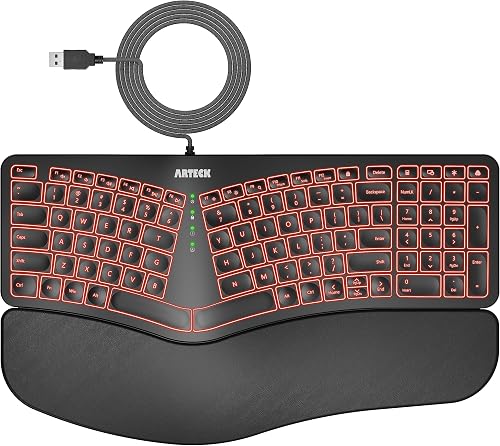
Arteck Split Ergonomic Keyboard with Palm Rest, USB Wired Backlit Keyboard
The Arteck Split Ergonomic Wired suits people who type late in dim rooms. Its LED backlight has seven colors and three brightness levels, and a 6 feet cable plugs straight into a USB port. The trade-off is a cable that rules out moving it between computers.

Wired Ergonomic Split Keyboard with RGB Backlight & Numpad, Black
The Wired Ergonomic Split RGB suits spreadsheet work in dim light. Its 17 multimedia shortcut keys handle volume, tracks and screen brightness, and two pairs of kickstands change the angle. The trade-off is a firm plastic palm rest instead of foam.

Perixx PERIBOARD-535BR [Firmware Updated] Wired Ergonomic Mechanical Keyboard - Full-Size - Low-Profile Brown Tactile Switches - NKRO Anti-
The Perixx Periboard-535BR suits writers and coders who like mechanical keys. Its quiet brown tactile switches sit under curved, stepped rows, and you can remap keys on the Perixx website without software. The trade-off is an adjustment period, which Perixx puts at one to two weeks for most users.

Logitech Wave Keys Ergonomic Wireless Keyboard with Palm Rest - Graphite
The Logitech Wave Keys suits people who find split boards hard to learn. Its curved key rows sit in one piece above a memory foam rest, and it works with Windows, macOS, iPadOS and ChromeOS. The trade-off is less wrist angle than a true split frame.

ProtoArc EK04 Bluetooth Ergonomic Keyboard with Wrist Rest, Split Numpad
The ProtoArc EK04 Ergonomic suits accountants and data entry staff who use the number pad all day. Its keyboard and number pad pair with three devices over 2.4G or Bluetooth, and four tilt legs set the angle. The trade-off is a hard leather wrist rest that cannot be removed.

Nulea Ergonomic Split Keyboard Wireless Cushioned Wrist Rest Rechargeable
The Nulea Rechargeable Split suits laptop users who also type on a tablet. It pairs over Bluetooth or 2.4G with three-device switching, and the battery runs about 200 hours. The trade-off is a wide frame that needs more desk space.
In-Depth Reviews
1. Is backlighting or mechanical feel worth the extra money?
Backlighting matters most if you type in a dim room or at night. The Arteck Split Ergonomic Wired has seven colors, while the Wired Ergonomic Split RGB adds RGB effects and a number pad.
Mechanical keys give a clear bump on each press, which helps if you type for hours. The Perixx Periboard-535BR uses low-profile brown tactile switches on a split-key frame.
2. Do you need multi-device wireless at your desk?
Multi-device wireless helps if you move between a computer, a tablet and a phone. The Logitech Wave Keys switches across three devices with Easy-Switch, and the ProtoArc EK04 Ergonomic pairs both of its parts with three devices.
If one computer is all you use, a wired board saves you from charging or batteries. The Arteck Split Ergonomic Wired and the Perixx Periboard-535BR both plug in and work right away.
3. Arteck Split Ergonomic Wired: Best Overall
The Arteck Split Ergonomic Wired has a backlit split layout with a soft wrist rest. The Arteck Split Ergonomic Wired suits people who type late in dim rooms. Its LED backlight has seven colors and three brightness levels, and a 6 feet cable plugs straight into a USB port. The trade-off is a cable that rules out moving it between computers.
4. Wired Ergonomic Split RGB: Best RGB Lighting
The Wired Ergonomic Split RGB has a split frame with RGB backlight and a number pad. The Wired Ergonomic Split RGB suits spreadsheet work in dim light. Its 17 multimedia shortcut keys handle volume, tracks and screen brightness, and two pairs of kickstands change the angle. The trade-off is a firm plastic palm rest instead of foam.
5. Perixx Periboard-535BR: Best Mechanical Keys
The Perixx Periboard-535BR has a split-key layout with low-profile brown tactile switches. The Perixx Periboard-535BR suits writers and coders who like mechanical keys. Its quiet brown tactile switches sit under curved, stepped rows, and you can remap keys on the Perixx website without software. The trade-off is an adjustment period, which Perixx puts at one to two weeks for most users.
6. Logitech Wave Keys: Best Wave Shape
The Logitech Wave Keys has a compact wave layout with a memory foam rest. The Logitech Wave Keys suits people who find split boards hard to learn. Its curved key rows sit in one piece above a memory foam rest, and it works with Windows, macOS, iPadOS and ChromeOS. The trade-off is less wrist angle than a true split frame.
7. ProtoArc EK04 Ergonomic: Best Separate Number Pad
The ProtoArc EK04 Ergonomic has a curved split keyset with a detached number pad. The ProtoArc EK04 Ergonomic suits accountants and data entry staff who use the number pad all day. Its keyboard and number pad pair with three devices over 2.4G or Bluetooth, and four tilt legs set the angle. The trade-off is a hard leather wrist rest that cannot be removed.
8. Nulea Rechargeable Split: Best Tilt Range
The Nulea Rechargeable Split has a split layout with three tilt angles. The Nulea Rechargeable Split suits laptop users who also type on a tablet. It pairs over Bluetooth or 2.4G with three-device switching, and the battery runs about 200 hours. The trade-off is a wide frame that needs more desk space.
How to Choose an Ergonomic Keyboard Under $100
Number pad
If you enter numbers all day, a separate number pad like the one with the ProtoArc EK04 Ergonomic lets you place it where your mouse hand is comfortable.
Wireless
Look for multi-device switching if you use more than one computer; the Nulea Rechargeable Split covers Bluetooth and 2.4G.
Key feel
Choose mechanical keys if you want feedback, as the Perixx Periboard-535BR offers, or scissor keys if you prefer a laptop feel.
Lighting
Pick a backlit board for dark rooms; the Arteck Split Ergonomic Wired lets you pick from seven colors.
Quick Setup Tips
- Brightness: When the Arteck Split Ergonomic Wired arrives, set one of its three brightness levels before a late typing session.
- Angle: Try both pairs of kickstands on the Wired Ergonomic Split RGB to find the angle that keeps your wrists flat.
- Practice: Give the Perixx Periboard-535BR a week or two of regular typing, since Perixx says most people adapt in that time.
- Charging: Charge the ProtoArc EK04 Ergonomic for about 2 hours over USB-C before you pair it.
- Price: Check the current price of the Arteck Split Ergonomic Wired on Amazon before you buy.
Frequently Asked Questions
What should you check in an ergonomic keyboard under $100?
Check the frame shape first, then extras like backlighting or mechanical keys. The Arteck Split Ergonomic Wired combines a split frame with a seven-color backlight.
How many typing angles does the Nulea Rechargeable Split offer?
It offers three angles through its adjustable tilt legs. The Nulea Rechargeable Split also switches between three devices.
How do you program keys on the Perixx Periboard-535BR?
You program keys through the Perixx website, with no software to install. The Perixx Periboard-535BR also has full NKRO anti-ghosting.
Which systems does the Logitech Wave Keys work with?
It works with Windows, macOS, iPadOS and ChromeOS. The Logitech Wave Keys switches between three devices with Easy-Switch.
Can the ProtoArc EK04 Ergonomic run on its cable?
No, its USB-C cable charges the battery only. The ProtoArc EK04 Ergonomic connects over 2.4G or Bluetooth.
The Bottom Line
The best ergonomic keyboard under $100 pick for most shoppers is the Arteck Split Ergonomic Wired. Choose the Wired Ergonomic Split RGB when you want RGB lighting and a number pad on a split frame. Choose the ProtoArc EK04 Ergonomic when you want a number pad you can place anywhere on the desk.